

Forum Replies Created
-
AuthorPosts
-
George
ParticipantHey Marc,
Thank you for reaching out!
What you describe here is unfortunately the only possible configuration of our plugins at this time:
I tested one of the free plugins but it allowed me only to see which users participated in one specific event, not the other way around.
I’m sorry about this! We do not have any plugins that would add the features you describe where you can track all of the user a has attended.
Sorry to disappoint, Marc. Please let me know if this information is helpful and if there is anything else I can help with.
Sincerely,
GeorgeParticipantThis reply is private.
ParticipantHey @zucreativelab,
Thanks for reaching out!
For active license-holders of WooCommerce Tickets, EDD Tickets, or any other similar platform-specific ticketing plugin, the update to Event Tickets Plus was and is indeed free.
However, yes, if your license expired before Event Tickets Plus was published, then a new license purchase is required. I’m sorry to bear this news, but I hope it is clear and helps you move forward with your project. Please let me know if this is the case and/or if there is anything else I can help with!
Sincerely,
GeorgeJanuary 13, 2016 at 8:41 am in reply to: List of Pending WCAG 2.0 and WPML Compatibility Issues #1055342ParticipantHey Nancy,
Thanks for reaching out. I’ll address your questions here in two parts.
WPML Compatibility
WPML compatibility is something we have recently indeed committed to for The Events Calendar core plugin, and for Events Calendar Pro. Our other add-ons are not fully compatible at this time, still. 🙁
I’m sorry about the latter part of this news; we are actively working on improvements for compatibility with our other add-ons, and while even Events Calendar Pro is still not 100% compatible, The Events Calendar should be quite solid with WPML. To learn more about The Events Calendar and using it with WPML, I would recommend checking out these two knowledgebase articles just to get a sense of how the integration works and what it entails:
• https://theeventscalendar.com/knowledgebase/setting-up-the-events-calendar-with-wpml/
• https://theeventscalendar.com/knowledgebase/creating-translations-for-events-using-wpml/
Accessibility Issues
Now, in regards to Accessibility, to be completely frank and honest we have several accessibility incompatibilities. This is not something we are proud of one bit. As of right now these are some of the main accessibility problems we have yet to resolve:
• The Month-view table can, and often does, render improperly and out of order when its content is read on a screen reader.
• The “View as” dropdown is not accessible to screen readers.
• Datepicker calendar is not accessible to screen readers.
• On screen readers, Prev/next day event navigation should include header + announce when no events present.
• Searching through venues/organizers via filters is not possible with screen readers.
• Search fields need focus styles and possibly better placeholder text.
• Some dropdowns throughout our plugin family do not have associated form labels.
• Color change defined between future/past events needs to be stronger.These are the bugs I was able to find in our bug-tracking system; some have been reported several months ago, and so there may be other issues that we have not found at this time. But hopefully this information is helpful.
Let me know if that’s the case and/or if there’s anything else I can help with! 🙂
Thanks,
GeorgeParticipantHey @Emma,
Thanks for reaching out! To be clear, do you mean something like on our demo page here → http://wpshindig.com/events/
In other words, on that page all of the “filters” are just visible on page load. You do not have to click “Show Filters” or anything like that to reveal the filters.
Is this what you mean? If so, yes this is definitely possible. 🙂
If this is not what you mean, can you go into some depth and detail about what exactly you do mean?
Thank you!
GeorgeParticipantHey Casey,
Thanks for reaching out!
What you describe is something we’d love to eventually include in our plugins, but at this time it is not possible 🙁
I’m sorry to bear that news; it’s a bummer. At this time, and for the foreseeable future, you can only connect one event to one venue at a time.
I hope this information is clear and helps you move forward with your project – let me know if that’s the case!
– George
ParticipantHey Mad Dog,
I found that this was a bug ticket we have still not addressed – I’m very about that. This should not be happening.
I have elevated the priority on this bug and so hopefully we can get a fix out for this in the next release or two.
Unfortunately, there is not a specific process for cleaning up the duplicates – manual work to do this would be required, which fact I am again sorry to bear!
A process that might work would be to find a “base” venue or organizer – so if you see one of either getting a lot of duplicates, pick one that you will attach all of the events to so you can remove the duplicates. You could signify this “original” venue or organizer by temporarily changing its title to include text like [Original] or [MD] or something else.
On events that belong to the duplicate version of this venue or organizer, go to edit the event and then choose this “original” organizer or venue where appropriate; then save the event to update its connection to this content.
Once the “duplicate” versions of a venue or organizer no longer as has events tied to it, you can then delete these duplicates, and then once those duplicates are all delete you can go back to that “original” version of it and remove the [Original] or [MD] or whatever text you add to the title to signify it.
I am sorry that a process like this is the best option at this time; I hope this information does help, though.
Please let me know what you think and if you have any further questions on this matter.
Thank you,
GeorgeJanuary 13, 2016 at 8:06 am in reply to: Activating plug-in results in not being able to customize theme #1055314ParticipantHey @integrated94,
I’m sorry to hear this!
Question #1
I’m curious about a few details here – first, you say “Goodwork’s option to customize appearance”. To be clear, do you mean the general WordPress customizer that is accessible in the Appearance > Customize menu directly? Like in this screenshot:
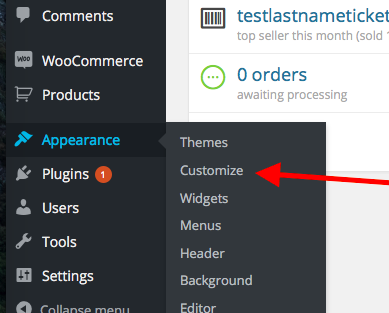
Or do you mean some specific customizer feature of the Goodwork theme?
Question #2
If you activate a default theme like Twenty Sixteen and then try this customizer again, does the issue persist? In other words, is the customizer functional in a default theme, but then not when the Goodworks theme is active?
Question #3
Can you share your “System Information” with us? Here’s how to do that → https://theeventscalendar.com/knowledgebase/sharing-sys-info/
Thank you!
GeorgeJanuary 13, 2016 at 7:58 am in reply to: Threads that are not resolved should no be closed. #1055310ParticipantThis reply is private.
January 13, 2016 at 7:40 am in reply to: Threads that are not resolved should no be closed. #1055298Participant@Douglas – can you share your “System Information” on your sites where this is happening? You may have shared this before, but I’m curious about the specific information as of now. Here’s how to share system information → https://theeventscalendar.com/knowledgebase/sharing-sys-info/
Next, can you share some specific Facebook events pages that you are attempting to import from?
Finally, can you confirm if this issue only happens now if you set up an auto-import on a schedule? Or does it happen if you do manual imports, too?
Thank you,
GeorgeParticipantHay @Musiclives,
I’m sorry about this news but unfortunately updating does seem like the only solution here. First, we cannot support outdated versions, so if there are issues on your site with this outdated version we cannot help troubleshoot those issues.
Next, it looks like your license(s) expired June 17, 2015 – this is quite some time ago, and the code of both The Events Calendar core and add-ons like Events Calendar Pro have changed quite substantially. So the outdated code will not likely work well by this point in time.
I’m sorry about this news! Please let me know if it helps or if you have any further questions here.
Thank you,
GeorgeJanuary 13, 2016 at 7:29 am in reply to: Threads that are not resolved should no be closed. #1055292ParticipantHey @Douglas, and @Lourene,
I’m sorry about the frustrations arising from that issue, but to be clear, my closing of that thread is not the end of the discussion and dialogue around this issue.
Nico has been out-of-office for a while and may be for up to another week, and so having a two-page thread there that cannot be as easily maintained is not an efficient way for us to help address the problems.
To review the nature of this issue, I would like to point out what @Lourene mentioned in her last sentence above:
I have no idea why you cannot duplicate this problem when so many of your users have the same problem
We do not know why this is happening so inconsistently, either.
@Douglas, please understand that we are taking this bug seriously and trying to fix it. But it’s like a game of whack-a-mole, it seems; some of the time, some of our team members can recreate some of these duplication issues. Other times, though, the issue cannot be recreated, or only intermittently, or only one facet of the issue. Also, while that thread – from October 2015 – did have several customer voices in it, recently there have not been many reports of duplication issues at all.
The issue is very confusing and we have yet to definitively pin down the problem – furthermore, there is the factor that we have to work with what the Facebook API gives us, and so this is one more constraint on the problem.
Instead of tracking this problem as it stands now in a thread that is long, assigned to someone out-of-office, and originally posted back in October 2015, I have made this new thread so that we can actually attend to the problems of this issue even more effectively.
Does this make sense, @Douglas? How about in your opinion, @Lourene?
Your patience means a lot and I am very sorry for all of the headaches here.
Please let me know what further thoughts you have on this matter and where things stand now with these issues on your site(s).
Thank you,
GeorgeParticipantHey there,
Apologies for the delayed reply, Nico’s been out-of-office for a bit so I wanted to chime in here to keep things moving!
I do not spot an error in your code; however, its placement in your child theme’s functions.php file might be relevant to the lack of functionality. If you place it in the PARENT theme’s functions.php file does anything improve? I doubt this will help but am curious.
—
A bigger point here is that you should not have a page that has the /events/ slug – hence the display of that error message. So an even better solution than the custom code would be one of these options:
1. Delete the page whose slug is /events, or just change its slug at least.
2. Change the “Events slug” option for your events calendar so that is not also trying to exist at /events – you can change it to /calendar, /agenda, anything at all. Check out Events > Settings in your site’s wp-admin to see the options for changing slugs.
Either option here may help and is recommended much more than the code change is.
I hope this information helps!
Sincerely,
GeorgeJanuary 12, 2016 at 9:07 pm in reply to: Issues with German translation in Events Calendar 4.0 #1054965ParticipantHey @Hans-gerd,
This information is correct.
For further assistance with translations on wordpress.org, please reach out to the translation teams there. I will close up this thread for now but wish you all the best of luck with translating! 😀
Thanks,
GeorgeParticipantHey Bryan,
There is not a substantive update at this time. Sorry to bear that news 🙁
This thread has grown quite large, but was originally posted back when our products were at the 3.12.x release family, and has not been updated since November 2015.
So I will close up this thread now.
If any issues, comments, or concerns arise, open up a new thread and we’ll get to you as fast as possible 🙂
Thanks,
George -
AuthorPosts