
Home › Forums › Calendar Products › Events Calendar PRO › Activating plug-in results in not being able to customize theme
- This topic has 4 replies, 3 voices, and was last updated 10 years, 8 months ago by
Support Droid.
-
AuthorPosts
-
January 12, 2016 at 5:42 pm #1054911
Linda Lagarejos
ParticipantAs soon as I activate Events Calendar Pro plug-in (v4.0.2), I cannot run Goodwork’s option to Customize appearance. The navigation menu (on the left side) displays, but the page sits at a spinning wheel. As soon as I deactivate the plug-in, I have no problem getting in to customize the theme.
January 13, 2016 at 8:06 am #1055314George
ParticipantHey @integrated94,
I’m sorry to hear this!
Question #1
I’m curious about a few details here – first, you say “Goodwork’s option to customize appearance”. To be clear, do you mean the general WordPress customizer that is accessible in the Appearance > Customize menu directly? Like in this screenshot:
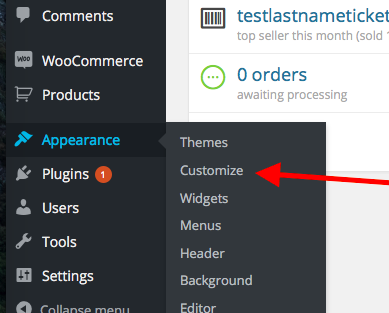
Or do you mean some specific customizer feature of the Goodwork theme?
Question #2
If you activate a default theme like Twenty Sixteen and then try this customizer again, does the issue persist? In other words, is the customizer functional in a default theme, but then not when the Goodworks theme is active?
Question #3
Can you share your “System Information” with us? Here’s how to do that → https://theeventscalendar.com/knowledgebase/sharing-sys-info/
Thank you!
GeorgeJanuary 13, 2016 at 12:35 pm #1055529ParticipantThis reply is private.
January 14, 2016 at 10:10 am #1056108ParticipantThank you so much for your testing!
This comment of yours reveals that the Goodwork theme itself is the source of the problem.
I activated Twenty Fifteen with the EC Pro plug-in activated and the Customize screen displays correctly.
If this is the case, then there is a code conflict arising from the Goodwork theme. We unfortunately cannot delve into the code of other themes/plugins, so the next step from here is to reach out to the Goodwork team and see if they can find the bug/conflict here and help resolve it.
In the meantime, just to try and make some effort in finding out that conflict, if you are willing to do this I would recommend seeing any errors pop up on your site if you head to your site’s wp-config.php file and change this line of code:
define('WP_DEBUG', false);to this:
define('WP_DEBUG', true);That will display PHP errors if any exist, which might be quite useful here.
Once you make this wp-config.php file change, make sure the Goodwork theme is active and then try to use the theme customizer. When you do this, do any errors pop up? If so, what are they?
This may be useful, although if the problems are JavaScript-related then unfortunately this step will not reveal that error.
I’m sorry about this situation but hope that reaching out to the Goodwork theme team helps you move forward with your project.
Thank you,
GeorgeFebruary 18, 2016 at 8:34 am #1076774KeymasterThis topic has not been active for quite some time and will now be closed.
If you still need assistance please simply open a new topic (linking to this one if necessary)
and one of the team will be only too happy to help. -
AuthorPosts
- The topic ‘Activating plug-in results in not being able to customize theme’ is closed to new replies.