Set default for venue and organiser

Home Forums Welcome! Pre-Sales Questions Set default for venue and organiser

Viewing 5 posts - 1 through 5 (of 5 total)
  • Author
    Posts
  • #1056121
    Only one venue
    Guest

    I’m using your plugin on a website I’m building (MAMP at the moment) but all events will be at the same venue, so is there a way of setting it as the default so that you don’t have to fill in the venue and organiser section every time you add an event?

    #1056138
    George
    Participant

    Hey there,

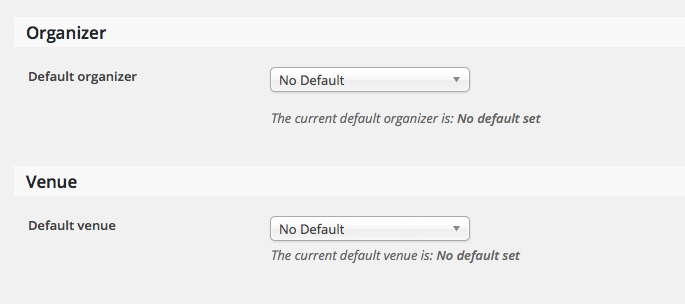
    If you head into your wp-admin and to Events > Settings > Default content, there are two options that let you set default Organizer and default Venue, like this:

    If you set the defaults and save the settings, that should do the trick!

    Let me know if this helps,
    George

    #1060661
    Kris
    Guest

    George. I’m attempting to do the same thing; however, there is no option for Default other than for the calendar view.

    I’m running version 4.0.5 at the moment.

    #1060669
    George
    Participant

    Hey Kris,

    I’m sorry to hear this!

    1. Can you share a full-page screenshot of your admin page at Events > Settings > Default content? I do not have the issue you describe so am curious what is there for you. You can do so by uploading the screenshot to Imgur.com, Flickr.com, CloudUp.com, or any similar image-hosting site; then just share the links to those images here and I’ll take a look.

    2. Can you share your “system information”? Here’s how → https://theeventscalendar.com/knowledgebase/sharing-sys-info/

    Thank you!
    George

    #1078185
    Support Droid
    Keymaster

    This topic has not been active for quite some time and will now be closed.

    If you still need assistance please simply open a new topic (linking to this one if necessary)
    and one of the team will be only too happy to help.

Viewing 5 posts - 1 through 5 (of 5 total)
  • The topic ‘Set default for venue and organiser’ is closed to new replies.