

Forum Replies Created
-
AuthorPosts
-
March 23, 2016 at 2:55 pm in reply to: tribe_events_tickets_metabox_advanced problems after updated to 4.1 #1093156
George
ParticipantHey Robert,
Can you clarify what you mean when you reference “your Legacy Support part”? Can you share a link to whatever thing you are referring to?
Thank you!
GeorgeMarch 23, 2016 at 2:54 pm in reply to: YouTube URLs are not auto converting to embeeded video in event post. #1093155ParticipantHey @cory,
Sorry for the delayed reply; I’ve been testing this and have been trying to recreate your issues but cannot recreate theme.
So at this time I think there is a theme or plugin code conflict that is prevent YouTube videos from working properly in your events.
I would recommend performing every single step in the process described here → https://theeventscalendar.com/knowledgebase/testing-for-conflicts/
After EACH STEP in that process, go to a test event that has a YouTube link in it that does not auto-expand; click “Update” on this event without actually changing anything; and then check on the event on the front end of your site.
Does the video seem to start behaving properly anywhere along the way?
Thanks,
GeorgeParticipantHi there,
We cannot log into customer sites for any reason, so I have removed the password you posted. We have not logged into your site and will not—sorry about any add inconvenience, but it’s a strict and very important policy!
In regards to your issues, I’m curious if you can share a few things:
1. First, share your system information. Here’s how to do that → https://theeventscalendar.com/knowledgebase/sharing-sys-info/
2. Next, try all of the steps outlined in this article → https://theeventscalendar.com/knowledgebase/fixing-http-404-errors/ After EACH STEP in this process, check on the photo view on the front end of your site; do the same issues persist? Or does anything improve?
Thank you!
GeorgeParticipantHey Tony,
Our plugins do not have any feature like this, though WooCommerce itself does have a “coupon codes” feature that might be handy. You can learn about their coupon features here to better determine if it’s adequate for your needs or not → https://docs.woothemes.com/document/coupon-management/
I hope this helps!
Thank you,
GeorgeParticipantHey Gary,
1) Is there an iOS app available to check in ticket holders that can scan the QR codes? I know I can manually check attendees in via the WordPress Admin, but that seems cumbersome at a large event with a potential 1500 people. Further, each venue on the tour would have different technology in-house, so we can’t rely on the exported CSV list functionality to integrate with whatever they have on site. As a result, we’d prefer to use iPhones/iPads to check people in, but want to know what the best method to do that is via iOS.
You can indeed use an iOS or other smartphone app to scan the QR codes—there’s a litany of options out there, so while we don’t “officially endorse” or recommend any specific one, if you search the app stores of your various devices for a QR code scanner, you should find many options.
2) Is there way to NOT SHOW remaining tickets available? My clients would prefer that information not to be shared. I looked in the Admin settings and do not see an option to deactivate that.
You can do this with custom CSS, but not, no admin-facing options will do the job. While we cannot help with writing custom CSS ourselves, it’s fairly simple especially if you know some CSS already. To make customizations like this easier, definitely check out a [free!] tool like Firebug if you use FireFox, or the Developer Tools for either Safari or Chrome. They have “Inspector” tools that let you zoom right over the element you’d like to hide or change—like the stock amount remaining, for example—and you can write custom CSS from there.
3) Similarly, is there a way to turn off the display of the “Do not list me on public display of attendees list” checkbox. We have no intention of sharing that information, and prefer that this option isn’t even visible.
You can disable the public display of attendees altogether, but there is unfortunately not a person-by-person option to opt-out of inclusion at this time.
4) Is there a way to LIMIT the amount of tickets sold in a given transaction? I don’t see an option for this anywhere.
There is not a way to do this with out plugins at this time.
I hope this information helps!
Sincerely,
GeorgeParticipantOkay, thank you—can you clarify what your settings are in your wp-admin if you go to Settings → General and look at these two options:
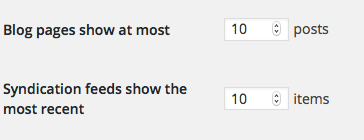
1. What are the values here for you on your site?
2. Also, is there any chance you could temporarily leave your site in that state where the 2014 theme is active and ALL PLUGINS except for JUST The Events Calendar and Events Calendar Pro are deactivated? Just temporarily! I know this is very frustrating to do with a live website, but if you can do this and let me know when you’ve put your site back in this state, I will work as quickly as possible to minimize the length of time that your site is in that state.
Thank you!
GeorgeParticipantHey Sven,
I’m sorry to hear this!
We have not heard of this specific conflict, and it could be related not just to the theme but perhaps specific settings you have with the theme?
I’m not sure. Your best bet from here is to reach out to the Enfold support folks and see if they can help.
Thank you,
GeorgeMarch 23, 2016 at 10:29 am in reply to: EDD Bot marking payments as paid twice adding attendees two times to an event #1092989ParticipantThank you for this!
Your system information still shows Event Tickets Plus is at version 4.0.4.
First, update this to version 4.1 like everything else.
Once updated, do you have all of the same problems you described thus far?
Thank you!
GeorgeParticipantThanks so much for this, Justin. I’ll be taking a deeper dive into this today, but in the meantime, there is one last thing I can think of recommending that might helpful:
Do any errors pop up on your site if you head to your site’s wp-config.php file and change this line of code:
define('WP_DEBUG', false);to this:
define('WP_DEBUG', true);That will display PHP errors if any exist, which might be quite useful here. If any do pop up, copy and paste them in full and share them here.
Thank you! And stay tuned—I’ll be exploring things a bit today and will see if I can spot anything outright problematic.
— George
March 23, 2016 at 10:23 am in reply to: How to avoid that Events Calendar produced an url per day ? #1092984ParticipantHey @DigitalPosition,
There is unfortunately no way to remove these daily URLs—they’re essential to the workings of the recurring events feature. I’m sorry about the limitation here. 🙁
Speaking of the recurring events feature, that’s what’s being discussed here—this, however is a PRO feature only.
The forum we’re in right now is a “pre-sales questions” forum, so I will close this thread here. If you have any further questions on this matter, please log into the account that has your PRO license and then post questions about PRO features in a premium support forum here.
No worries about posting here initially! But to ensure that we support our license-holders as best as we can, we try to encourage them to post in the premium forums they paid for. This prevents abuse of our free forums and keeps things organized.
Sorry for the extra hassle here—if you open a new thread in a premium forum related to this one, you can just share a link back to this thread for reference so that we can pick up where we left off.
Thank you!
GeorgeMarch 23, 2016 at 10:19 am in reply to: tribe_events_tickets_metabox_advanced problems after updated to 4.1 #1092981ParticipantThanks for clarifying, Robert. I can dig into this a bit more, but before doing so, I’m just curious—what were your goals with those pre-4.1 fields?
If they were to collect information from attendees along with their ticket purchase, then just to be clear, are you fully aware of the new built-in features for this in the 4.1 updates? These features are quite powerful, and offer many different field types you can use—text fields, checkboxes, drop-downs, etc.
I only wanted to touch on this because the problem is still coming back to your own custom-coded fields. I will be taking a closer look at this from our end to see if it reveals a bug, for sure! No worries—but there is a limited amount of things we can do to help here, and I just wanted to clarify that it may be simpler and just-as-effective to use the new built-in fields feature.
You can read more about the built-in features here: https://theeventscalendar.com/knowledgebase/collecting-attendee-information/
Cheers! And stay tuned—I’m going to be testing a bit today with these problems to see what I find.
George
ParticipantI’m so sorry I missed that problem!
I’ve tested this extensively on my own site, with Filter Activated, and cannot reproduce the JavaScript error that DOES arise on your site (I can confirm that I found the same error on your site that you describe).
I’m interested if you can do a test here that will help reveal if there are any theme or plugin conflicts at play? This test is described in full here → https://theeventscalendar.com/knowledgebase/testing-for-conflicts/
After EACH STEP in that process, check on this issue firsthand again and see if anything changes.
What do you find when you try this?
Thank you for your patience with this issue; it’s an odd one that I cannot recreate, and we don’t have any bugs reported for this yet, so I hope these tests for conflicts reveal a culprit. Let us know what you find!
Sincerely,
GeorgeParticipant🙂
ParticipantHey @gpcongress,
If you copy and paste the following code into your theme’s functions.php file, the dates should only display the days as you described; no times will be shown:
add_filter( 'tribe_events_event_schedule_details_formatting', 'tribe_events_display_time' );function tribe_events_display_time( $settings ) {
$settings['time'] = false;
return $settings;
}Cheers!
GeorgeParticipantHey Annemieke,
Thank you for clarifying this. I do not have a specific code solution for this at this time, but I would like to clarify that I confirmed with our developers that this “error” is actually not an outright error—nothing is quite broken, necessarily, and there should be no negative impact of this on your site.
The message is just a diagnostic “notice”, and while we will be ensuring this doesn’t arise any more in our next update, it’s not anything problematic at its core.
Do you find any issues with Maps behavior on your site, though? If so, can you elaborate on these issues and share links to the specific pages where they are visible on your site?
Thank you!
George -
AuthorPosts