

Forum Replies Created
-
AuthorPosts
-
George
ParticipantThank you for this information!
I took a look at your site and found the “View As” dropdown was working fine—it seemed that Filter Bar was active, too, so it seems to be genuinely working. Here’s a screenshot of the dropdown working on your site:
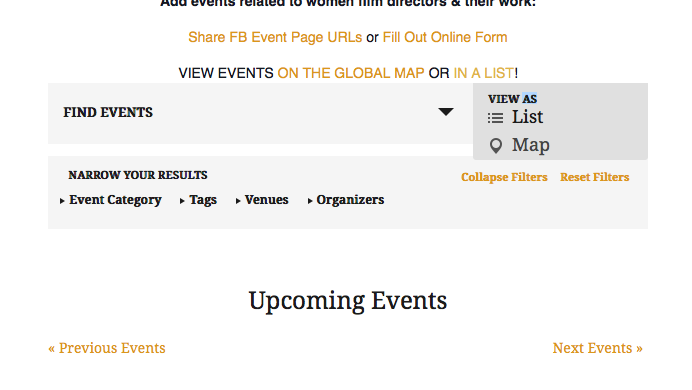
Do you find the same thing, now? Or are there still issues? If so, can you clarify what issues persist?
So sorry for the trouble here! I appreciate your patience with this.
Sincerely,
GeorgeParticipantI’m sorry to hear this, @Oystein, but am glad to do that and you should see an email in your inbox soon confirming the refund.
Thank you for giving our plugins a shot to begin with—I’m sorry for the trouble here and hope the rest of your project is smoother sailing!
Sincerely,
GeorgeParticipantNo problem; best of luck with your site!
ParticipantThanks Dario—we’ve processed your refund. Check your email for an email from us confirming that.
Best of luck with your project!
GeorgeMarch 22, 2016 at 6:59 pm in reply to: tribe_events_tickets_metabox_advanced problems after updated to 4.1 #1092688ParticipantIf you leave your ticketing and The Events Calendar plugins at 4.1 on your site, and then remove your custom code that you’ve shared above temporarily, do your issues persist?
Or do the issues themselves only show up in 4.1 when your custom code is running?
Thank you,
GeorgeParticipantHey @dcantato,
That indeed may work—try it out on your site firsthand and see what happens!
We cannot help with customizations, @dcantato, so for any further code-related questions you will have to take the reins on tinkering, learning, and seeing what works.
Please read this page to learn more about the type of support we can provide → https://theeventscalendar.com/knowledgebase/what-support-is-provided-for-license-holders/
Thank you,
George
PS
So while everything I wrote above is true, I still wanted to help you resolve this. You ask about removing categories by removing the OR statement; this unfortunately won’t quite do the job, and to hopefully save you time, I have just gone ahead and written a snippet for you. 😉 Please read it and try to see how it works, I hope you can learn from it!
To use the snippet, first remove all other custom coding you’ve done so far to try and achieve this.
Once that’s gone, add the following code to your theme’s functions.php file:
/**
* FORCE the "Related Events" section to only to look in tags for relationship.
*
* @link http://m.tri.be/192k
*/
add_filter( 'tribe_related_posts_args', 'tribe_force_tags_for_related_events' );function tribe_force_tags_for_related_events( $args ) {
if ( ! is_array( $args['tax_query'] ) )
return $args;foreach ( $args['tax_query'] as $key => $arg ) {
if ( ! empty( $args['tax_query'][ $key ]['taxonomy'] ) ) {if ( 'tribe_events_cat' === $args['tax_query'][ $key ]['taxonomy'] )
unset( $args['tax_query'][ $key ] );
}
}return $args;
}
That works well for me and should reduce the search for similar events to ONLY look for tags—not categories, no matter what.
Cheers
March 22, 2016 at 6:34 pm in reply to: When will Version 4.1, as described below, be released? #1092682ParticipantNo worries! Stay tuned. 🙂
ParticipantHey there,
Thanks for reaching out! Can you elaborate a bit on exactly what you mean here? Give examples, if possible.
From the sound of things, what you’re trying to will likely require some custom coding. We unfortunately cannot help with writing custom code, so I wanted to mention this clearly right off the top, but let me know more about your goals here and I’ll take a look!
To learn more about the scope of support we can provide, check out this article → https://theeventscalendar.com/knowledgebase/what-support-is-provided-for-license-holders/
Thank you!
GeorgeParticipantHey there,
Can you clarify what API key you are referring to, and why you’re trying to add such a key? Also, what versions of The Events Calendar and Events Calendar Pro are you running on your site?
Thank you!
GeorgeParticipantHey there!
This sounds like an interesting project—I’m sorry to bear the news, though, that this is not possible:
Is it possible to import a CSV file to automatically generate these invite-only tickets with Events Tickets Plus?
It could technically be achieved, probably, but only with some serious tinkering and code-customizing.
Sorry to disappoint! Let me know if I can help with anything else. 🙂
Cheers,
GeorgeParticipantHi Jason,
Our response times are at the pace of one reply every twenty-four hours. We aim for faster replies than this, of course, and I’m sorry for the delayed response here, but I just wanted to clarify what the norms are here.
That being said, I took a look your system information—thank you for sharing it!
It looks like Events Calendar Pro is not even installed on our site?
The licenses tab only shows up when a license-using plugin is activated alongside The Events Calendar, so the first thing here is to simply install and activate the plugin Events Calendar Pro.
You can get the files for the plugin any time here → http://theeventscalendar.com/my-account/downloads
Let me know what you find once you install the plugin!
— George
ParticipantHey @Dario,
Thanks for clarifying that a bit. I’m sorry about our lack of support WPML—it’s a major pain point for us, too, and something we are hoping to fix, but that will unfortunately not be for many months from now at the earliest, if all goes to plan.
With this in mind, then, do you feel a refund is appropriate? Are you definitively going to move to a different plugin? I am happy to refund your purchases if so—no worries. You simply need to follow the steps here and we’ll issue the refund in full immediately → https://theeventscalendar.com/knowledgebase/refund-policy/
I’m sorry about this situation, @Dario. 🙁
Sincerely,
GeorgeParticipantThank you for elaborating on all of this, @lewiscenterarts. The site is beautiful and meaningful, and I would love to dig in more here, but unfortunately the nature of your problem is one that seems to be arising from that custom coding and rendering of the “related” items.
Troubleshooting that, then, is something I’m not quite able to do unless I were to read through all of that code directly—in the context of the functions.php file and such—but this is unfortunately a level of support we cannot provide here on the support forums. 🙁
This article elaborates on this a bit: https://theeventscalendar.com/knowledgebase/what-support-is-provided-for-license-holders/
I’m genuinely sorry about this, @lewiscenterarts. The problem is just a bit too far outside the scope of our license support. Please let me know what you think, and if there are perhaps any more specific clarifications of features/functions/behaviors/etc. I can make here.
In closing, I would just like to mention that, if possible, you can try (or have your developer try) to post the code that filters “filter_tribe_joins_in_subselect” into a Gist at http://gist.github.com. Post the whole, un-edited function or functions. I cannot guarantee an outcome of value here, but am happy to take a look in the off-hours of our support forums.
Thank you—and again, sorry for the trouble here.
Sincerely,
GeorgeParticipantYikes, so sorry about that Jessica! I meant to share this link → https://theeventscalendar.com/knowledgebase/testing-for-conflicts/
You’ve already posted your System Information in the opening of this thread, which is much appreciated! I had actually reviewed that, and it’s because I didn’t notice any thing in it that was outright problematic that I feel the above-shared steps are necessary.
Thank you for your patience here—so sorry for that mistake, and for the trouble here in general. 🙂
Sincerely,
GeorgeParticipantHey Geoff,
I am not running WordFence on my test site, but that doesn’t change the current situation of things in regards to the specific issues you have.
First, you confirmed that things work with WordFence deactivated, so the problem here is definitively caused by WordFence:
If I turn of Wordfence security it works OK
Next, you said this in your most recent reply:
The editor role cannot edit events even with Wordfence set to Level 0 ie no security!
This is a consequence of something within WordFence, as you confirmed above. This is not a problem within our code, it is a problem WordFence is causing.
When I test a default Editor role, with no WordFence, then the Editor user can create can edit events fine, without issue.
For any specific WordFence-related questions, like creating editor roles that allow have the permissions you want, please bring those questions to the WordFence support team. Reach out to the WordFence folks about how WordFence-modified Editors are not getting full Editor capabilities.
I’m sorry that you have to go to another support team for help with these issues, but with we do not make that plugin so unfortunately cannot address the specific problems within or caused by that plugin.
Please let me know if this makes sense—if you feel I’m missing something, then I’m sorry for the trouble! Let me know, and let me know if there’s anything resulting from our plugins specifically that I can try to help with.
Sincerely,
George -
AuthorPosts