
Home › Forums › Calendar Products › Events Calendar PRO › No Widgets visible
- This topic has 8 replies, 3 voices, and was last updated 10 years, 6 months ago by
Support Droid.
-
AuthorPosts
-
March 18, 2016 at 10:52 am #1091101
Michael
ParticipantHello,
working with Version 4.1 Calendar and Calendar Pro
Today all widgets disappeared.
EventCalender wants to update to 4.1.0.1
Pro does not.
I think Prop does not work
How can I get back my widgets?March 18, 2016 at 2:52 pm #1091214George
ParticipantHey Michael,
Thanks for reaching out!
There is not a 4.1.0.1 release for Events Calendar Pro—there is only one for The Events Calendar. This is fine! As long as the first two numbers in the plugin version match—4.1.x—it is fine.
There may be updates for one plugin at a time and that’s fine—just wanted to clarify this.
Current Versions:
• Events Calendar Pro: 4.1
• The Events Calendar: 4.1.0.1As for your actual issues, can you clarify what’s happening with the widgets? If they are broken, can you share links to the specific pages where there are broken widgets and such?
If you’ve removed the widgets for now because they’re broken, can you temporarily add them back to the page so that I can see their brokenness in person? I will take a look and try to see what the issue is.
Also, can you share your System Information? Here’s how to do that → https://theeventscalendar.com/knowledgebase/sharing-sys-info/
Thank you!
GeorgeMarch 19, 2016 at 3:39 am #1091283ParticipantHello, now I updated to The Events Calendar: 4.1.0.1.
You find a broken Widget here:
http://www.niederrheintheater.de
Beneath this Headline:
KOMMENDE VERANSTALTUNGEN IN BRÜGGEN
SCHLOSS DILBORN UND BURG BÜRGEN
Above the button: gesamter Überblick….
And You see the issue here:I can’t find the fotocalender.
http://niederrheinisches-theater.de/events/foto/?tribeHideRecurrence=1Sorry, suddenly with looking for my fotocalender, I had the idea looking if pro is activated, it was´nt.
After activating, the widgets work again, but the fotocalender does not appear.I don´t know when I deactivate pro, can this happen automatically?
March 19, 2016 at 11:26 am #1091418ParticipantHey Michael,
Thank you for the update—I’m glad to hear that the widgets work again!
I do not know why the calendar plugin was deactivated; this does not happen automatically.
Regardless of that, I’m wondering if anything improves if you head to Events → Settings → Display in your wp-admin, and then look for an option called “Enable event views.”
There should be checkboxes here.
Make sure the “Photo” checkbox is checked and save changes:
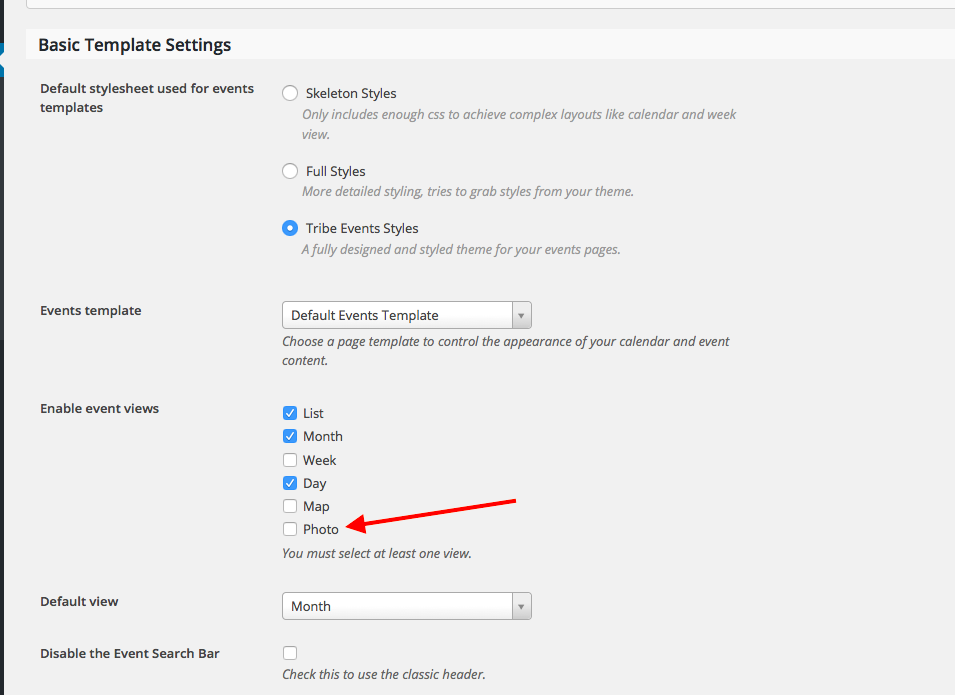
Does this help at all?
If not, then can you share your current System Information? Here is how to do that: https://theeventscalendar.com/knowledgebase/sharing-sys-info/
Thank you!
GeorgeMarch 23, 2016 at 10:10 am #1092975ParticipantThis reply is private.
March 23, 2016 at 10:11 am #1092976ParticipantHello George,
got influenza, sorry.
Now I looked up.
Photo-Calender and Weekcalender don´t appear.Screenshot:
https://www.dropbox.com/s/6ofdi6ezgqw60qi/Screenshot%202016-03-23%2018.02.44.png?dl=0
Password: calenderSystem:
http://niederrheinisches-theater.de/wp-admin
User: Support
Pass: [REMOVED BY ADMIN]Have a look.
best regards, michael
March 23, 2016 at 10:15 am #1092979ParticipantThis reply is private.
March 23, 2016 at 2:50 pm #1093152ParticipantHi there,
We cannot log into customer sites for any reason, so I have removed the password you posted. We have not logged into your site and will not—sorry about any add inconvenience, but it’s a strict and very important policy!
In regards to your issues, I’m curious if you can share a few things:
1. First, share your system information. Here’s how to do that → https://theeventscalendar.com/knowledgebase/sharing-sys-info/
2. Next, try all of the steps outlined in this article → https://theeventscalendar.com/knowledgebase/fixing-http-404-errors/ After EACH STEP in this process, check on the photo view on the front end of your site; do the same issues persist? Or does anything improve?
Thank you!
GeorgeApril 7, 2016 at 9:35 am #1099643KeymasterThis topic has not been active for quite some time and will now be closed.
If you still need assistance please simply open a new topic (linking to this one if necessary)
and one of the team will be only too happy to help. -
AuthorPosts

- The topic ‘No Widgets visible’ is closed to new replies.