
Home › Forums › Calendar Products › Events Calendar PRO › Elegant Themes Divi and PRO
- This topic has 8 replies, 3 voices, and was last updated 10 years, 7 months ago by
George.
-
AuthorPosts
-
March 21, 2016 at 10:40 am #1091909
Steve
ParticipantHi I bought the PRO to get some support but find that I am still abandoned. The issue is that in list view we only get 5 of the entries showing on the first page – there are actually 13. if we search by month the items reappear – is there a work around for this? – all worked well until we did the upgrade – but even rolling back to earlier versions doesn’t seem to fix it. Tried all the deactivate plugins and change themes stuff but wtill having issues – is this a known problem??
Steve
March 21, 2016 at 12:22 pm #1091967ParticipantHey Steve,
I’m sorry to hear about these issues!
First, can you post your system information here with us? Here’s how to do that: https://theeventscalendar.com/knowledgebase/sharing-sys-info/
Next, can you clarify that in your theme and plugin testing, your site was in a state where a default theme like Twenty Sixteen was activated AND the only active plugins were The Events Calendar and Events Calendar Pro, nothing else? I’m just wondering if this was the state of things when you did your plugin/theme testing—or was your process differently separated, so that perhaps at times there were other plugins activated and/or the Divi theme activated etc.
Thank you!
GeorgeMarch 21, 2016 at 11:12 pm #1092202ParticipantHi George
here is the system info – I changed to 2014 theme and de activated plugins for testing – i got different results , but not the right ones
WORDPRESS VERSION
4.4.2
PHP VERSION
5.5.32
PLUGINS
Edit Footer Link Plugin version 1.0 by Richard Eastes(http://grab.graphics)
Alpine PhotoTile for Pinterest version 1.2.6.3 by the Alpine Press(http://thealpinepress.com/)
Bloom version 1.0.5 by Elegant Themes(http://www.elegantthemes.com)
Business Directory Plugin version 3.7.4 by D. Rodenbaugh(http://businessdirectoryplugin.com)
Contact Form 7 MailChimp Extension version 0.4.29 by Renzo Johnson(http://renzojohnson.com)
Contact Form DB version 2.9.7 by Michael Simpson
Contact Form 7 version 4.4 by Takayuki Miyoshi(http://ideasilo.wordpress.com/)
Divi Booster version 1.3.5 by Dan Mossop(http://www.danmossop.com)
Easy Testimonials version 1.18 by Gold Plugins(http://goldplugins.com)
Elegant Themes Updater version 1.0 by Elegant Themes(http://elegantthemes.com)
The Events Calendar PRO version 4.1 by Modern Tribe, Inc.(http://m.tri.be/20)
MailChimp for WordPress Lite version 2.3.8 by ibericode(http://ibericode.com/)
Ninja Forms – MailChimp version 1.3.4 by Pippin Williamson(http://pippinsplugins.com)
Ninja Forms – Layout & Styles version 1.2.7 by The WP Ninjas(http://ninjaforms.com)
Ninja Forms version 2.9.27 by The WP Ninjas(http://ninjaforms.com)
Photo Gallery version 1.2.14 by WebDorado(http://web-dorado.com/)
Ninja Forms – PopControl version 1.1 by Hotchkiss Consulting Group(http://hotchkissconsulting.com/)
Really Simple CAPTCHA version 1.8.0.1 by Takayuki Miyoshi(http://ideasilo.wordpress.com/)
Remove Taxonomy Base Slug version 2.1 by Alexandru Vornicescu(http://alexvorn.com)
Simple Lightbox version 2.3.1 by Archetyped(http://archetyped.com)
The Events Calendar version 4.1.0.1 by Modern Tribe, Inc.(http://m.tri.be/1x)
UK Cookie Consent version 1.8.2 by Catapult(http://catapultdesign.co.uk/)
WordPress Importer version 0.6.1 by wordpressdotorg(http://wordpress.org/)
WordPress SEO version 1.7.4 by Team Yoast(https://yoast.com/)
WP Cerber version 1.8.1 by Gregory M(http://wpcerber.com)
NETWORK PLUGINS
–
MU PLUGINS
–
THEME
Divi
MULTISITE
–
SETTINGS
recurring_events_are_hidden = exposed
tribeEventsTemplate =
tribeEventsBeforeHTML =
tribeEventsAfterHTML =
previous_ecp_versions = Array
(
[0] => 0
[1] => 3.9.1
[2] => 4.0.7
)
latest_ecp_version = 4.1.0.1
last-update-message = 4.1.0.1
donate-link =
postsPerPage = 25
liveFiltersUpdate = 1
showComments =
showEventsInMainLoop = 1
eventsSlug = fairs
singleEventSlug = fair
multiDayCutoff = 00:00
defaultCurrencySymbol = £
reverseCurrencyPosition =
embedGoogleMaps = 1
embedGoogleMapsZoom = 10
debugEvents =
viewOption = list
stylesheetOption = tribe
tribeEnableViews = Array
(
[0] => list
[1] => month
)
tribeDisableTribeBar =
monthEventAmount = 7
dateWithYearFormat = F j, Y
dateWithoutYearFormat = F j
monthAndYearFormat = F Y
dateTimeSeparator = @
timeRangeSeparator = –
datepickerFormat = 3
earliest_date = 2014-05-18 00:00:00
latest_date = 2017-02-05 15:00:00
schema-version = 4.1.0.1
earliest_date_markers = Array
(
[0] => 600
)
latest_date_markers = Array
(
[0] => 863
)
enable_month_view_cache = 1
tribe_events_timezone_mode = site
tribe_events_timezones_show_zone =
disable_metabox_custom_fields = show
pro-schema-version = 4.1
hideSubsequentRecurrencesDefault =
userToggleSubsequentRecurrences =
recurrenceMaxMonthsBefore = 24
recurrenceMaxMonthsAfter = 24
geoloc_default_geofence = 25
geoloc_default_unit = miles
hideLocationSearch =
hideRelatedEvents =
week_view_hide_weekends =
weekDayFormat = D jS
WORDPRESS TIMEZONE
–
SERVER TIMEZONE
UTC
COMMON LIBRARY DIR
/home/wedding53/public_html/wp-content/plugins/the-events-calendar/common/src/Tribe
COMMON LIBRARY VERSION
4.1March 22, 2016 at 9:38 am #1092442ParticipantHi got different results , but not the right ones
Hi Steve, can you clarify the specific “different results” you got? And what made them “not the right ones”?
Thank you!
GeorgeMarch 23, 2016 at 2:23 am #1092764ParticipantHi There
Using the bare bones set up i had a single long list of events output.
regards
S
March 23, 2016 at 10:58 am #1093005ParticipantOkay, thank you—can you clarify what your settings are in your wp-admin if you go to Settings → General and look at these two options:
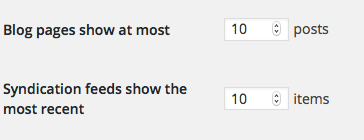
1. What are the values here for you on your site?
2. Also, is there any chance you could temporarily leave your site in that state where the 2014 theme is active and ALL PLUGINS except for JUST The Events Calendar and Events Calendar Pro are deactivated? Just temporarily! I know this is very frustrating to do with a live website, but if you can do this and let me know when you’ve put your site back in this state, I will work as quickly as possible to minimize the length of time that your site is in that state.
Thank you!
GeorgeMarch 24, 2016 at 8:45 am #1093436Chris
ParticipantI had this same issue and fixed it by setting the amount in DIVI Theme Options in Admin : “Posts on archive” I don’t know what it is in English since I use the Dutch version. But there you can change the amount of posts shown.
March 24, 2016 at 9:59 am #1093523ParticipantMartin – Thanks very much for the heads up – I altered the arcchive post to 30 and results now display as expcted
March 24, 2016 at 11:18 am #1093580 -
AuthorPosts
- The topic ‘Elegant Themes Divi and PRO’ is closed to new replies.