

Forum Replies Created
-
AuthorPosts
-
George
ParticipantHey Friedrich,
Thanks for reaching out. Our plugins unfortunately only provide a rather-basic API for working with events and event details—you can explore this API in this file in your copy of The Events Calendar:
the-events-calendar/src/Tribe/API.phpBest of luck with your coding!
Cheers,
GeorgeParticipantHey there!
I notice you are using versions 4.0.6 of The Events Calendar and Events Calendar Pro, which are outdated. The current versions are 4.1.4 for The Events Calendar and 4.1.3 for Events Calendar Pro.
Can you update both plugins and have another look at the issue? Let us know if issues persist.
Thanks!
GeorgeParticipantHey Lisa!
Our ticketing plugins unfortunately have no support for Ecwid at this time. 🙁
Each supported eCommerce platform has its own set of an extensive codebase dedicated to support the specific platform, each platform having its own idiosyncrasies and nuances. So adding support for a new platform, e.g. Ecwid, is a very extensive undertaking.
I’m sorry to disappoint!
GeorgeParticipantThis reply is private.
ParticipantI’m sorry to hear that, and cannot recreate the behavior.
The only other thing standing out to me is your site’s version of WordPress, which your system information shows as version 4.4.3. The current version is 4.5.2—if you update this to the latest version, does anything improve?
Thanks!
GeorgeParticipantThis reply is private.
ParticipantThank you for this information!
Here is a screenshot of my settings page’s “Stylesheet” options:
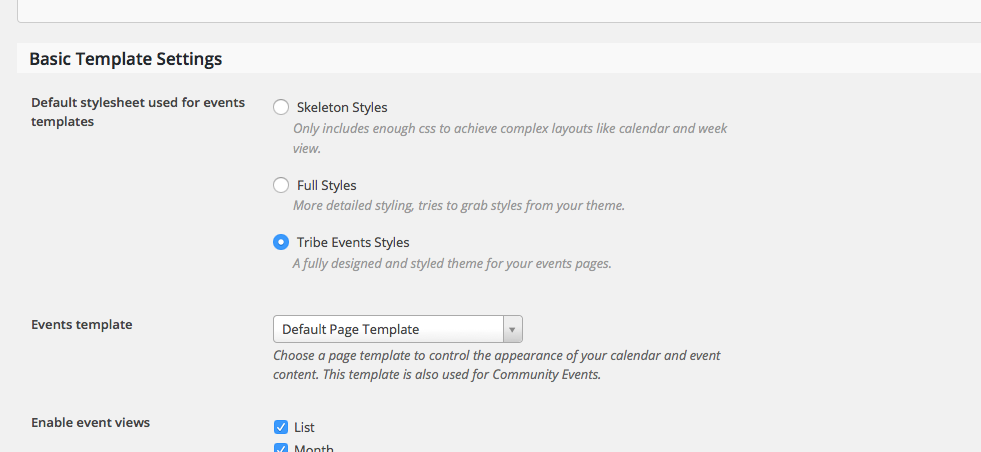
1. Can you share a screenshot of your exact stylesheet options?
2. I see your site is hosted at http://jorgedae.myhostpoint.ch—do you have any WordPress installations on any other hosts, or locally on your computer for example? No worries if not! 🙂 If so, though, what do you find if you try to change this setting on this other WordPress installation?
Thanks!
GeorgeParticipantSure thing—we don’t specifically endorse or have relationships with any particular developers, but we have compiled a list of well-reviewed developers in the community here for your perusal ? http://m.tri.be/18k1
Check out those folks and reach out for some professional assistance with your project; I wish you the best of luck with it!
ParticipantThank you for all of this testing and information!
I noticed that your site’s version of Event Tickets Plus is 4.0.3, which is outdated. The plugin is currently at version 4.1.3.
You can grab the latest version of the plugin files here ? https://theeventscalendar.com/my-account/downloads/
Also, I notice that Event Tickets is not activated or installed on your site. This is not a “free version” of Event Tickets Plus; Event Tickets is the “core” plugin, and Event Tickets Plus is an add-on to the core plugin.
So please also make sure that Event Tickets is installed and activated, which can be downloaded any time here ? https://wordpress.org/plugins/event-tickets/
1. Install and activate Event Tickets
2. Update Event Tickets Plus
3. Take a look at the same issues you have been reportingHow do things behave?
ParticipantThis reply is private.
ParticipantHey Lisa,
Awesome, glad to hear about that progress with the 502 error and such. In regards to the update notifications, can you confirm that you have entered your Events Calendar Pro license key in the Events → Settings → Licenses section of your site’s wp-admin?
If you have not entered the key, please do so and your site should then receive notifications of updates. If the key is entered and shows as valid, and you still don’t get updates, then unfortunately your server could be blocking certain request calls like that; in which case your best courses of action are to check http://theeventscalendar.com/blog manually for updates, and then in the meantime contact your webhost and ask them to allow the license-check update requests from Events Calendar Pro to http://theeventscalendar.com
I hope this information helps!
George
ParticipantAwesome! 😀
ParticipantThank you for reporting this!
From your description of things it indeed seems that this is a conflict with the Sensei plugin. To be clear on this, what Geoff B. wrote in your other thread is accurate: this is a confirmed bug and we are working towards a solution here as fast as possible. (https://theeventscalendar.com/support/forums/topic/the-events-calendar-4-1-4-events-list-widget-broken-on-non-home-pages-by-sensei/)
Thank you for reporting this! I will close this thread for now, but if you have any further questions on this bug please feel free to post in that other thread of yours linked above.
To the original author of this thread, @pack3512, please stay tuned for an update from either The Events Calendar or the Sensei plugin in the near future to address this bug.
Sorry for the trouble!
GeorgeMay 25, 2016 at 8:08 am in reply to: Send attachment based on purchased ticket's location/venue #1118684ParticipantHey James,
Josh is out of office for a bit so I just wanted to step in here. I have to bear some bad news, unfortunately, because we actually can’t dive into variable-by-variable, function-by-function assistance with custom coding at all.
We cannot help with code modifications, custom designs, etc., so you unfortunately will have to take to the reins on making your customizations a reality.
⚠️ Please read this page to learn more: https://theeventscalendar.com/knowledgebase/what-support-is-provided-for-license-holders/
Now, while what I wrote above is true and we will not be able to help with the coding process here, I did want to at least try to help a bit and offer some general advice. You ask about how to get titles and such from the tickets…
Well, there are a number of ways to do it. Tickets are just post types, so you could get them in an array by using code like the following:
// $event_id is the ID of the Event whose tickets you want to get info about.
$main = Tribe__Tickets_Plus__Commerce__WooCommerce__Main::get_instance();
$tickets = $main->get_tickets( $event_id );
Where to go from here? Well, I would recommend simply doing a var_dump() on that $tickets variable to see all of the data that it already provides. You could then use a number of WordPress and PHP functions from there on that $tickets variable to extract all sorts of additional, specific data you want.
Next, when it comes to getting venue information, you can use all sorts of WordPress functions to get information from Venues because venues are just a post type.
To get the actual Venue ID though, so that you CAN then use those WordPress functions to begin with, try out some code like this:
// $event_id is the ID of the Event whose venue you want to get info about.

$venue_id = tribe_get_venue_id( $event_id );
Now you can do stuff like this to get post information about the Venue, like the title etc:
$venue_info = get_post( $venue_id );
Other Resources
You can learn more about getting information from post types here:
• http://codex.wordpress.org
• https://codex.wordpress.org/Function_Reference/get_post_field
• https://developer.wordpress.org/reference/functions/get_post/
• Exploring the /src/template-tags/ folders in any Events Calendar/Event Tickets plugin for a series of handy template-tag functions that get and show specific bits of data.
From here, to implement the features you describe, you would have to write that custom code or hire a professional developer to do it for you. We have a list of great developers here → http://m.tri.be/18k1 (and have no affiliation with any of these folks—they’re simply some well-respected names in the community that we’ve compiled to share in situations like this one).
I hope this information helps! Best of luck with your custom coding.
George
ParticipantThank you for this information! Your plugin versions are fine here, but I am a bit puzzled as to why all of the plugin names would remain in English, except for The Events Calendar which is Veranstaltungstickets in your system information….
1. Do you know why The Events Calendar specifically is using the German version of its title? Have you configured this? Is your site’s Language set to German?
2. If you undo whatever makes the translation of that title to German happen, does anything improve with the behavior of this problem? So, for example, if you have your site’s Language set to German, does temporarily setting it to English make any difference here?
If the answer to question #2 above is “No”, then I would recommend doing the complete set of troubleshooting steps outlined here ? https://theeventscalendar.com/knowledgebase/testing-for-conflicts/
After EACH STEP in that process, check on the issues again and try to recreate the problem. What do you find when you do this?
Thank you!
George -
AuthorPosts