

Forum Replies Created
-
AuthorPosts
-
George
ParticipantHey @May-i,
Thanks for reaching out. Can you clarify a bit more about what you mean here? Do you mean that, if the user has two tabs open, one with the cart and one on the original event page, the same “cost” will show on both pages?
If that is not what you mean, then can you explain a bit more about what is currently happening, compared to what you want to happen?
Sorry for my misunderstanding of things; I just want to be sure I understand your request so that I can best recommend a way forward.
Cheers!
GeorgeParticipantThis reply is private.
ParticipantThank you for confirming this, @Mattboggs. I am sorry about the timing of these issues and the repeated requests for the sorts of troubleshooting steps I describe above!
I cannot recreate any issues with the QR Code generation; so, if you are still interested in trying to figure out why that’s happening sometime, when things are a bit less busy perhaps, I would recommend the steps I posted in the last post of mine in this thread above this one.
Thank you for your patience here!
GeorgeParticipantThank you for testing all of that, @Brandon!
I would definitely recommend reaching out to your theme developer’s support team for assistance with the theme from here, to try and get things work.
As to why it might be happening at all, issues like this usually arise from a theme’s code managing custom queries poorly, or interfering with the global $wp_query in some way. It can happen from within even very popular themes, and should be relatively easy for the theme developers to fix (dependent on the exact, specific cause of course).
Let me know if there is anything else I can try to help with!
Sincerely,
GeorgeParticipantThank you for this Jorge!
You said above, “I have installed the german wordpress version and can’t change it to another version.”
1. Can you share a link to the specific location where you found this “German WordPress version”?
2. Can you confirm what the language is set to in your site if you go to Settings > General in your wp-admin?
3. Can you confirm that you are able to change the site language on the Settings > General page in your wp-admin?
4. If you change the language to English, does anything improve with these issues?
Thank you,
GeorgeParticipantThanks for your patience and persistence here, @Deshub. Please do keep us posted on your interaction with your web host!
As noted, I have not been able to recreate any of the odd behaviors you are experiencing, and have confirmed that your license is valid and configured properly on our end.
So, this is an odd issue—but I will keep this thread open and am happy to try and see this through to its end.
Let us know how it goes with your web host, and if they notice anything on their end of things.
Cheers!
GeorgeParticipantThis reply is private.
ParticipantThank you for this. I know I have recommended some troubleshooting steps before, but you replied with the comment, “With the above plugins on\off, the site disabled.” Does this mean that when you deactivated plugins on your site, the site shut down?
If not, then I would recommend doing the following steps:
1. Deactivate EVERY SINGLE PLUGIN on your site except for ONLY these specific plugins, nothing else:
• The Events Calendar
• Event Tickets
• Event Tickets Plus
• WooCommerce☝️ Any other plugin, whether related to The Events Calendar or a simple little plugin or anything at all, please deactivate it.
2. Once all but those above four plugins are deactivated, create a new event for testing purposes, add new tickets for testing purposes to that event, and then do some test purchases of this ticket.
3. Does anything change with regards to the QR Codes?
4. If issues persist, then leave all but the above four plugins deactivated as-is, and then also activate a default theme like Twenty Twelve or Twenty Sixteen.
5. Then, repeat step #2 here: create test event, test tickets, “buy” some, see if QR Codes behave differently.
6. What do you find?
I am sorry to recommend this, but cannot recreate your issues and so this is the only thing that I can recommend at this time to try and reveal issues.
Thank you for your patience! I am sorry for all the trouble here—it’s an odd issue that we cannot recreate, and that there are no known bugs for. So this extra investigating and testing on your end is unfortunately the only step from here to try and reveal the problem.
Sincerely,
GeorgeParticipantHi Lisa,
This page lists the currently-supported eCommerce platforms ? https://theeventscalendar.com/product/wordpress-event-tickets-plus/
This screenshot highlights the specific section that mentions that:
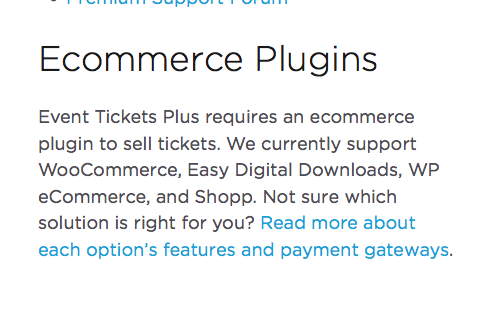
☝️ There is a link in that screenshot to a page where you can read more about the various eCommerce solutions. That page is here, if you would like to explore that ? https://theeventscalendar.com/knowledgebase/choosing-ecommerce/
I hope this information helps!
GeorgeMay 27, 2016 at 9:00 am in reply to: which add-on is best for both (event registration) and (use filter by category) #1119736ParticipantHey Mark,
Thanks for your follow-up. You write this question:
how do i force the registrant THROUGH the ticket process before getting ical download?
☝️ I’m not certain what means, so can you please clarify what you mean? Are you saying that you don’t want the “Export to iCal” links to show unless the person viewing the page has purchased tickets for that event?
— George
ParticipantThis reply is private.
ParticipantThis reply is private.
ParticipantWeird! Sorry to hear this.
Can you post your site’s “System Information” here to help us investigate why this might be happening? Here’s how to post that information ? https://theeventscalendar.com/knowledgebase/sharing-sys-info/
Thank you,
GeorgeParticipantHey Khaled,
Thanks for reaching out!
1. I tried recreating the problem you describe but was not able to. Can you confirm that you are referring to the search/filter fields shown in the following screenshot:

2. Also, are you referring to the “Search” field specifically, or the “Near” field?
3. Can you share an exact term that you try searching that creates this problem? I will use the exact term that you use to see if I get the same result.
Thank you!
GeorgeParticipantI’m sorry to hear about this, @Brandon. I do not have the issues you describe here, so I’m wondering—does anything improve if you deactivate ALL plugins on your site except for ONLY the The Events Calendar and official add-ons? This means only these specific plugins should be active on your site:
• The Events Calendar
• Events Calendar Pro
• Filter Bar
• ImporterI see you have an “events calendar shortcode” plugin, which we do not make. Please be sure to deactivate this, and all other plugins that are not the ones listed above.
1. In this state, how do things behave?
If issues persist and the filters don’t seem to work here, then how about if you leave your site in this state, and then also activate a default theme like Twenty Twelve or Twenty Sixteen?
2. In this state, how do things behave?
Let us know what you find!
George
-
AuthorPosts