

Forum Replies Created
-
AuthorPosts
-
June 20, 2016 at 9:45 am in reply to: Event tickets all became free, and now there are two price fields #1129335
George
ParticipantHey James,
Sorry to resurrect a dead thread here, but I wanted to confirm with you that we’ve actually been able to recreate this bug and are working on a fix that will soon be released for WooCommerce Tickets.
I’m sorry if this news came late, and you’ve already updated to Event Tickets Plus, but just wanted to inform you of this!
Sincerely,
GeorgeParticipantHey @Pau,
Thanks for reaching out and for acknowledging the limitations of our support. While I will indeed not be able to help with any code customizing questions specifically, I’m happy to help here!
Just to be 100% clear, are you referring to the block of event information that is seen right under the List View event title? What I mean is the block of text that I’ve highlighted here with the red box:
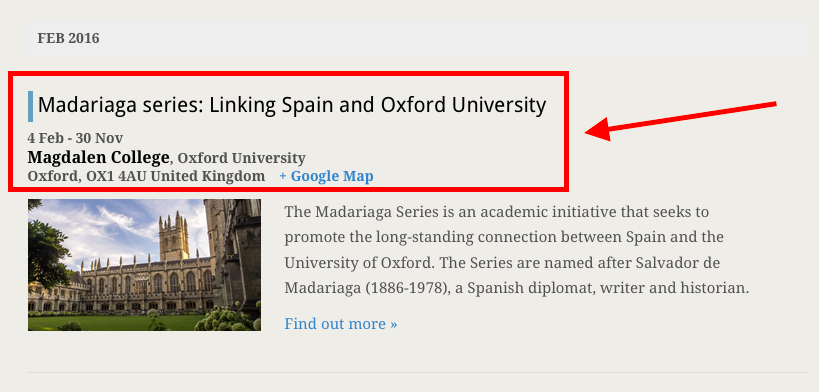
☝️ I just want to ensure I understand your goals so that I can best help out here!
Thank you,
GeorgeParticipantHey @Amy,
Sorry for the trouble here. That text is likely “screen reader text”, meant to be in place for accessibility reasons so that folks with screen readers can navigate the page more easily.
I would recommend adding this CSS to the bottom of your theme’s style.css file to hide that text:
.screen-reader-text {

    clip: rect(1px, 1px, 1px, 1px) !important;

    position: absolute !important;

    height: 1px !important;

    width: 1px !important;

    overflow: hidden !important;

}
I hope this helps!
Cheers,
GeorgeParticipantThank you for sharing the CSV file, @Eduardo!
Can you clarify what site you are trying to import this CSV into?
— George
ParticipantHey Olivier,
Thanks for reaching out.
Can you clarify which “Account” you are referring to? And can you also share a screenshot of where you see this VAT number?
You can share the image by uploading the screenshots to this thread. If you have issues with that, you can upload to Imgur.com, Flickr.com, CloudUp.com, or any similar image-hosting site; then just share the links to those images here and I’ll take a look.
Thank you!
GeorgeJune 20, 2016 at 6:49 am in reply to: Using Page (instead of Page Template) for "Events Template" #1129220ParticipantHey @Rachel,
Thanks for reaching out.
Unfortunately, you cannot insert The Events Calendar into a page. 🙁
The closest you can come to that are by way of the methods described in this knowledgebase article. ? https://theeventscalendar.com/knowledgebase/inserting-calendar-content-post-page-content/
Check out that article and let me know if you have any further questions here!
Sorry to disappoint.
Sincerely,
GeorgeParticipantHey @Malcolm,
Thanks for reaching out.
There is unfortunately no alternative method for ticket creation than to manually create the tickets. 🙁 I’m sorry to disappoint!
A Possible Alternative
There is one method here that might help a bit, and can be recreated with a few clicks across any ticket: Additional Information.
“Additional Information” is a recent feature in Event Tickets Plus, and may help here. It essentially means that, when buying a ticket (or making an RSVP), the customer has to specify some additional information. For catering, it might be specifying any food allergies. If a free t-shirt comes with the ticket, it might be specifying the size you wear…etc.
In this case, you could create an Additional Information field that is a dropdown of all of the available time slots for the ticket.
To learn about creating these fields in-depth, please read this guide. ? https://theeventscalendar.com/knowledgebase/collecting-attendee-information/
☝️ After reading that guide, you can use those methods to create a dropdown field like shown in this screenshot:
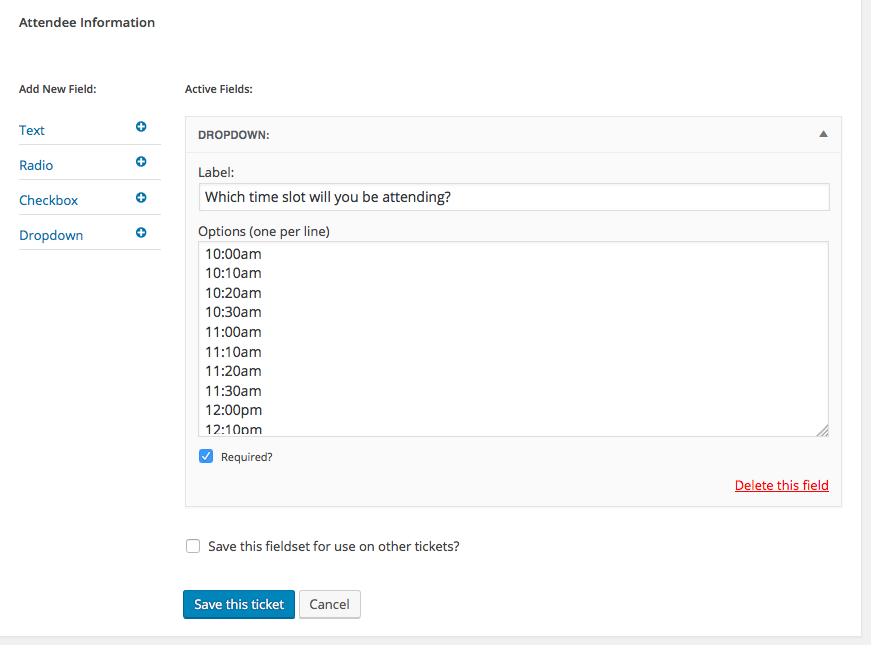
Please note, in that screenshot, these two checkboxes:
• “Required?”—require a selection before being able to complete the purchase, so that every single ticket has a specified time!
• “Save this fieldset for use on other tickets?”—check this to save the Dropdown of the time slots. You will be able to give the dropdown a title, like “Golf Time Slots” or something. Then, when you create another event down the road, you can just choose that dropdown when creating the ticket and the dropdown will pre-populate with all the same options, saving you lots of time! 😀Here’s a quick, 10-second screencast of how that looks on the front end when folks buy one of these tickets. ? https://cloudup.com/ccRf3LvBRwV
⚠️ Please note: There is not a way, at present, to specify stock levels for each dropdown option or anything like that at this time. If this crucial to your ticketing needs, then this “additional information” workaround will likely not help much. But I just wanted to share this information in case it helps.
Sincerely,
GeorgeParticipantHey @Simon,
Thanks for reaching out!
You can perform an upgrade manually any time you’d like. The cost of an upgrade is indeed the cost of the license you are upgrading to, minus the amount you’ve already spent on the license you are upgrading from.
To do this, head to http://theeventscalendar.com/license-keys
Navigate to your Business License.
And then just look for and use the “Upgrade:” links in the top-right corner of the license key box, beneath the “Renew” button.
I already have an Agency license in my account, so for me the upgrade link is only to the “Unlimited” license; but if you have a Business License, then you will see links for Agency and Unlimited. Use the Agency link and you’re good to go!
Here’s a screenshot of where to find those links, for reference:

I hope this helps—happy upgrading!
— George
ParticipantHey @marco,
Thanks for reaching out!
This is an interesting idea, and one that other customers have inquired about, but at this time it is not possible with our plugins. 🙁 I have looked for WooCommerce Extensions that help make this a reality, but that search, too, was to no avail when I tried it.
I’m sorry to disappoint! Please let me know if there’s anything else I can try to help with.
Sincerely,
GeorgeParticipantHey @Stefan,
Thanks for reaching out!
There are, unfortunately, limited possibilities for fixing the display of that link. One thing that might help is to increase the width of the Organizer column and the “Other” column both, so that they are stacked atop each other on the right said of the details box, thus giving the Facebook links enough room to be fully expanded.
Here’s how that would look:
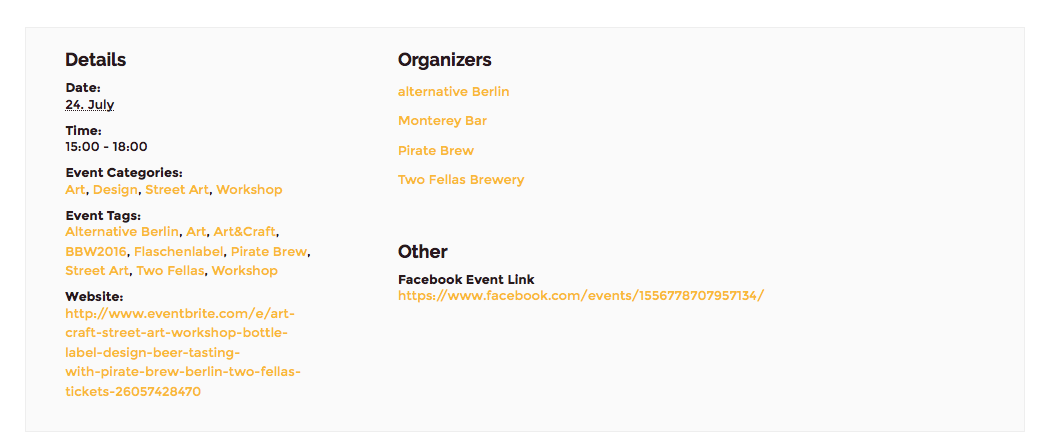
☝️ To do this, you’d just need to add CSS like the following to the bottom of your theme’s style.css file:
body.single-tribe_events .tribe-events-meta-group.tribe-events-meta-group-other

body.single-tribe_events .tribe-events-meta-group.tribe-events-meta-group-organizer {

    width: 50% !important

}
I hope this helps!
GeorgeParticipantHey Marta,
Thanks for reaching out!
Our plugins unfortunately do not have any special integrations with any “page builder” products. 🙁
They might not break outright with those plugins, especially if those plugins on your site are well-coded. So if you’re able to do so, I would recommend trying out The Events Calendar (which is free) on your site first to see how things behave. ? http://wordpress.org/plugins/the-events-calendar
But aside from possibly working well alongside those Page Builder features, our plugins have no special integration with or specific support for them.
I hope this information helps!
GeorgeParticipant2. Is a bit frustrating that you are telling me limit=”0″ won’t work because I copied the exact shortcode you provided me earlier in the ticket.
1. Can you please share a screenshot of where I provided this, or a link to the page were you found this? I will fix that if it is on a page.
But I just tried to change it to a =”1″ and it didn’t work either. What I am wanting to achieve is in 2 columns. Column 1 just the mini_calendar image display with no calendar items listed below it =”0″. Then in Column 2 have the List of events =”3″. If for some reason it can’t be =”0″ in column 1, I could do limit=”1″ if I can do an offset of 1 in column 2 (so that it doesn’t duplicate with column 1 and column 2 starts with the 2nd calendar item and does calendar items 2-4 instead of 1-3).
• You unfortunately cannot do an “offset”, as you mention wanting to do in the second column.
2. Can you please confirm if limit="3" works?
3. Can you please link to the page where you have these two columns? I will take a look and recommend custom CSS that you can add to make this a reality; custom CSS sounds like the best—and perhaps only—solution for this specific configuration at this time.
I have already done the instructions provided there, but it is not fixing the issue (still see that error message in the settings tab in WP. So what’s the next step as I am not getting what I am paying for when the account shows my licenses aren’t active and aren’t updating properly.
4. Can you go to http://theeventscalendar.com/license-keys, and take a screenshot of all of as much of the page content as possible? Then share the screenshot here: you can do so by uploading the screenshots to this thread. If you have issues with that, you can upload to Imgur.com, Flickr.com, CloudUp.com, or any similar image-hosting site; then just share the links to those images here and I’ll take a look.
4. You did not address the url issue where it shows 2 of my licensed domains are omcar1.staging.yournewsites.com instead of OMCAR.com and rairc2.staging.yournewsites.com.
5. To help me answer this, please share the screenshot as I mentioned in step #4.
I have listed things here in number-listed format. I appreciate how your previous answers follow this format, and request that you please keep answering in that way. This helps keep track of individual issues and helps me help you as efficiently as possible.
Thank you,
GeorgeParticipantThis reply is private.
ParticipantThis reply is private.
ParticipantHey @Priyesh,
Adding support for IE7 would take extensive custom coding, especially of CSS. You could personally make all of the necessary CSS code changes yourself, or hire someone to assist you, but otherwise it is not possible to have full support for IE7.
If you are interested in hiring someone, have a list of great developers here → http://m.tri.be/18k1 (and we have no affiliation with any of these folks–they’re simply some well-respected names in the community that we’ve compiled).
As for issues in the Safari browser, we do support Safari and so I will take a look here. To help us figure out what’s going on, can you please share the following details?
1. What version of Safari are you using when you see the issues?
2. What is the specific URL on your site on which the issues arise?
3. Can you please post your System Information? Here’s how to do that ? https://theeventscalendar.com/knowledgebase/sharing-sys-info/Thank you!
George -
AuthorPosts