

Forum Replies Created
-
AuthorPosts
-
George
Participant😀
June 17, 2016 at 8:13 am in reply to: Adding additional content to the designated calendar page #1128427ParticipantHey Betsy,
Thanks for reaching out.
I’m happy to help here. I should note that we do not make Visual Composer, nor do we have any special integrations with it, so for any question along the lines of, “how do I do this with Visual Composer?” please direct those questions to the Visual Composer support team.
As for our own code though, there are two ways to add content to the main events view.
1. First is to use the “Add HTML before content” and “Add HTML after content” options in Events → Settings → Display in your site’s wp-admin.
2. Next is to use the steps outlined on this guide → https://theeventscalendar.com/knowledgebase/themers-guide/
☝️ If you use those steps, you can make a theme template version of this The Events Calendar file:
the-events-calendar/src/views/default-template.phpYou can then customize that template however you see fit, and add content on the main events page, etc.
— George
ParticipantHey @Riccardo,
Thanks for reaching out. While our ability to assist hands-on with any writing of custom code is very limited, we do have a guide to using the handy function tribe_get_events()
This function may be helpful for your needs; you can read the guide here ? https://theeventscalendar.com/knowledgebase/using-tribe_get_events/
I hope that guide helps—let me know if so, and if there are any other questions I can try to assist with!
Sincerely,
GeorgeJune 17, 2016 at 8:00 am in reply to: How do you know what registered user submits the events #1128416Participant😀
ParticipantHey Riccardo,
There is not a way to filter by subcategory at this time. 🙁
However, the normal category="" filter will work if you provide it with a subcategory:
[tribe_events_list category="mysubcat"]☝️ This will only show events that are in the subcategory “mysubcat”—if this subcat is a child of the parent category “MyParentCat”, then events that are in that category will not be included—only ones that are explicitly in the subcategory “mysubcat”.
I hope this helps!
GeorgeJune 17, 2016 at 7:50 am in reply to: Are there example of the exact syntax – how to use these shortcode arguments? #1128411ParticipantHey @Th,
Thanks for reaching out. Those shortcode arguments work the same as any other, so in this sort of format:
before_widget=""Now, what you put between the quotes there simply gets displayed in certain places depending on the argument.
So let’s say you have this shortcode:
[tribe_events_list before_widget="here are some events!"]Well, then the text “here are some events!” will display before the widget:
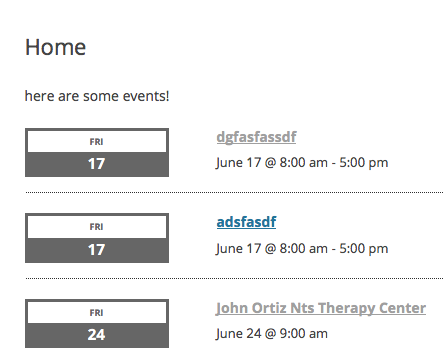
A title argument adds a title; before_title and after_title add strings before and after the title; and so on.
If you’re curious how they all work, I recommend putting a widget shortcode in a sample page, and just tinkering around a bit, experimenting with the different attributes. It’s the best way to see what they do.
I hope this information helps,
GeorgeParticipantHey Austin,
Thanks for reaching out!
Can you clarify what you mean when you say that you want to Week View to look like that page? In what way?
Are you talking about the whole site design?
Or just the fact that it takes up 100% of the width of the page, for example?
Let me know what you mean.
Please note that your theme dictates much of the front-end design and appearance of the calendar; we cannot help with themes or with design (please read here), and we cannot share the WP Shindig theme at this time.
☝️ I only mention this stuff now just to help set your expectations early—please do let me know what you more details about your goals here and I will do my best to assist!
Cheers,
GeorgeParticipantHey Jeremy,
I’m sorry to hear about these issues. We’ve had bugs with the Sensei plugin in the past, and so my hunch is that another bug is occurring here.
To help investigate that, can you post your site’s complete System Information to this thread? Here’s how to do that ? https://theeventscalendar.com/knowledgebase/sharing-sys-info/
Thank you!
GeorgeParticipantHey Debra,
Thanks for reaching out.
To be clear, our plugins are not standalone pieces of software. They are WordPress plugins.
So, you mention having one site.
Install The Events Calendar and Events Calendar Pro on this one site.
Then, you and your team can all log into WordPress site’s wp-admin. You can share one account, or have several administrator accounts.
Then you can all create and update/edit events on the site whenever you want from wherever you want.
I hope this information helps!
George
ParticipantHey @Austen,
Thanks for reaching out.
The “related posts” on that page and other single events are powered by a plugin on your site called Jetpack.
To disable those, you’ll want to head into your Jetpack settings and try to disable the “related posts” feature on the Events, Venues, and Organizers post types.
We do not make Jetpack, but if you head over to their documentation and support site you should be able to find relevant information on how to do this. ? https://jetpack.com/support/related-posts/
You could also add CSS like this to the bottom of your theme’s style.css file to hide those related posts:
body.single-tribe_events #jp-relatedposts {

    display: none !important;

}
Cheers,
GeorgeParticipantHey @Priyesh,
Thank you for reaching out.
We unfortunately only support IE9, and while we try to offer graceful degradation for IE8, we do not support IE7.
I am sorry to disappoint!
GeorgeParticipantHey Glenn,
Can you clarify what you mean? Does the CSS I recommended fix the border placement?
— George
ParticipantThis reply is private.
ParticipantThis reply is private.
Participant😀
-
AuthorPosts