

Forum Replies Created
-
AuthorPosts
-
George
ParticipantHey Glenn,
Thanks for pointing this out. We cannot help with code customizations or design tweaks, so you’ll have to take the reins from here, but here’s some CSS that should help. Try pasting this into the bottom of your theme’s style.css file:
.tribe-mini-calendar-event {

    border-bottom: none !important;

    border-top: 1px dotted #2f2f2f !important;

}
If you need to write any more custom CSS on your site, definitely check out a [free!] tool like Firebug if you use FireFox, or the Developer Tools for either Safari or Chrome. They have “Inspector” tools that let you zoom right over the element whose styles you want to change—very helpful!
Best of luck with your site,
GeorgeParticipantI am very sorry about the nature of these problems, Becky. Your patience and persistence means a lot, so please do keep us posted on things from here as you go about starting over from scratch.
Sincerely,
GeorgeParticipantThis reply is private.
ParticipantNo problem! I will close up this thread, but feel free to open a new thread any time if other questions arise. 😀
— George
June 16, 2016 at 12:59 pm in reply to: License Number being rejected even though its active #1128125ParticipantHey Craig,
Let’s go through your issues one at a time.
#1 Updating to Events Calendar Pro on Ralsc.org
There are a number of reasons why the license message may be showing up on ralsc.org. It is licensed, so I don’t know why the message is displaying, but would recommend manually updating Events Calendar Pro on that site for now. Read how to do those here: https://theeventscalendar.com/knowledgebase/manual-updates/
#2 tribe_mini_calendar limit
You cannot supply “0” as a limit to the widget. Can you clarify your goal here?
Are you trying to display <me>more than 3 events, for example? Are you trying to have it show ALL events on that day, regardless of the number?
#3 “Out of installs” notices
If you run into out-of-installs notices, then there is only one way to go about fixing these:
• Head into the wp-admin of the site on which the notice appears.
• Remove the license key from the settings page.
• Go to http://theeventscalendar.com/license-keys
• Use the “disconnect” link next to the domain name for the site on which you got the notice.Only after doing these steps, you can try re-connecting the license from inside your wp-admin.
George
ParticipantGlad to hear it!
I’ll close up this thread for now, but if other issues arise please open a new thread any time. 😀
— George
ParticipantThis reply is private.
ParticipantThanks for sharing this! 😀
Can you share a link to a page on your site where the “divide line being in the wrong place” issue can be seen firsthand? I’ll take a look and recommend what I can.
Cheers,
GeorgeParticipantThis reply is private.
Participant😀
June 16, 2016 at 12:25 pm in reply to: Organizer is required and Organizer Email is required error #1128099ParticipantTom,
I understand your frustrations and we are trying to figure out the issue here.
I cannot reproduce it thus far, but the only reason I ever mention that is because it’s the reason I then ask you to do troubleshooting steps–if I could reproduce the problem, I would do the troubleshooting steps myself.
Next, it’s worth noting this fact because it points to a unique issue specific to your site, like for example that you might have custom coding on your site or other code that is conflicting with things.
To that end, Tom, now that you’ve updated to 4.2, can you please confirm if you have any “require Community fields” snippets at all on your site? If so, please remove these snippets completely for now and see if anything improves.
Thank you for your patience here, Tom.
Sincerely,
GeorgeParticipantThank you for this information, and for testing that!
I’m sorry for the slow pace of this issue; it’s an odd issue that I have not been able to reproduce thus far, but I have now set up an hourly auto-import of that Facebook page you mentioned, and will see if I get similar behavior as you:
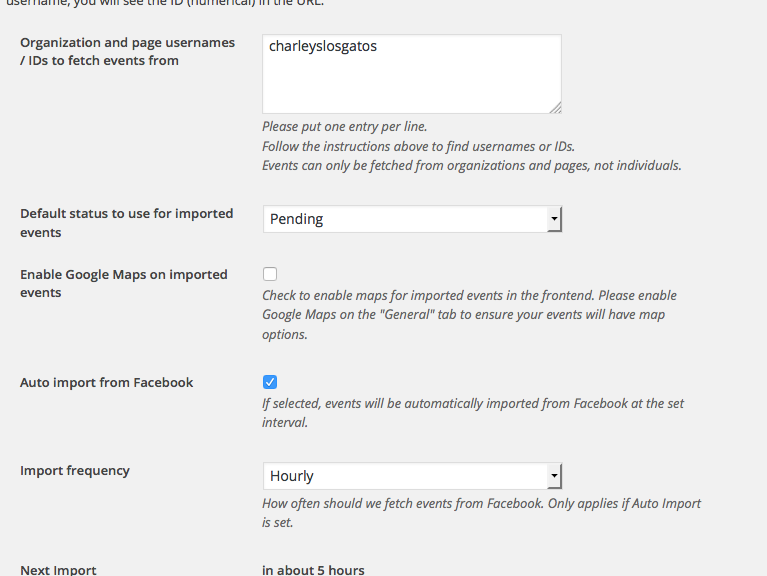
☝️ I will let some imports run and let some events get imported, and report what I find!
Thank you for your patience,
GeorgeJune 16, 2016 at 11:57 am in reply to: https://tiga.org/events/the-tiga-games-industry-awards-2016 #1128076ParticipantHey Richard,
I am sorry about the pace of support, but we unfortunately do not offer Skype or phone support. The specific steps above are, fortunately, not anything that our presence is required to fulfill:
• Upgrading WordPress
• Deactivating plugins and themes to test(See my post before this one for the complete details)
These are steps you can do whenever most convenient for you; while doing them, observe the behavior of the issues; and then report back in the forums.
Let us know if you can do these steps and, if so, what you find.
Thank you!
GeorgeParticipantI’m sorry about the persistence of this bug, @Becky. I have continually failed to recreate your issue—for me, the Community Events settings always work.
It may be worth deleting the existing versions of The Events Calendar and Community Events off of your site; this will not delete any events data.
If you delete these plugins, and then install them “freshly” on your site, does anything improve? You can get fresh copies of the files for The Events Calendar here and for Community Events here.
Sorry for the trouble here!
GeorgeParticipantThank you Denise!
This sounds like a JavaScript conflict. If you activate a default theme like Twenty Twelve or Twenty Sixteen on your site, and then try the edit link again, does any of the behavior change?
If not, then what if you leave that theme active, and then also deactivate every plugin on your site except for just these ones:
• The Events Calendar
• WooCommerce
• Event Tickets
• Event Tickets Plus
☝️But other than these four plugins, deactivate every other one and then see how the edit link behaves.Let us know what you find!
George -
AuthorPosts