

Forum Replies Created
-
AuthorPosts
-
George
ParticipantHey @Restoreoregon,
I’m sorry to hear this! Just to be clear, are you referring to the “edit” link as shown in the following screenshot?
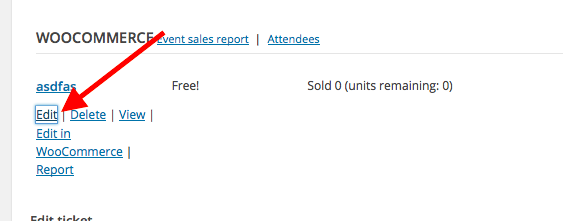
☝️ If so, then this link shows up and works fine for me on my own testing site. I am using version 4.2 of all of our software, too.
1. Can you confirm if this is the link you are referring to? If not, share a screenshot of which one you are referring to. (You can do so by uploading the screenshots to this thread. If you have issues with that, you can upload to Imgur.com, Flickr.com, CloudUp.com, or any similar image-hosting site; then just share the links to those images here and I’ll take a look.)
2. Can you clarify exactly how this issue manifests? For example: does the link show up, but upon being clicked, nothing happens? Or does the link not even show up?
Thank you!
GeorgeParticipantHey Melanie,
Sorry to hear this!
This is a bug that we are working on fixing at the moment—sorry for the trouble!
In the meantime, can you share your site’s System Information so that I can confirm if there might be other factors causing this error? Here’s how to share that info ? https://theeventscalendar.com/knowledgebase/sharing-sys-info/
Thank you!
GeorgeParticipantHey there,
We unfortunately cannot help with code customizations, so you’ll have to take the reins on refining this, making iWe unfortunately cannot help with code customizationst work with your design, etc, but here’s an example of two snippets I wrote for you to achieve this ? https://git.io/voE7Q
Here’s a screenshot of this to prove that it works:
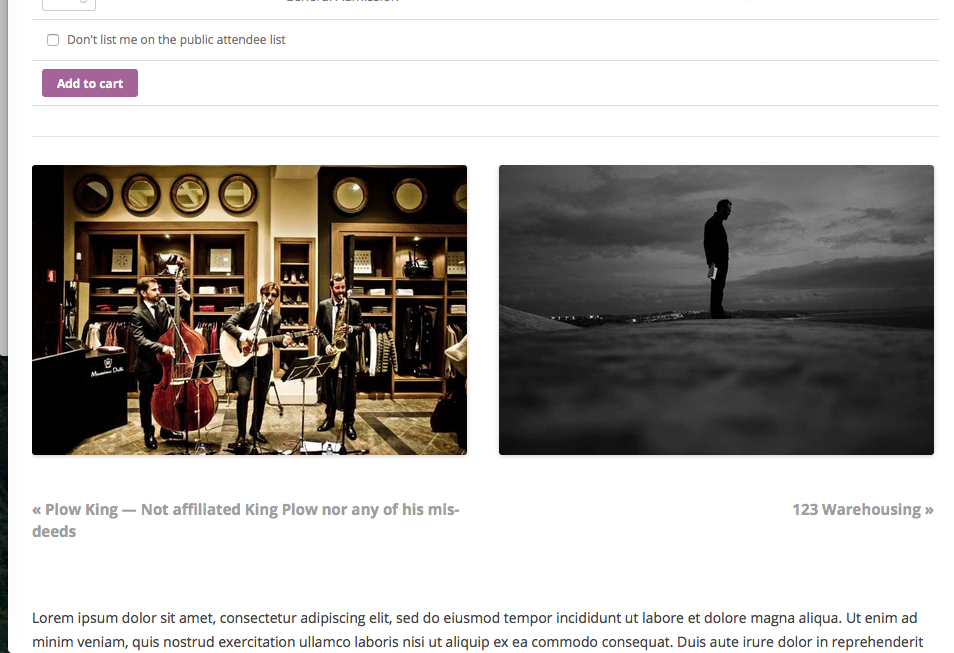
As noted, you’ll need to take the reins on further refinement, but I hope this helps!
Your code is close, but the tricky thing with events is that the “previous” and “next” events only have these relationships to the “currently-viewed” event based on the time and date the event will occur. WordPress does not have support for events out-of-the-box (hence the existence of our plugins!), and is not built for that, so when you use its built-in features for getting adjacent posts, the relationship of “next” or “previous” is based on the date the post was published—quite different than the relationships of events!
So, as you can see in the snippet I shared with you, some custom class methods within The Events Calendar need to be used here.
Tinker around with it, and let me know if there’s anything else I can try to help with.
Cheers!
GeorgeParticipantHey Michele,
Thanks for reaching out! Events Calendar Pro unfortunately doesn’t have any shortcodes that generate events in the style of the Photo View. 🙁
Sorry to disappoint!
GeorgeJune 16, 2016 at 9:30 am in reply to: How do you know what registered user submits the events #1127943ParticipantHey Christian,
Thanks for reaching out.
Upon event submission, the author is the user who submitted the event. I’m not sure why it’s not being reflected as such in your site, as I cannot recreate the problem you describe.
I noticed that you’re using slightly out-of-date versions of our plugins; if you update The Events Calendar and all of its add-ons (including Community Events, of course) to version 4.2, does anything improve with this issue on your site?
Thank you!
GeorgeParticipantThis reply is private.
ParticipantHey Teme,
Thanks for reaching out. I’m sorry to bear the news that our plugins unfortunately do not provide any features along these lines at this time. 🙁
Sorry to disappoint!
Let me know if there is anything else I can try to help with.
Sincerely,
GeorgeParticipantHey @wilco,
Thanks for reaching out.
This is a known bug that we are working on, but at this time our plugins do not support translated category URLs. 🙁
I don’t have a specific ETA for when the fix will arrive, but it is a bug that we are actively working on.
Sorry to disappoint!
GeorgeParticipantSorry to hear this, Norman!
1. Do you encounter this anywhere on the front-end of your site? Or only in the error log?
2. Can you post your site’s “System Information” to this thread? This will help us investigate the nature of this problem—I cannot reproduce this error and we have no other reports of it, so the System Information will be very helpful!
Here is how to post your System Information ? https://theeventscalendar.com/knowledgebase/sharing-sys-info/
Thank you!
GeorgeJune 16, 2016 at 8:31 am in reply to: Using Buttons to change calendar view rather than dropdown #1127912ParticipantHey Jacob,
Thanks for reaching out.
It is unfortunately not possible by any out-of-the-box means to create buttons that perform the same actions as the “View As” dropdown menu.
It’s technically possible, in a sense—but unfortunately only by way of some extensive custom coding, and we are not able to help with writing custom code here.
If you are keen on writing custom code for this to happen, then to get started, I would recommend watching the JavaScript console as you use the “View As” button—see how things are working, and then dive into the plugin JavaScript and copy-and-paste much of it as you create your custom buttons.
Note that you can probably also “trigger” a click on a “View As” menu item when some other custom button is clicked, using jQuery’s trigger() function. You can read more about that here → http://api.jquery.com/trigger/
Best of luck with your customizing!
George
ParticipantHey Claudia,
Sorry to hear about this! Can you post your site’s “System Information” so I can take a closer look at your site’s profile and try to spot anything that might be affecting this?
Thank you!
GeorgeJune 16, 2016 at 8:23 am in reply to: Need older version of Events Calendar Pro – No calendar display with 4.2 #1127903ParticipantHey @Cwendt,
While you can access older files at http://theeventscalendar.com/my-account/downloads, if things are not working with 4.2 I would urge you to stick with us here and let us try to help with some troubleshooting, as this could be indicative of deeper issues on your site (like code conflicts that need to be resolved).
If you’re interested in this:
1. Can you clarify the nature of the issue? Does literally everything work fine, except when you try viewing your calendar page and it’s empty? Or are there other issues going on?
2. Can you post your site’s system information? Here’s how: https://theeventscalendar.com/knowledgebase/sharing-sys-info/
If you don’t to pursue solutions here, and just want to roll back, that is fine of course…but I just wanted to mention these steps because there could be a problem with your side that will end up needing to be fixed anyways.
Let me know what course of action you’d like to proceed with!
Sincerely,
GeorgeParticipantHey Websource,
I don’t see a specific plan for this for 4.3, but will make a ticket to try and ensure we improve this.
For now, here’s a patched-together snippet I made: https://git.io/voRx4
You can try adding that to your theme’s functions.php file or a custom plugin. It will look for how many tickets are left across all of the tickets on event; if under 10, a “Less than 10 left!” message will display. Here’s a screenshot:
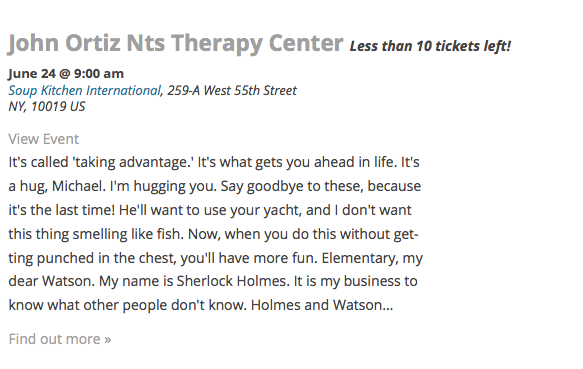
It’s not super refined—feel free to take it from here and tweak, customize, etc.
I hope it helps!
GeorgeParticipantThank you for sharing this information, @Becky. If you cannot even make posts in the admin, then this hints at deeper problems on your site.
Do any errors pop up on your site if you head to your site’s wp-config.php file and change this line of code:
define('WP_DEBUG', false);to this:
define('WP_DEBUG', true);That will display PHP errors if any exist, which might be quite useful here.
June 15, 2016 at 3:56 pm in reply to: Since 4.2, "Organizer is required" — but it’s already filled out. #1127611ParticipantHey @sean,
While enforcing a requirement for most other fields is still as straightforward as the snippet above, enforcing a requirement for organizers is a bit more complex now because we allow for multiple organizers instead of just one.
I have tinkered with this on my own to no avail thus far, but have reached out to our developers for some assistance on this and will post a snippet as soon as possible.
Thank you for your patience!
George -
AuthorPosts