
Home › Forums › Ticket Products › Event Tickets Plus › Show how many seats are left
- This topic has 8 replies, 3 voices, and was last updated 10 years, 3 months ago by
websource.
-
AuthorPosts
-
June 13, 2016 at 2:43 am #1126009
websource
ParticipantHi there
More than a half a year ago i created this topic: https://theeventscalendar.com/support/forums/topic/show-how-many-tickets-are-left/
There havnt been any updates for long at the uservoice page (https://tribe.uservoice.com/forums/195723-feature-ideas/suggestions/5605710–sold-out-only-x-positions-left-etc-type-label)
Any Update or ETA by now?
June 13, 2016 at 7:27 am #1126078George
ParticipantHey @Websource,
When you say “summary calendar view,” are you talking about the Month View, for example? So that, e.g., when you hover over an event and the event’s tooltip pops up, that the tooltip will “only x tickets” left or “sold out”, etc.?
I’m just curious about the details here so that I can best supply an answer and possible solutions. We have rolled out some updates related to these types of messages, but at this time not on the month view, for example.
Thank you!
GeorgeJune 13, 2016 at 7:52 am #1126097ParticipantHi George
For me the important one is the list view. (http://wpshindig.com/events/list/)
Of Course also the other ones would be nice but what counts is the listview at the moment.Thanks
BrianJune 13, 2016 at 7:56 pm #1126514ParticipantHey Brian,
Thanks for clarifying this. We unfortunately do not have the labels on the list view at this time—these sorts of labels only show up on the individual events in the ticketing area.
If you can sit tight, I will put together a snippet to try to add such labels to the list view. We cannot normally do this, but since this was promised to arrive in 4.2 but didn’t I will put together a snippet. It’s a bit complex (at least, just to make sure it works in various cases), so sit tight—just wanted to update you here!
Stay tuned.
— George
June 13, 2016 at 11:27 pm #1126567ParticipantThanks George for your work in advance.
Will this be available in 4.3?June 15, 2016 at 4:28 pm #1127621ParticipantHey Websource,
I don’t see a specific plan for this for 4.3, but will make a ticket to try and ensure we improve this.
For now, here’s a patched-together snippet I made: https://git.io/voRx4
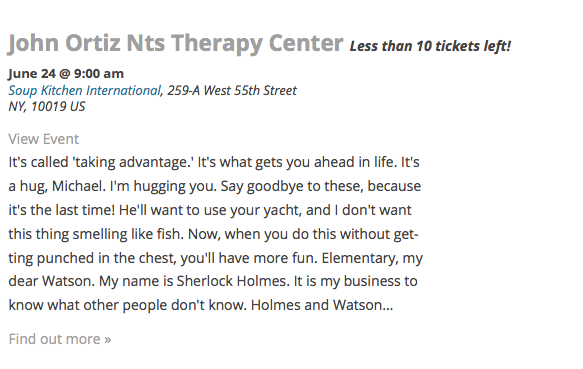
You can try adding that to your theme’s functions.php file or a custom plugin. It will look for how many tickets are left across all of the tickets on event; if under 10, a “Less than 10 left!” message will display. Here’s a screenshot:
It’s not super refined—feel free to take it from here and tweak, customize, etc.
I hope it helps!
GeorgeJune 24, 2016 at 12:18 am #1131382ParticipantThanks George for your work here.
Because you wrote this..
We cannot normally do this, but since this was promised to arrive in 4.2 but didn’t I will put together a snippet.
..i expected it to come in the upcoming release. This is such a basic feature i hope you guys have on your asap plans.
Thanks Brian
June 24, 2016 at 10:19 am #1131607ParticipantI hope my snippet helps—do stay tuned to future releases to see when this arrives. Check out the release notes for releases on http://theeventscalendar.com/blog to see what is included in each release.
Cheers!
George -
AuthorPosts
- The topic ‘Show how many seats are left’ is closed to new replies.