
Home › Forums › Ticket Products › Community Tickets › Can I pre-save 150 tickets for sale?
- This topic has 5 replies, 4 voices, and was last updated 10 years, 3 months ago by
Malcolm.
-
AuthorPosts
-
June 19, 2016 at 1:37 pm #1129051
Malcolm
ParticipantFor some golf events I would like to offer tee times to be purchased or rsvp’d.
Some events would require 100 different tickets, changing in time only ie 3 spaces at 10am 3 spaces at 10.10am etc
Is there a simpler way than creating this manually? Could I offer this preset to community users?
Thanks for your help
June 20, 2016 at 6:46 am #1129219George
ParticipantHey @Malcolm,
Thanks for reaching out.
There is unfortunately no alternative method for ticket creation than to manually create the tickets. 🙁 I’m sorry to disappoint!
A Possible Alternative
There is one method here that might help a bit, and can be recreated with a few clicks across any ticket: Additional Information.
“Additional Information” is a recent feature in Event Tickets Plus, and may help here. It essentially means that, when buying a ticket (or making an RSVP), the customer has to specify some additional information. For catering, it might be specifying any food allergies. If a free t-shirt comes with the ticket, it might be specifying the size you wear…etc.
In this case, you could create an Additional Information field that is a dropdown of all of the available time slots for the ticket.
To learn about creating these fields in-depth, please read this guide. ? https://theeventscalendar.com/knowledgebase/collecting-attendee-information/
☝️ After reading that guide, you can use those methods to create a dropdown field like shown in this screenshot:
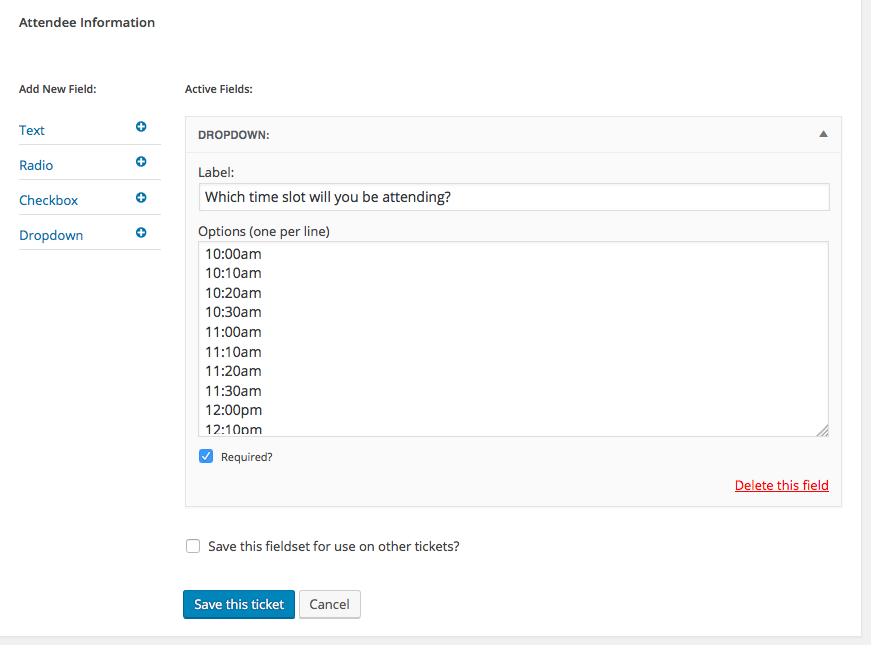
Please note, in that screenshot, these two checkboxes:
• “Required?”—require a selection before being able to complete the purchase, so that every single ticket has a specified time!
• “Save this fieldset for use on other tickets?”—check this to save the Dropdown of the time slots. You will be able to give the dropdown a title, like “Golf Time Slots” or something. Then, when you create another event down the road, you can just choose that dropdown when creating the ticket and the dropdown will pre-populate with all the same options, saving you lots of time! 😀Here’s a quick, 10-second screencast of how that looks on the front end when folks buy one of these tickets. ? https://cloudup.com/ccRf3LvBRwV
⚠️ Please note: There is not a way, at present, to specify stock levels for each dropdown option or anything like that at this time. If this crucial to your ticketing needs, then this “additional information” workaround will likely not help much. But I just wanted to share this information in case it helps.
Sincerely,
GeorgeJune 23, 2016 at 5:57 am #1130855ParticipantGeorge thanks for your detailed reply!!
I was thinking I could create a product from within woo commerce with stock levels? and the 99 variables! And place this product link on the event page?June 23, 2016 at 9:14 am #1130953ParticipantThis reply is private.
July 8, 2016 at 9:35 am #1137291Support Droid
KeymasterThis topic has not been active for quite some time and will now be closed.
If you still need assistance please simply open a new topic (linking to this one if necessary)
and one of the team will be only too happy to help. -
AuthorPosts
- The topic ‘Can I pre-save 150 tickets for sale?’ is closed to new replies.