

Forum Replies Created
-
AuthorPosts
-
George
ParticipantHey @Debra,
Thanks for reaching out.
Can you clarify what type of export you are referring to? There are a few different export options with The Events Calendar, so I’m just curious about what specific type of export tool you are looking for.
Thank you!
GeorgeParticipantThis reply is private.
ParticipantNo worries! 😀
ParticipantHey Joe,
Quick note here: I’ve copied and pasted your errors into a Gist here ? https://git.io/vKcMe
This makes it easier to navigate this thread with all that text out of the way, but it also makes it easier for me to share the errors with our developers.
I’ve modified your original post to link to that Gist. I hope you don’t mind this! 😀 Just makes it a bit easier for us to work with these errors.
Cheers,
GeorgeParticipantI’m really sorry to hear about this!
1. Can you confirm if these errors arise anywhere on your site’s front-end, or are they only in the error logs?
2. If they do not affect the front-end, then can you please post your site’s complete, un-edited “System Information”? Here is how to do that → https://theeventscalendar.com/knowledgebase/sharing-sys-info/
This will help me investigate this issue a bit more closely.
Thank you!
GeorgeParticipantHey Daniela,
Thanks for reaching out, and for your interest in our plugins!
I’ll address your questions in the order they appear.
1) Manage users permissions on a calendar. “Author and Editor” users must be able to insert/modify/delete their own events, but they must not be allowed to edit other users events. “Administrator” users must be able to add / modify / delete all the events
Our plugins themselves do not provide any user management features. These are all provided by WordPress itself.
When it comes to the sort of distinction of capabilities like you describe:
• Authors can create and publish their own events.
• Authors can view other users’ events in the wp-admin, but cannot edit or publish/un-publish them.
• Editors CAN edit other users’ events in the wp-admin, and CAN publish them or un-publish them.☝️This the default configuration. You can modify this with code or some sort of user roles/permissions plugin though.
2) “Administrator” users must be able to block events insertion for a single day and/or periods of time. When a period of time is blocked, no one will be able to insert events for that period except for the Administrators.
Our plugins unfortunately do not provide any sort of feature like this. 🙁
3) When a user adds an event, the event must be colored with a specific color assigned to the user. Therefore every user must have a different color assigned and when the Administrator creates a new user, he must be able to choose a color for him/her that it’s not already in use by another user.
Our plugins unfortunately do not provide any sort of feature like this. 🙁 It could be built with extensive customizations, but there’s nothing out of the box for this.
There is a third-party add-on that we do not make, which adds colors to events based on their category, but this is still unfortunately not based on the author/user → https://wordpress.org/plugins/the-events-calendar-category-colors/
I hope this information helps!
George
ParticipantHey Kevin,
Thanks for reaching out!
This is an interesting problem, and just in case it’s helpful I would like to highlight our no-questions-asked refund policy. Read more about it here if you’d like → https://theeventscalendar.com/knowledgebase/refund-policy/
I only mention that in case you want to try Event Tickets Plus firsthand, but are afraid about it not working and being stuck with that bill with no recourse for a refund.
Now, with all that being said, I think you might be in like here if you use the following plugins:
• WooCommerce [Free]
• Event Tickets [Free]
• Event Tickets Plus [Premium]WooCommerce comes with a free payment gateway called “Cash on Delivery,” as shown in this screenshot:
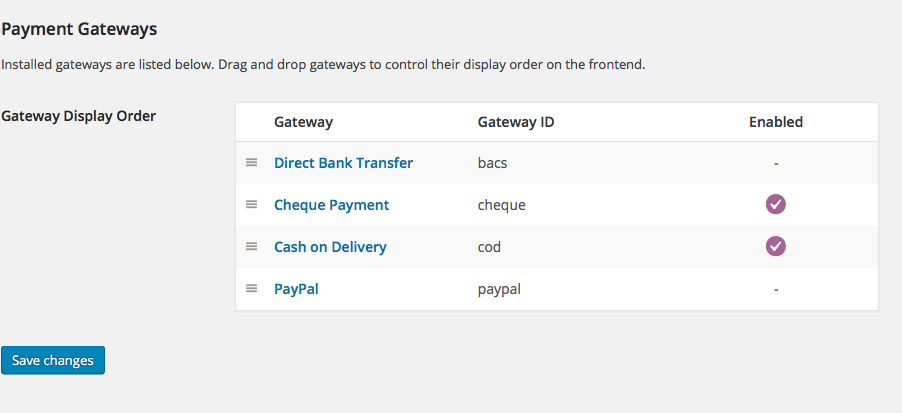
This might not be 100% literally your current setup, but here’s what that payment gateway would allow along with Event Tickets Plus’ “WooCommerce” ticket type:
• You could list tickets with a price, so they do not say “free”.
• Folks can go through the checkout process;not RSVP, but the actual checkout process with a price tag on it.
• BUT, they will not be charged anything there in the checkout, either by credit card or otherwise. It will say “Cash on delivery”—you could add text on pages to make it clear that the after-purchase phone call is required or what not…
• They will get normal tickets, you get all the same attendee features, etc.I hope this helps! It unfortunately may be hard to visualize it all without trying out the plugins firsthand, and doing some test purchases, but I hope this information all helps!
— George
ParticipantHey Rick,
Thanks for reaching out.
In regards to the response times, apologies for the wait; our response time is one reply within 24 hours to each reply, and we just had many many support requests today. Thanks for your patience!
Next, in regards to your question, our plugins themselves do not offer any sort of “fee”-adding ability like you describe. Adding a “convenience fee” may be possible with WooCommerce itself, or other WooCommerce extensions, but our plugins do not provide this.
So, for assistance in adding these fees, I’d recommend checking out the support forums and extensions on http://woocommerce.com itself—if you find an extension that works with WooCommerce’s “Simple Product” product type, then it should work fine alongside our ticketing plugins! (You can ask in the support forums of the extension itself if it supports that product type).
Cheers,
GeorgeParticipantThis reply is private.
July 11, 2016 at 2:22 pm in reply to: Cannot proccess any orders. Submitting CC info gives missing data errors #1138389ParticipantThanks for this information, James. I’m still a bit stumped by this issue, to be honest, but what you said here seems like a great thing to rule out first and foremost:
I have downloaded WooCommerce Stripe Gateway version 3.0.2 but my site does not run the required version of php to activate this plugin.
☝️ Part of the problem here could be that you’re using an out-of-date Stripe gateway plugin, which means that it is probably using and citing an out-of-date version of the Stripe API itself.
If you update to the most recent version of that Stripe gateway plugin, then it will probably be using a more recent version of the Stripe API and that alone may fix these issues.
If it does not outright fix all of the issues, it is still an essential step to do before we can do any other steps given the nature of the problem….
When it comes to getting the PHP version updated, if you contact your web host’s support, they should be able to perform that update without issue.
Let me know what you think and if you can do these steps!
Thank you,
GeorgeJuly 11, 2016 at 2:16 pm in reply to: HELP _ Events Calendar Plug-in permanently disabled by our hosting company! #1138387ParticipantHey Kelly,
Thank you for the follow-up and please do keep us posted here!
As for the issues, these emerged late last week from numerous customer reports. Our developers worked hard since then and over the weekend to publish a fix early this morning, which customers are indeed reporting has helped.
Please note that there may be other issues on your site; but especially now since you’ve confirmed using event recurrence on ALL events on your site, it seems the most likely scenario that this recurrence issue is the core of the problem.
Keep us posted!
GeorgeParticipantThis reply is private.
July 11, 2016 at 2:03 pm in reply to: Take 3: Removing Scripts/Styles on pages they shouldn't be loading #1138376ParticipantThank you for this information.
First, you mention that some of your older replies were deleted from the forums—I just wanted to make it clear that we do not delete customer replies from the forums unless the customer explicitly requests it (because of the post having sensitive information or something).
So, if those replies were truly posted and then are gone now, I’m really sorry for the inconvenience of that, and can’t think of a reason why that happened other than some weird technical fluke. Sorry about this!
Back to your actual issues:
Can you provide a list of the stylesheets and scripts that are showing up where they don’t belong? Is it just the scripts and styles of the “This week” widget, for example?
Thank you,
GeorgeParticipantHey @wheretogokiddo,
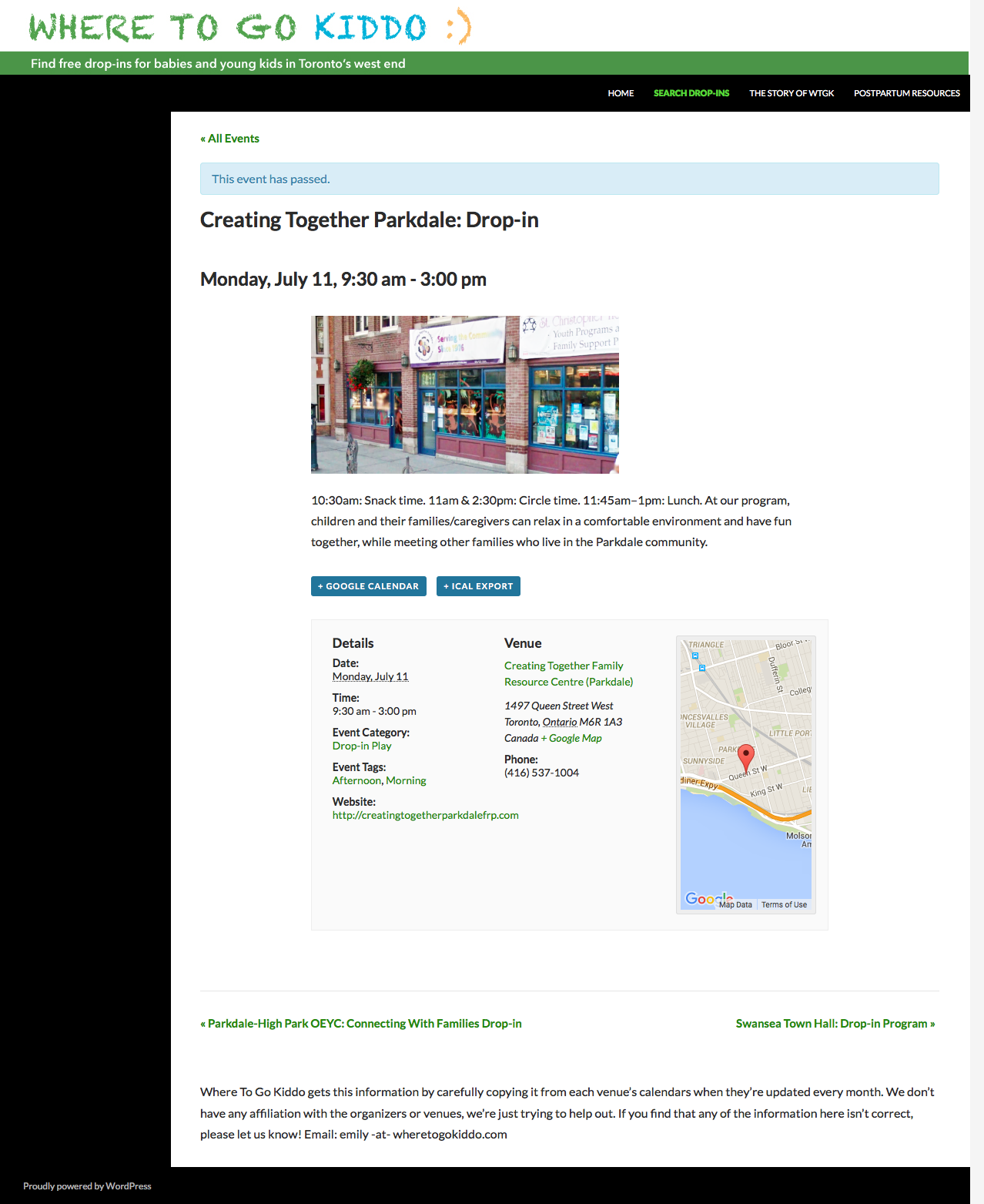
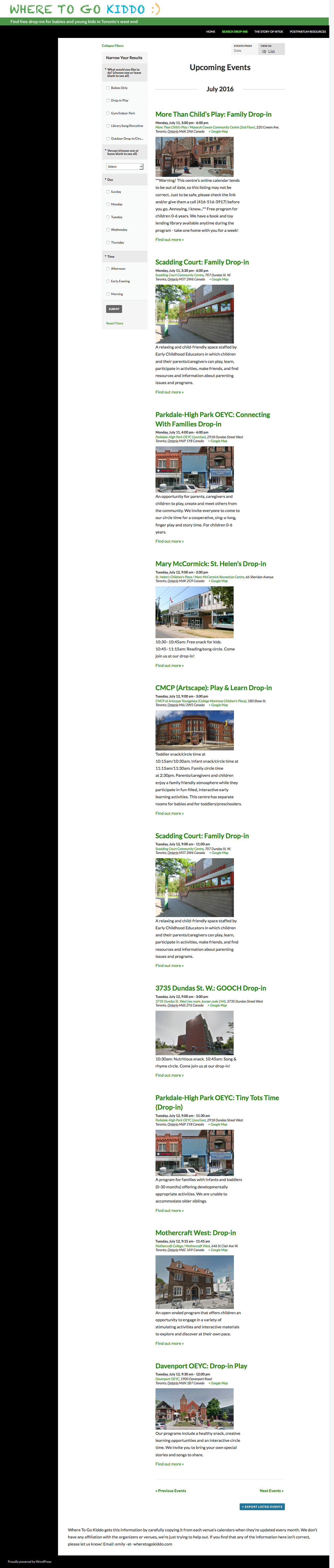
Thanks for your followup. I checked out your single-event page and the list page, but do not see that text any more. It seems to have worked, in other words.
Here’s a screenshot of the single event page, for example:
Here’s a screenshot of the full list view, too:
Do you still see the text when you view the site? If so, where?
Thank you!
GeorgeParticipantExcellent! 😀
Cheers,
George -
AuthorPosts