
Home › Forums › Welcome! › Pre-Sales Questions › WooCommerce Gateway Requiements and Tickets Plus
- This topic has 3 replies, 1 voice, and was last updated 10 years, 2 months ago by
George.
-
AuthorPosts
-
July 11, 2016 at 5:49 pm #1138474
Kevin ROwell
GuestI am building a site for a friend that will sell tickets to classes. Currently, the plan is to have them “buy” the ticket online and then they will be called back to take payment over the phone.
I tested with the basic Tickets and the RSVP puts a “FREE” tag on the ticket. This will not work as I think it is confusing to the customer. There is no credit card gateway setup yet as they are just getting off the ground. Adding that will be the next step.
If I user Tickets Plus, what would be the best way to meet the Tickets Plus requirement for WooCommerce w/o the CC processing enabled?
July 11, 2016 at 6:34 pm #1138477ParticipantHey Kevin,
Thanks for reaching out!
This is an interesting problem, and just in case it’s helpful I would like to highlight our no-questions-asked refund policy. Read more about it here if you’d like → https://theeventscalendar.com/knowledgebase/refund-policy/
I only mention that in case you want to try Event Tickets Plus firsthand, but are afraid about it not working and being stuck with that bill with no recourse for a refund.
Now, with all that being said, I think you might be in like here if you use the following plugins:
• WooCommerce [Free]
• Event Tickets [Free]
• Event Tickets Plus [Premium]WooCommerce comes with a free payment gateway called “Cash on Delivery,” as shown in this screenshot:
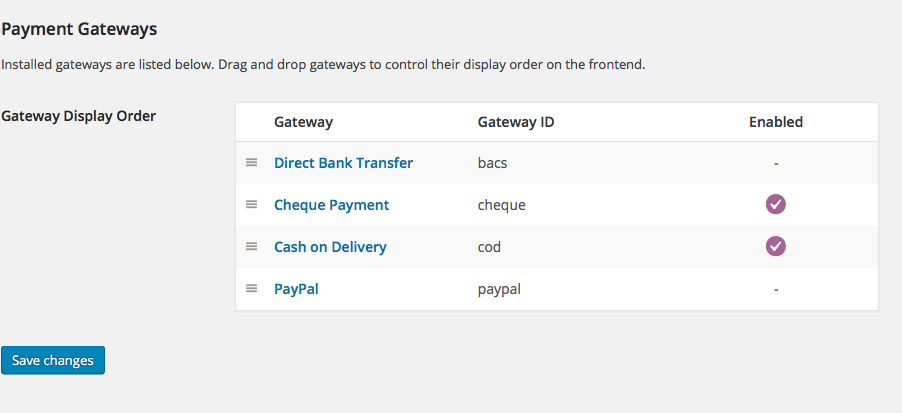
This might not be 100% literally your current setup, but here’s what that payment gateway would allow along with Event Tickets Plus’ “WooCommerce” ticket type:
• You could list tickets with a price, so they do not say “free”.
• Folks can go through the checkout process;not RSVP, but the actual checkout process with a price tag on it.
• BUT, they will not be charged anything there in the checkout, either by credit card or otherwise. It will say “Cash on delivery”—you could add text on pages to make it clear that the after-purchase phone call is required or what not…
• They will get normal tickets, you get all the same attendee features, etc.I hope this helps! It unfortunately may be hard to visualize it all without trying out the plugins firsthand, and doing some test purchases, but I hope this information all helps!
— George
July 11, 2016 at 7:05 pm #1138490GuestHi George,
I think you pretty much nailed it. I’ve got to get WooCommerce setup but I think I’ll jump in and test it out. Thanks for the fast reply.
-Kevin
July 13, 2016 at 5:04 pm #1139421ParticipantRight on! I hope it works well. I’ll close up this thread for now, but feel free to open a new one any time if other questions or issues arise.
Cheers,
George -
AuthorPosts
- The topic ‘WooCommerce Gateway Requiements and Tickets Plus’ is closed to new replies.