

Forum Replies Created
-
AuthorPosts
-
Geoff B.
MemberGood afternoon Dan,
I’m super stoked that this worked for you!
We want to get an “Upcoming Events” section to look like the image I attached.
Unfortunately, it looks like the attached image got lost in Cyberspace. Would you mind reposting or sending me a link to the image in question ?
That way, I’ll be able to answer your question better 🙂
Have a great day!
Geoff B.
MemberGood afternoon Pau,
I’m super stoked that this worked for you.
Thank you for your great words and for sticking with us on this oneYou are welcome back on our support forums any time 🙂
For now, I am going to close this thread.
Have a great week!
Geoff B.
MemberGood morning Matthias,
Thank you for writing back.
Here are some answers to your new set of questions.
You pinpointed it. That is what i want to have. To set for each organizer the options shown in the screenshot.
I’m not afraid of doing customization so what would this customization mean? I think it needs to be developed…can you estimate roughly effort?This customization would roughly mean:
- Looking at the current code that handles commissions / fees in our plugin ( You might want to read our Themer’s guide to get a high-level sense of how that works).
- Turning that code into a function that could be reused on a per-organizer basis (based on settings for each user)
- Adding a filter / conditional to the existing function so that it’s bypassed by the new function IF there is a value set for each organizer
- Adding some fields to capture the per-organizer settings (perhaps via something like Advanced Custom Fields)
With that in mind, just to set expectations, the scope of our support is mostly to get our customers started on the right track and to help them in case of issues. We unfortunately do not provide complete support for customization. But we certainly try to point our awesome customers in the right direction.
On a related note, what you are trying to do actually reminds me a lot of: https://www.woothemes.com/products/product-vendors/
I will have a look at that since this is one of the most important features. So that i understand this correct: This features does not need to be implemented in eventscalendar but in woocommerce?
Exactly.
Every thing transactional is completely handled by WooCommerce. The Events Calendar will help to create the WooCommerce product, tie it to the event and offer some reporting. But everything pertaining to payment, billing and even Ticket issuing is handled by WooCommerce.
Do you recommend a plugin for that so i may skip on testing a lot of them?
We recommend Members: https://wordpress.org/plugins/members/
Unfortunatly this is far less than i need. Every organizer will have an own page in the directory rich of features and content (like video, image gallery, contact form, etc.). I can build this outside your plugins, no problem with that. Since Fact WP can handle WC Products as well as custom post type i will get everything into one search.
I totally understand what you are saying, but keep in mind both the organizer AND the venue objects offer a full standard content field to put rich content in. But in the end, it’s totally your call.
1) On the Organizers Page (the one mentioned above, not your listing) i need to show all of their events and tickets.
2) In every Event/Ticket the organizer should link to his page
Is this possible?The short answer is yes. But as stated before, I believe it would be far simpler to extend the existing organizers in the calendar than to run a parallel solution.
Your current preferred solution really means that you would have to have 2 sets of Organizer objects (the one we offer + an organizer listing). Ideally with matching names to simplify pairing.
The idea here would be to reuse the code that generates single organizer views (e.g.: http://wpshindig.com/organizer/matt-gross/) to show all events tied to a single organizer.
That being said, there is no view that currently lists only tickets. But, since Events and Tickets are tied together, I am pretty sure you could run a query to list all tickets related to events offered by a single organizer.
Will your plugins work with every theme (like for example enfold from kriesi.at) or are there limitations?
Our plugins work well with all themes that respect the standard WordPress loops and best practices.
To be transparent, there are times where some theme customizations might conflict.Enfold is a very popular theme and we have a good relationship with the folks at Kriesi .
This means that we always have workarounds, recommended settings and patches available for popular themes 🙂Last question: Is there a chance to get a test of your plugins or do you have a refund policy?
We actually have a 30 day refund policy on all of our products. In other words, you should be able to test at will.
Best regards,
Geoff B.
MemberHello Victor,
Thank you for writing back.
Yes, this can be done.
But to get it to look exactly like that, you will have to do some customizations (mostly for the overlapping day look).Take a look at the bottom screenshots here: https://wordpress.org/plugins/the-events-calendar-category-colors/screenshots/
It already has the colours going on, but the layout is slightly different. The main difference is that an event that lasts several days will show as one box per day (as opposed to one big block that spans across the days).
Just to set expectations, the scope of our support is mostly to get our customers started on the right track and to help them in case of issues.
We unfortunately do not provide complete support for customization.With that in mind, as suggested before, you might want to take a look at our Themer’s guide. We purposely made our plugins customizable because of the wide variety of needs out there.
Let me know if that helps.
Have a great day!
Geoff B.
MemberGood evening Victor and welcome to the Events Calendar forum!
Thank you for your interest in our products.
We’ll be glad to answer your question.before i purchase the plugin, i need to check can your calendar join the date to together?
example i have a event on 6 – 7 June 2016. i want block out the date in colour.The short answer to this question is yes. You can probably achieve that.
But only with some template customization, not out of the box.You can get a sense of what the display typically looks like here: http://wpshindig.com/events/
That being said, by combining:
- Template customization: You might want to read our Themer’s guide to get a sense of how that works.
- The ideas found in the following third-party plugin: https://wordpress.org/plugins/the-events-calendar-category-colors/screenshots/
You can get pretty close to what you are looking for.
You could also hire one of our recommended customizers to do the customization for you.
Let me know if that helps.
Have a great day!
Geoff B.
MemberGood evening Jessica and welcome to the Events Calendar Support forum!
Thank you for reaching out to us.
I would love to help you with this topic.
The simplest solution would be to use the fields found in Events -> Settings -> Display (Scroll all the way down to Advanced Template Settings)
Another solution would be to use a third-party plugin such as: https://wordpress.org/plugins/theme-my-login/ which gives you greater control over login look and feature.
Let me know if that helps.
Have a great day!
Geoff B.
MemberGood evening Dan,
Thank you for your files and your words.
I was able to run several tests. And I believe I have found the issue.
Could you please make sure the Events Calendar Pro is activated on your website ?Only by deactivating the plugin was I able to reproduce your issue.
This is because Pro is required to display this shortcode.Best regards,
Geoff B.
MemberGood evening Jon,
Thank you for writing back, giving valuable additional information and providing me with your system information.
So far, I have not been successful at reproducing the issue on my end, but I would like to push my tests a bit further.
In case there is a theme conflict going on, could you please send me a copy of your WordPress theme / child theme in a .zip file link (via Dropbox or Google Drive) so that I can run some tests with it ?
There is something else that would be worth trying (as it might help).
Could you head over to Events -> Settings -> General and scroll al the way down the screen. Please check if there is not a “Fix venue data” button available. And if so, click on it.
Best regards and thank you for your patience,
Geoff B.
MemberThis reply is private.
June 28, 2016 at 3:56 pm in reply to: Updating from Events Calendar 4.1.4 to 4.2.1 Crashes My Website #1133204MemberGood evening David,
Thank you for writing back, for your detailed answer and for the system information.
Based on what you have sent me (and some other reports I have seen), I am pretty sure the culprit is PHP 5.3.29
In fact, the official WordPress recommendation is PHP 5.6+ (but so far I have found that PHP 5.4+ is sufficient for the time being).
Is upgrading PHP something that is possible on your install ?
Best regards,
Geoff B.
MemberHello Steve,
I am so sorry, you are still stuck with the 500 error message.
As I was reviewing this thread, I noticed that you have not confirmed if upgrading your PHP version was possible. Could you please tell me if that’ an option ? I highly recommend this for many reasons.
As for the memory, you could probably tackle that with your wp-config.php file (which was the first option in my previously shared link).
If none of these things are possible for you, your only short term option would be to downgrade:
- You can find the previous versions of our premium plugins here: https://theeventscalendar.com/my-account/downloads/
- You can find the previous versions of the Events Calendar free here: https://wordpress.org/plugins/the-events-calendar/developers/
The downside of this is that unless you can increase your memory or your PHP version (I am not sure which one will solve the issue), it looks like you might be prevented from updating on your current install.
Full disclosure, if I were in your shoes, I would absolutely discuss this with my web host.
Let me know how that goes.
Best regards,
Geoff B.MemberHi Pau,
Thank you for writing back and for your great words.
These are great questions. The short answer is “it depends”.
Here is what I mean by that:- By default (you can tweak that), your content area for a screen width of 981px and above is 79.125% of the available width with 5.5% of padding-right
- Still by default, your sidebar takes 20.875% with a left-padding of 30px;
So in short, it all comes down to how you decide to setup the display and paddings.
Here are a couple of ideas to try out:
- Removing the padding left of the sidebar (maybe for the whole site)
.et_right_sidebar #sidebar {

padding-left: 0px !important;

}- Experimenting with the settings under Events -> Settings -> Display (the events template one)
- Changing the percentages allocated to the content area and to the sidebar
- Adding a CSS rule to limit Divi’s padding of tr elements
#content-area .tribe-mini-calendar td, #content-area .tribe-mini-calendar th {

padding: 0 !important;

}
Let me know how that goes.Best regards,
Geoff B.June 28, 2016 at 3:08 pm in reply to: ECP is messing my entire site/blog/events when I activate (since update) #1133182MemberGood afternoon Anthony,
I am super stoked that this fixed it for you.
Thank you for letting me know that it worked retroactively, that’s good to know.One last question, in your next release or fix for this issue, when I update the plugin, should I then delete this snippet from functions?
Yes, absolutely.
You are welcome back on our support forums any time 🙂
For now, I am going to close this thread. But, as promised, you will be contacted as soon as the fix is out.
Have a great week!
Geoff B.
MemberGood afternoon Matthias,
I will be stepping in on behalf of Caroline so that you can get answers to your questions in a timely fashion.
a ticket is a woocommerce product, an event is a custom post type
Is that correct?Yes, that is absolutely correct.
Payment
Did i get it right that right that every user how submits tickets enters his bank account to get paid? Or how is it handled? (assuming split payments is not active)Actually, the most common way to receive payment is not via bank account, but rather via Paypal.
That means that there is no need for bank account info. There is actually a field for each community organizer to submit the email address that’s related to their PayPal account as you can see here: https://cloudup.com/cLLbENEo9CvWhen doing split payments is it possible to set a percentage as commission?
You can use the split payment type of your choosing (see screenshot):
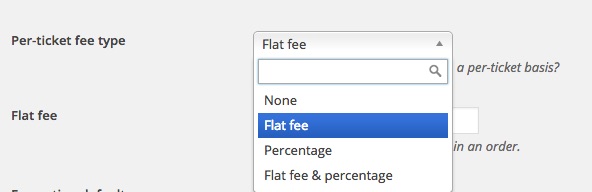
You can also read all about it here: https://theeventscalendar.com/knowledgebase/configuring-community-tickets/
So I guess that the answer to your question is “it depends” on what you have in mind for commission. If you are looking for a fixed value for one of the options above that would apply to ALL, then the answer is yes, it is possible.
If, on the other hand, you are looking to set different commission rates for each organizer, then the answer is no. At least not built-in.
You would have to do some customizations to be able to do that.Event/Ticket attendee approvement
Does your software have a function that billing is not done until the event-organizer confirms that the event will be carried out/take place?That’s a great question.
All the billing is done at the WooCommerce level. So, I guess that you would need to implement that directly in WooCommerce.The closest thing I can think of would be a third-party plugin such as https://www.woothemes.com/products/woocommerce-pre-orders/
Full disclosure, integration with our plugins and on their workflow has not been tested.
So in short, it might be worth investigating, but I am pretty sure that there would need to be some customization to integrate properly.You could hire one of our recommended customizers to do the customization for you if this is a bit outside of your comfort zone.
Pricing/Plans, Membership
Is it possible to limit the users who can submit tickets/events?Yes, you can control precisely what different users can and cannot do using a plugin such as Members (and creating the roles accordingly).
You can read about that here: https://theeventscalendar.com/knowledgebase/admin-roles-and-permissions/
Main Goal
A solution which is running on WordPress that handles
– Listings of Persons/companies (like an overview who there are etc.)
– Adding Events/Tickets as described
– have a calendar view or sort by date option for events/tickets
– Have everything searchable within one search formBased on these goals (and my understanding of your needs), it looks like all of these could be handled with our plugins.
The listing of persons/companies would be handled by our Organizers or Venues taxonomy (which you can rename to something else easily).
Here’s an example of how you can display them: https://theeventscalendar.com/knowledgebase/listing-venues-and-organizers/Another thing is that we want to us WP Facet to get a much better search on our site.
https://facetwp.com/
As far as i know it will work without problems with your data. Is that correct?I do not have specific examples of such integration in mind, but I see no reason why this should not work with our products.
Let me know if that helps.
Have a great day!
Geoff B.
MemberGood afternoon Bernard,
Thank you for writing back.
It looks like you are using the Enfold theme. If that is the case, I believe the good folks at Kriesi have a solution for you: http://www.kriesi.at/support/topic/conflict-with-event-calendar-attendee-information/
Let me know if that helps.
Have a great day!
Geoff B.
-
AuthorPosts