

Forum Replies Created
-
AuthorPosts
-
July 4, 2016 at 10:34 pm in reply to: *For Geoff B* – WPML – Venues & Event Dates not carrying over to translation #1135317
Geoff B.
MemberGood evening Greg,
Thank you for writing again.
I apologize for the delay in answering caused by National holidays here.
I would love to help with your client’s issue.
“When we translate an event from EN (either using duplicate or overwrite) it doesn’t bring over the date or the venue, we have to enter them again manually. Any way to automatically copy this information in the translation?”
The date not copying is pretty odd. If they are using the proper configuration, either duplicate or overwrite should carry the date over.
Could you get me that client’s complete system information in a private reply using the instructions found in the following link?https://theeventscalendar.com/knowledgebase/sharing-sys-info/
As for the venue, I assume that your client is creating the venue as he’s creating the event or using a venue that has no existing translation.
Can you confirm that this is the case ?If so, then the Venue is typically carried over (even though it is not visible in the screen).
But regardless of that fact, I have logged this as a bug. The good news is that we are really making great progress on all the WPML enhancements.
So that situation should not last too long at this point. Once again, I am sorry about this and I can’t wait for things to get way better.To answer your question about the cause of this, without boring you with details, this is caused by the current way the interaction with the icl_translations table is performed (which is getting a major overhaul).
Best regards and thank you for your ongoing patience as we try to fix these glitches once and for all,
Geoff B.
July 4, 2016 at 9:55 pm in reply to: how to add attendee when an order is do by the admin in the backoffice ? #1135311MemberGood evening Sallé,
Thank you for writing back. We apologize for the delay caused by national holidays here.
yes we use Woocommerce and our client want to add order in the backoffice.
so when he do this, where can he add the attendees ? is it possible ?If you are purchasing a simple ticket through the backend AND you are not asking for additional attendee info, then you do not need to enter the attendee info since it is automatically ported over to the attendee list.
But, only as long as there is a pre-existing customer in the store.
See attached picture to see where this gets incorporated in the manual order.
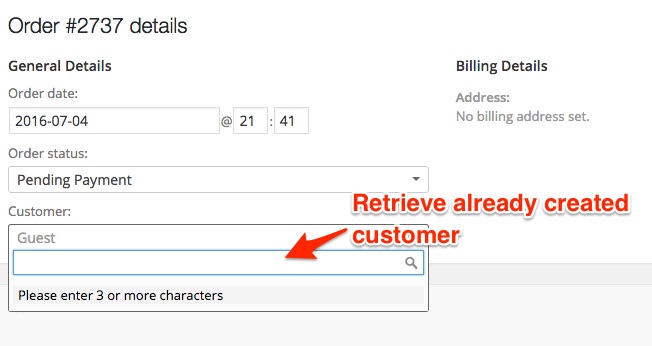
IF on the other hand, you have additional attendee info that you want to capture, then your solution would be to:
- Make sure the customer you are placing the order for is already present in the database (adding a WordPress user with a customer role OR an existing customer with a previous order)
- Use the following third-party plugin: https://codecanyon.net/item/shop-as-customer-for-woocommerce/7043722
It is not truly a “back-end” solution, but it works great.
Hopefully this will be acceptable to your client.
Let me know if it is ?
Best regards,
Geoff B.
MemberGood evening Jill,
I’m super stoked that this worked for you!
Can I style the list? I’d love to make each “ecs-event” class 1/3 the width of the container so it’s somewhat similar to the front page of http://www.harmonypresents.com.. Can I make those changes somewhere?
Absolutely. You will need to style the ecs-event class. Here’s a rough idea of what you could start with.
.ecs-event {

display: inline-block;

width: 30%;

float: left;

margin-right: 1%;

}
Let me know if that helps.
Have a great day!
Geoff B.
MemberGood evening Ted and welcome back!
Thank you for reaching out to us.
I would love to help you with this topic.That’s a great question.
I believe you can simply head over to our demo website and register for an account: http://wpshindig.com/events/community/add
This way you’ll be able to try it on your phone!
If not, here are some quick screen grabs (on a basic theme with no styling)
Let me know if that helps.
Have a great day!
Geoff B.
June 30, 2016 at 8:01 pm in reply to: Hide ticket stock and question on multiple single ticket sales. #1134327MemberGood evening Matt and welcome back!
Thank you for reaching out to us.
I would love to help you with these topics.I do not know where to add the css code to hide ticket stock: span.tribe-tickets-remaining { display: none; }
You need to add that to your theme or child theme’s style.css file or Custom CSS option.
If that sounds overly complicated to you, you might want to try the following plugin: https://wordpress.org/plugins/the-events-calendar-user-css/
Also, if someone buys 5 tickets, is it all on the same QR code i.e 1 ticket for 5 ?
Normally, each ticket should get it’s own QR code (for check-in purposes).
If that’s not the case, it means that there is something off on your install. Let me know if that’s the case.
and lastly, is it possible to resend a ticket to someone if they lost their emailed ticket.
You can do that straight from the WooCommerce order itself.
Head over to the Actions menu on the right side.
Let me know if that helps.
Have a great day!
Geoff B.
MemberGood evening Abraham and welcome back!
Thank you for reaching out to us.
I would love to help you with this topic.When creating an order via Admin, there does not appear to be a way to enter the ticket options. How can this be accomplished?
You are 100% right, this is because the attendee information is actually handled by our plugin and not WooCommerce.
But, there is a workaround. You might want to checkout this awesome third-party plugin: http://codecanyon.net/item/shop-as-customer-for-woocommerce/7043722
This way, you will still be able to do manual orders but the same way that client would.
Let me know if that helps.
Have a great day!
Geoff B.
MemberGood evening Tommy and welcome to the Events Calendar Support forum!
Thank you for reaching out to us.
We are sorry to hear about the issues you are experiencing with your imports
I would love to help you with this topic.I would recommend the following:
- Make sure the file is encoded UTF-8 (and not Mac OS roman).
- To tackle entries with ‘ , it’s best to surround them with quotation marks in your file.
E.g.: “test2’s company”, first2, last2
Let me know if that helps.
Have a great day!
Geoff B.
MemberGood evening Claus and welcome to the Events Calendar Support forum!
Thank you for reaching out to us.
You are welcome back on our support forums any time if you have questions that you need personalized answers to 🙂
For now, I am going to close this thread.
Have a great week!
Geoff B.
June 30, 2016 at 7:34 pm in reply to: how to add attendee when an order is do by the admin in the backoffice ? #1134319MemberGood evening Alexander and welcome back!
Thank you for reaching out to us.
I would love to help you with this topic.in the front we can add attendee, but when we take order directly in the backoffice how can we add attendees to the event ?
Could you clarify what you mean by taking the order directly in the back office ? Are you performing a manual order ? (in WooCommerce for example)
If so, you should be able to get the attendee to display in the front-end AND in the attendees list.
However, you will have to make sure you reduce stock manually as well.
Best regards,
Geoff B.
MemberGood evening Denise and welcome to the Events Calendar Support forum!
Thank you for reaching out to us.
I would love to help you with this topic.I change the category IDs to get different category events and can filter using keywords. I assume the way to import into specific categories is to use keyword filters and create a number of recurring imports, correct?
Based on what you are telling me, if I understand correctly, what you are trying to do is to assign your events to the right category as you are importing.
What is not clear to me is if you are doing so as a one-time import or as if you want to sync for a recurring import.
If you are doing a one-time import:
- You are right, if you want to assign your events straight to the correct categories as you are importing, your best bet is to have as many imports as there are keywords you want to use
- As an alternative, you can simply import all events without assigning them to a category and tackle the category assignment after the import. This can be accomplished easily via our own https://wordpress.org/plugins/advanced-post-manager/ which adds nice filtering abilities to displaying your events (for bulk changes for example).
If you are doing a scheduled import:
- Your only option is to have as many imports as there are keywords you want to use using method 1 from above.
Additionally, if there was a way for you to have .ics files that already filtered by category, that would really simplify the process 🙂
When I import, the images stay on the original site and are accessed from that site. They will not show up in the list view or pop up.
Unfortunately, images are not support in the iCal import process. iCal feeds themselves do not include file attachments that can be used to import from one source to another. You would need to add images after import in order for imported events to have images.
Sorry for the confusion! Does this help answer your question? Please let me know.
As a side note, we are currently working on improving our import abilities. It is slightly too soon to announce anything, but stay tuned!
Can I import to venues? To organizers using ical importer? If so, how?
The iCal importer in it’s current state does a good basic job, but does not allow you to import taxonomies such as Organizers or Venues.
Based on your needs so far, it looks like you might prefer using our CSV importer that allows complete control over mapping as well as the ability to import Organizers and Venues.
You could use an iCal to CSV converter (none are guaranteed but we’ve heard of some, e.g. https://www.gcal2excel.com) and then use our free CSV import functionality.
I do not get Google maps on imported events.
That’s a separate issue. Normally, that should work.
Can you tell if you have Enable Google Maps on imported events checked in Events -> Import ?
Let me know if that helps.
Have a great day!
Geoff B.
MemberHey Dan,
I’m glad this has helped you move forward a tad.
You are welcome back on our support forums any time 🙂
For now, I am going to close this thread.
Have a great week!
Geoff B.
MemberHey Timothy,
Thank you for writing back, providing more details, as well as a copy of the requested files and system info.
Based on what I am seeing, here are my next recommended steps:
- Make a backup of your Database (so that you can go back to it if anything goes wrong)
- Grab a copy of the latest version of the Events Calendar Pro here: https://theeventscalendar.com/my-account/downloads/ (you are several versions behind)
- Update the Events Calendar Pro (there is a good chance that this will solve most of your issues).
- If that does not completely solve it, could you also temporarily rename the /tribe-events/ folder in your theme to something such as /z-tribe-events/
Let me know how that goes.
Best regards,
Geoff B.MemberGood evening Roger and welcome to the Events Calendar Support forum!
Thank you for reaching out to us and bringing this to our attention:
What is missing – I think – is an equivalent of the “Blog”, “Shop” and “Portfolio” Module for “Events Calendar”. So it is possible to place the full fledged calendar (loop) into a page.
You are absolutely right. In fact, this is why we are currently working at expanding our shortcodes to accomplish just that.
Unfortunately, I cannot give you a release date at this point. But stay tuned!As a side note, the third-party Event Rocket plugin came close to achieving this. Unfortunately, this plugin is no longer compatible with ours since version 4.x+
As you pointed out, you could also try your hand at a custom page template using our Themer’s guide.
Finally in regards to the support we provide, the scope of our support is mostly to get our customers started on the right track and to help them in case of issues.
We unfortunately do not provide complete support for customization.
But we always appreciate and listen to feature requests, feedback and suggestions from our customers.In fact, you can always vote or suggest features on our User Voice forum (e.g.: https://tribe.uservoice.com/forums/195723-feature-ideas/suggestions/3926703-shortcode-ability-for-simple-implimentation-on-any)
Is there anything else I can help you with today ?
Best regards,
Geoff B.
June 30, 2016 at 2:25 pm in reply to: Strange reproduceable 404 on translated venues/organizers but not on events #1134226MemberHey Stefan,
Thank you for writing back.
Unfortunately, the bug has not yet been fixed.
Hang tight as we work this one out with the folks at WPML.Thank you for your patience.
Best regards,
Geoff B.
June 30, 2016 at 1:25 pm in reply to: Updating from Events Calendar 4.1.4 to 4.2.1 Crashes My Website #1134191MemberGood evening David,
Thank you for writing back.
After a few extra tests and reviewing of this thread, there is something I believe might be worth checking into.
Because you mentioned that you are using a Windows server I’m wondering if there is not something wrong with the web.config file after the update.
Could you take a look if you get a chance ?
At this point, I believe the next logical step would be to activate the debug mode and take a look at the error logs after you try to upgrade if you are up for that: https://www.elegantthemes.com/blog/tips-tricks/using-the-wordpress-debug-log
Best regards and thank you for sticking with us on this,
Geoff B.
-
AuthorPosts