
Home › Forums › Ticket Products › Event Tickets Plus › how to add attendee when an order is do by the admin in the backoffice ?
- This topic has 5 replies, 4 voices, and was last updated 10 years, 2 months ago by
Sallé Alexander.
-
AuthorPosts
-
June 30, 2016 at 10:53 am #1134097
Sallé Alexander
Participanthello,
in the front we can add attendee, but when we take order directly in the backoffice how can we add attendees to the event ?
is it possible ?
all the best
Alexander
June 30, 2016 at 7:34 pm #1134319Geoff B.
MemberGood evening Alexander and welcome back!
Thank you for reaching out to us.
I would love to help you with this topic.in the front we can add attendee, but when we take order directly in the backoffice how can we add attendees to the event ?
Could you clarify what you mean by taking the order directly in the back office ? Are you performing a manual order ? (in WooCommerce for example)
If so, you should be able to get the attendee to display in the front-end AND in the attendees list.
However, you will have to make sure you reduce stock manually as well.
Best regards,
Geoff B.
July 1, 2016 at 12:59 am #1134374Participanthello,
yes we use Woocommerce and our client want to add order in the backoffice.
so when he do this, where can he add the attendees ?is it possible ?
best
Alexander
July 4, 2016 at 9:55 pm #1135311MemberGood evening Sallé,
Thank you for writing back. We apologize for the delay caused by national holidays here.
yes we use Woocommerce and our client want to add order in the backoffice.
so when he do this, where can he add the attendees ? is it possible ?If you are purchasing a simple ticket through the backend AND you are not asking for additional attendee info, then you do not need to enter the attendee info since it is automatically ported over to the attendee list.
But, only as long as there is a pre-existing customer in the store.
See attached picture to see where this gets incorporated in the manual order.
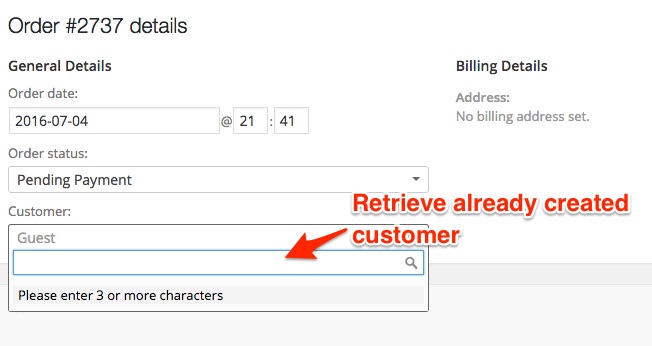
IF on the other hand, you have additional attendee info that you want to capture, then your solution would be to:
- Make sure the customer you are placing the order for is already present in the database (adding a WordPress user with a customer role OR an existing customer with a previous order)
- Use the following third-party plugin: https://codecanyon.net/item/shop-as-customer-for-woocommerce/7043722
It is not truly a “back-end” solution, but it works great.
Hopefully this will be acceptable to your client.
Let me know if it is ?
Best regards,
Geoff B.
July 19, 2016 at 9:35 am #1141566Support Droid
KeymasterThis topic has not been active for quite some time and will now be closed.
If you still need assistance please simply open a new topic (linking to this one if necessary)
and one of the team will be only too happy to help. -
AuthorPosts
- The topic ‘how to add attendee when an order is do by the admin in the backoffice ?’ is closed to new replies.