

Forum Replies Created
-
AuthorPosts
-
Geoff B.
MemberGood evening Bernard,
Thank you for your awesome words!
I’m super stoked that this worked for you.
You are welcome back on our support forums any time 🙂
For now, I am going to close this thread.
Have a great week!
Geoff B.
MemberHey James,
Thank you for writing back and for your understanding.
One more note, before you head over to WP All import, you might want to get a good look at our recently improved built-in CSV import which now lets you import tickets as an alternative.
You are welcome back on our support forums any time 🙂
For now, I am going to close this thread.
Have a great week!
Geoff B.
MemberGood evening Darrell and welcome to the Events Calendar forum!
Thank you for your interest in our products.
We’ll be glad to answer your questions.I have many questions and would prefer to talk to someone versus reading all these forum posts…
Unfortunately, as much as we are looking forward to answering every single one of your questions, we unfortunately are not able to provide phone support or Chat for now.
So, please, ask away. Every question is a good question in our book.
Best regards,
Geoff B.
MemberGood evening Jacob and welcome back!
Thank you for reaching out to us.
I would love to help you with this topic.
I is possible, to keep my default week view on the /events page while setting the default view to “list” for the categorized filter view on /events/kategorie/familyevents/ ?
The short answer is yes. This is possible.
To accomplish that, you have 2 options:
- Code the redirection manually in your .htaccess file
- Use a redirection plugin so that /events/kategorie/familyevents/ redirects to the URL of the list view
Let me know if that helps.
Have a great day!
Geoff B.
MemberGood evening James and welcome back!
Thank you for reaching out to us.
I would love to answer your questions.
You told us before, that this was in the plans to have but not quite ready… any idea when this might be ready.
This is a great question. I do not have a precise date to offer yet unfortunately, but this would be a feature release.
That means that if all goes well, it should be around the end of summer.Can you advise if there is a better way to achieve this?
I realize that this must be pretty time-consuming and we can’t wait for the new features either.
If the proposed duplicate tec event plugin does not cut it, the only alternative I can think of would be to use the premium version of WP All import.
It would allow you to use CSV files instead of manual entries.
I wish I had a better answer for you, but for now it’s the best one I have.
Best regards,
Geoff B.
July 4, 2016 at 11:54 pm in reply to: Attendee Information Not Showing On Non-Standard Themes (Enfold and Stockholm) #1135346MemberGood evening Jack and welcome to the Events Calendar Support forum!
Thank you for reaching out to us.
We are sorry to hear about the issues you are experiencing trying to display the attendee information.
I would love to help you with this topic.I think you will find a solution here: http://www.kriesi.at/support/topic/conflict-with-event-calendar-attendee-information/
Let me know if that helps.
Have a great day!
Geoff B.
MemberGood evening Birgitte and welcome to the Events Calendar Support forum!
Thank you for reaching out to us.
I would love to answer these questions.– Where to start if I want to style my calendar like this one?
It depends what part of that style you want to replicate (since this is a customized theme). But a good first step would be to use the Photo view to display your calendar.
Perhaps you could expand on what you like about that specific example ?
– Also – how can I get this image view by shortcode? (Want it on my frontpage)
Currently, unfortunately, you can’t do that built-in. You would need to do custom page template that includes the Photo view.
You might want to read our Themer’s guide to get a sense of how that works. Or, as an alternative, you could hire one of our recommended customizers to do the customization for you.
The good news is that we are currently working on enhancing our shortcodes, so stay tuned!
– How to integrate my WordPress header / footer etc. in the calender view page (the page does not exist in pages?)
http://kirsebaergaarden.com/beta/kalender/You could either:
- Integrate that through your theme’s archive.php file (the default one used by our calendar)
- Switch the setting found at Events -> Settings -> Display (look for Events template)
Let me know if that helps.
Have a great day!
Geoff B.
MemberGood evening Simon and welcome back!
Thank you for reaching out to us.
I would love to help you with this topic.
There are 3 ways you could go about this:
- Use the following snippet to replace “at” by ” ” https://theeventscalendar.com/knowledgebase/change-the-wording-of-any-bit-of-text-or-string/
- Using theme customization / override on the view you are using. You might want to read our Themer’s guide to get a sense of how that works. You could simply make a copy of the current template and remove the “at” completely
- Finding the “at” in the translation file for your language and replacing it with a white space
Let me know if that helps.
Have a great day!
Geoff B.
MemberGood evening Fred,
I am sorry that I asked you for something that is outside of your comfort zone.
I did not mean to, I was mainly trying to help out.You will be informed when the snippet is integrated in our next Maintenance release.
In the meantime, if you do find somebody to help out on your end that is comfortable with my suggestions, we would love to let you enjoy the solution before it’s officially released.
Best regards,
Geoff B.
MemberThis reply is private.
MemberGood evening Tommy,
I apologize for the delay answering, this is caused by national holidays in the Canada and US.
Thank you for writing back.
I tried uploading a test csv file using the suggestions you gave. I took a template and just had one event with a venue that has an apostrophe in the name and at first it seemed to work but I tried it again with a different venue name and it doesn’t upload the event with the venue, it’s just the event name, date, time, etc.
Would you mind sending me those exact examples ? I do believe your results, but I’m thinking that 2 heads are probably better than 1 when it comes to troubleshooting.
I am truly sorry that this seems to be a recurring issue with your clients.
The good news is that in every case I have seen so far, it has always been possible to solve these issue (after examination of the csv file).
So the more examples that don’t work, the better (so that I can test them and figure out what the issue is).
Best regards,
Geoff B.
July 4, 2016 at 11:23 pm in reply to: Updating from Events Calendar 4.1.4 to 4.2.1 Crashes My Website #1135334MemberGood evening David,
Thank you for running those tests.
These are some pretty interesting results indeed. I am sorry that it resulted in the site crashing again.
I’m mostly glad that you managed to get things solved! Amazing work on finding a solution!
Thank you for relaying the error messages, I will pass them to Dev to see if there is something more we can do to prevent such cases from happening again.
You are welcome back on our support forums any time 🙂
For now, I am going to close this thread.
Have a great week!
Geoff B.
July 4, 2016 at 11:17 pm in reply to: Hide ticket stock and question on multiple single ticket sales. #1135333MemberGood evening Matt,
Sorry for the delay in answering caused by the National Holidays in the US and Canada.
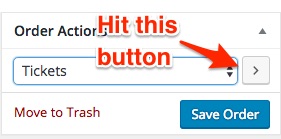
Thank you for your great words!On ‘Actions’ to regenerate and resend the ticket, What do I do exactly ?
See the attached picture for more clarity 🙂
Lastly (and this is a new question), I want the ticket orders to ‘auto-complete’ and send the ticket to the purchaser. What are those exact settings ?
There are a couple of ways to go about this.
- Some of our users have had success with our built-in feature to do just that. You can find it in Events -> Settings -> Tickets. However, that does not seem to work with everybody. We are currently working at enhancing that feature.
- The following snippet (which you need to insert into your WordPress theme’s functions.php file does a great job at doing just that: https://docs.woothemes.com/document/automatically-complete-orders/ the only issue with it is that it autocompletes ALL WooCommerce orders (not just tickets)
Holy Smokes ! I have no idea how to use The Events Calendar User CSS plugin. I just want to hide the number of tickets available for all events…Whew !
This is is totally my bad. I take it back, this plugin is not the right one for you (although it works great).
The one you need is: https://wordpress.org/plugins/simple-custom-css/
Once installed and activated, head over to Appearance > Custom CSS.
You can now enter your custom CSS rules easily 🙂
Let me know how that goes.
Best regards,
Geoff B.MemberGood evening Thomas,
Thank you for writing back.
Is it this easy to do in Month view? I’d like month view to only show weekdays.
I guess some simple CSS should cut it. Try the following:
.tribe-events-month #tribe-events-saturday, .tribe-events-month #tribe-events-sunday {display:none;}.tribe-events-month .tribe-events-calendar tbody tr td+td+td+td+td+td {display:none;}
Let me know if that helps.
Have a great day!
Geoff B.
MemberGood evening Matthias,
I am sorry about the delay caused by National Holiday here.
What i need is a Photo View with a Date-Range Search. You showed a way to customize the get_events.
Can i do this with the buld in search for the photo view?
So that there is not longer the “date” field but two fields with begin and end?As you know, date-range search as not yet been programmed (at least on our end). But I am 100% confident that this can be accomplished.
Once you or a customizer programs it, it can be used to replace the current search functionality in any view of your choice (including photo view).Unfortunately, this goes outside of the scope of our support at this point. But if you do get it done, I would love to see it in action 🙂
Or may i buy the bundle and the events calendar pro seperately? si i have to do two purchases?
Will they work together even if not bought in a bundle?You make a great point. We are currently working at improving our purchase experience so your feedback is especially appreciated.
At this point, the only solution is to purchase the bundle and Pro separately. This is for discounting reasons.
But, the good news is that the plugins will still work great together even when purchased separately!The other point that you are making is very interesting. I guess, you would have preferred a “make your own bundle” option.
I will bring these points in our weekly meeting so that we can improve.
Thank you for your understanding and for your great feedback.
Best regards,
Geoff B.
-
AuthorPosts