
Home › Forums › Ticket Products › Event Tickets Plus › Hide ticket stock and question on multiple single ticket sales.
- This topic has 8 replies, 4 voices, and was last updated 10 years, 3 months ago by
mattboggs.
-
AuthorPosts
-
June 30, 2016 at 11:06 am #1134104
mattboggs
ParticipantI do not know where to add the css code to hide ticket stock: span.tribe-tickets-remaining { display: none; }
Also, if someone buys 5 tickets, is it all on the same QR code i.e 1 ticket for 5 ? and lastly, is it possible to resend a ticket to someone if they lost their emailed ticket.Thanks so much for the help.
Matt
June 30, 2016 at 8:01 pm #1134327Geoff B.
MemberGood evening Matt and welcome back!
Thank you for reaching out to us.
I would love to help you with these topics.I do not know where to add the css code to hide ticket stock: span.tribe-tickets-remaining { display: none; }
You need to add that to your theme or child theme’s style.css file or Custom CSS option.
If that sounds overly complicated to you, you might want to try the following plugin: https://wordpress.org/plugins/the-events-calendar-user-css/
Also, if someone buys 5 tickets, is it all on the same QR code i.e 1 ticket for 5 ?
Normally, each ticket should get it’s own QR code (for check-in purposes).
If that’s not the case, it means that there is something off on your install. Let me know if that’s the case.
and lastly, is it possible to resend a ticket to someone if they lost their emailed ticket.
You can do that straight from the WooCommerce order itself.
Head over to the Actions menu on the right side.
Let me know if that helps.
Have a great day!
Geoff B.
June 30, 2016 at 11:20 pm #1134363ParticipantGood evening Geoff and thanks for your help. I will try the css plugin in the morning. I see the multiple QR codes so no worries there. On ‘Actions’ to regenerate and resend the ticket, What do I do exactly ? Lastly (and this is a new question), I want the ticket orders to ‘auto-complete’ and send the ticket to the purchaser. What are those exact settings ?
Once again, thank you all for your excellent support and product.
Matt
July 1, 2016 at 9:40 am #1134558ParticipantHoly Smokes ! I have no idea how to use The Events Calendar User CSS plugin. I just want to hide the number of tickets available for all events…Whew !
July 4, 2016 at 11:17 pm #1135333MemberGood evening Matt,
Sorry for the delay in answering caused by the National Holidays in the US and Canada.
Thank you for your great words!On ‘Actions’ to regenerate and resend the ticket, What do I do exactly ?
See the attached picture for more clarity 🙂
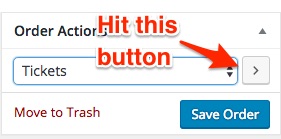
Lastly (and this is a new question), I want the ticket orders to ‘auto-complete’ and send the ticket to the purchaser. What are those exact settings ?
There are a couple of ways to go about this.
- Some of our users have had success with our built-in feature to do just that. You can find it in Events -> Settings -> Tickets. However, that does not seem to work with everybody. We are currently working at enhancing that feature.
- The following snippet (which you need to insert into your WordPress theme’s functions.php file does a great job at doing just that: https://docs.woothemes.com/document/automatically-complete-orders/ the only issue with it is that it autocompletes ALL WooCommerce orders (not just tickets)
Holy Smokes ! I have no idea how to use The Events Calendar User CSS plugin. I just want to hide the number of tickets available for all events…Whew !
This is is totally my bad. I take it back, this plugin is not the right one for you (although it works great).
The one you need is: https://wordpress.org/plugins/simple-custom-css/
Once installed and activated, head over to Appearance > Custom CSS.
You can now enter your custom CSS rules easily 🙂
Let me know how that goes.
Best regards,
Geoff B.July 5, 2016 at 8:51 am #1135481ParticipantSo, when looking at the ‘function.php’ in my theme, I am greeted with this message:
Hi,there!
I must emphasize a point that please refrain from editing this file,
or you cannot smooth update in the future.
If you wanna customize your own functions,please add them in custom-functions.php in includes folder.What do you advise ?
July 5, 2016 at 9:43 pm #1135844MemberGood evening Matt,
Thank you for writing back.
So, when looking at the ‘function.php’ in my theme, I am greeted with this message:
Hi,there!
I must emphasize a point that please refrain from editing this file,
or you cannot smooth update in the future.This is a fair warning. What it means is that if you update your theme in the future, you will lose all changes (like adding the snippet for auto-complete) you have made in your theme’s functions.php
The good news is that you can workaround that limitation by creating a child-theme. I suggest reading the following on that very topic: https://www.elegantthemes.com/blog/resources/wordpress-child-theme-tutorial
That prevent the snippet from being deleted upon a theme update.
But in your case, it looks like your theme is giving you even simpler advice: create/edit a file name custom-functions.php and place it in the includes folder of your theme.
As a side note, just like when editing anything, we always recommend having a backup of the files you are editing AND a way to revert to the previous version of that file if necessary.
Let me know how that goes.
Best regards,
Geoff B.July 20, 2016 at 9:35 am #1141999Support Droid
KeymasterThis topic has not been active for quite some time and will now be closed.
If you still need assistance please simply open a new topic (linking to this one if necessary)
and one of the team will be only too happy to help. -
AuthorPosts
- The topic ‘Hide ticket stock and question on multiple single ticket sales.’ is closed to new replies.