

Forum Replies Created
-
AuthorPosts
-
July 8, 2016 at 12:14 am in reply to: Fatal Error when updating Event Tickets and Event Calendar Plug-ins #1137118
Geoff B.
MemberGood evening Josie and welcome to the Events Calendar Support forum!
Thank you for reaching out to us.
We are sorry to hear about the fatal error messages you have encountered while attempting to upgrade our plugins.
I would love to help you with this topic.First of all, the good news is that normally, your events should not be lost.
Here is how to repair the current situation:
- Connect to your site via FTP and head to /wp-content/plugins OR, if FTP is not an option, use your CPanel’s file manager to head to the same place
- Find the Events Tickets Plus plugin folder and completely delete it
- Your website should be back online
- Go to your downloads page https://theeventscalendar.com/my-account/downloads/ and download + install the Events Tickets Plus plugin manually
Let me know how that goes.
Best regards,
Geoff B.MemberGood evening David and welcome to the Events Calendar Support forum!
Thank you for reaching out to us.
We are sorry to hear about the filter reset button being hidden on mobile.
I would love to help you with this topic.One approach that seems to fit the issue on your site would be to add the following CSS rule in your mobile Stylesheet (or @media section):
.tribe-bar-disabled {

top: 35px;

}
Let me know if that helps.
Have a great day!
Geoff B.
MemberGood evening Heyward and welcome to the Events Calendar Support forum!
Thank you for reaching out to us.
I would love to help you with this topic.There are a couple of ways to go about this:
- Entering the URL found in the Calendar Export button seems to work in iCal as a calendar to subscribe to
- Your site has an event RSS feed which could be converted to an iCal feed. You can find it at /events/feed
Let me know if that helps.
Have a great day!
Geoff B.
MemberGood evening Danny and welcome to the Events Calendar Support forum!
Thank you for reaching out to us.
We are sorry to hear that Event Tickets Plus was nowhere to be found.
I would love to help you with this topic.I am not sure why your account did not get that automatic Event Tickets Plus license added to it, but I went ahead and added that license.
You can now find Event Tickets Plus in your downloads page as of now.
I also recommend reading the following article for a smooth transition: https://theeventscalendar.com/knowledgebase/moving-to-event-tickets-plus/
Let me know how that goes.
Best regards,
Geoff B.MemberGood evening John and welcome to the Events Calendar Support forum!
Thank you for reaching out to us.
I would love to help you with this topic.Is there a way to display thee upcoming event widget on my homepage if it is not WP?
That is a great question.
The short answer is that you could probably achieve that with some coding or the use of an iframe in your non-WordPress website.
Unfortunately, it is slightly outside of the scope of the support we can provide for our plugin.
With that in mind, I would:
- Read on how to use iFrames on an HTML site
- Give the following a shot: http://www.web-source.net/embedding_web_pages.htm#.V39JApMrI6s
Let me know if that helps.
Have a great day!
Geoff B.
MemberGood evening Joshua and welcome to the Events Calendar Support forum!
Thank you for reaching out to us.
I would love to help you with this topic.am working to change the color of my events page so the days of the week are in white and not blue.
I suggest adding the following CSS rule to your WordPress theme’s CSS file
.tribe-events-calendar tr th {color: #fff}I also want to increase the wrapper so the calendar is not so close to the ends of the page.
I would recommend the following CSS rule as a starting point.
.tribe-events-pg-template {max-width: 1200px; margin: auto;}
Let me know how that goes.Best regards,
Geoff B.MemberGood evening Mathias and welcome to the Events Calendar Support forum!
Thank you for reaching out to us.
We are sorry to hear about the buying button not displaying as it should.
I would love to help you with this topic.I licensed Event Calendar PRO and Event Tickets Plus, set it up and created an event. If I view my event the buying button does not appear.
Unfortunately, we only support WPML for the Events Calendar and the Events Calendar Pro for the moment.
This means that all or other add-ons and plugins, such as Event Tickets Plus, are not yet ready to work properly with WPML yet.We do apologize for the inconvenience this might create.
The good news is that we are working with the WPML team to improve compatibility. The plan from there is to expand that compatibility for all of our plugins.
As an avid WPML user myself, I can’t wait.I wish I had a better answer for you, but for now it’s the best one I have.
Furthermore the events monthly view page does apparently not exist. At least it shows the 404 error page.
I believe you can solve that by:
- Going to Events -> Settings -> Display and changing the Event Template setting
- Re-saving your permalink under Settings > Permalinks
Let me know how that goes.
Best regards,
Geoff B.MemberGood evening Laura,
Thank you for writing back and for trying different settings.
I’m sorry to hear that you had to restore a copy of the website 🙁Thank you also for providing more info on how your setup spans across various timezones.
In that case, the best configuration is:
- Use the timezone of your main branch as the general WordPress timezone. Which, as you found out, is Chicago in your case.
- ‘use the local timezones for each event’ in Events -> Settings -> General
- As you are creating each event, make sure that it’s timezone setting matches the location it’s in
Is there anything else I could help you on with this topic?
Have a great day!
Geoff B.
MemberGood evening Michael,
Thank you for writing back.
My apologies for the system information double request.
That being said, I am glad that you managed to fix most of your recurring issues.
If I understand this correctly, there is only one event left that seems to be causing issues.
Could you forward me a copy of the printscreen that recurring event’s “Edit Event” screen so that I can take a look at it and run some tests ?
Best regards,
Geoff B.
MemberDear Thomas,
I am sorry this did not work for you.
I just retested those rules and it should work properly.
With that in mind, I went on your site and looked at the CSS.
I believe that something went wrong in the copy paste of those 2 rules:
- .tribe-events-month #tribe-events-saturday was missing a space and shows as .tribe-events-month#tribe-events-saturday in your CSS rules
- I cannot find the
.tribe-events-month .tribe-events-calendar tbody tr td+td+td+td+td+td rule on your site. There might be a chance that is also due to copy-paste
Would you mind double-checking your CSS file to make sure it is exactly as in the snippets above ?
Best regards,
Geoff B.
MemberBonjour Jonathan,
Merci de nous écrire à nouveau.
Je suis tout à fait d’accord avec vous. PHP 7 est nettement plus rapide.J’ai tenté d’obtenir un correctif temporaire, mais en vain pour le moment malheureusement.
Il semble qu’il y ait plusieurs correctifs à apporter à nos plugiciels pour avoir une bonne compatibilité PHP 7. Nous sommes désolés des inconvénients que cela peut causer pour vous.
Par ailleurs, et sans excuser quoi que ce soit, nous ne sommes pas les seuls. Il y a plusieurs bogues reliés à WooCommerce sous PHP 7 également.
À défaut de pouvoir vous offrir une date de résolution pour le moment, je peux vous assurer que nous prenons ce sujet très au sérieux et que nous vous contacterons aussitôt que le bogue sera réglé.
En attendant, je sais que vous utilisez déjà W3 Total cache (qui est un excellent plugiciel). Toutefois, si vous cherchez un gain de performance, à mon avis WP Rocket est plus performant, particulièrement avec les site WooCommerce.
J’aimerais avoir une meilleure réponse pour vous, mais pour le moment, le tout est entre les mains de l’équipe de développement.
Merci de votre grande compréhension et patience.
Geoff B.
MemberGood afternoon Catherine,
Thank you for writing back and providing your system info.
There are a couple of things I would recommend:
- If you get a chance, you should consider upgrading your PHP version to at least 5.4.x . I have seen some pretty odd things happen with PHP 5.3.x . In fact WordPress recommends 5.6+
- Secondly, I would recommend simply deleting the Events Calendar Pro from your plugins and installing it manually (via the .zip file “Add” interface or via FTP). You can download the latest versions here: https://theeventscalendar.com/my-account/downloads/
Let me know if that helps.
Have a great day!
Geoff B.
MemberGood afternoon Victoria,
Thank you for writing back, for providing details and for the system information.
I’m glad upgrading WooCommerce helped the totals work again.
As a first observation, I would recommend thinking about an upgrade of your PHP version (currently 5.3).
I have seen some pretty odd things happen with 5.3.x . In fact, WordPress officially recommends 5.6+But 5.4.x+ should be fine for now.
As per the refund procedure, both methods should normally work (unless there is some WooCommerce customization in your WordPress theme that prevents it from working properly).
My personal preference is method #1 as it shows the people that were refunded in the attendees list.
But if you would rather not have a trace of that person in the logs, then method #2 is probably a better solution.For method #1, just make sure to follow the steps described in the following screenshot
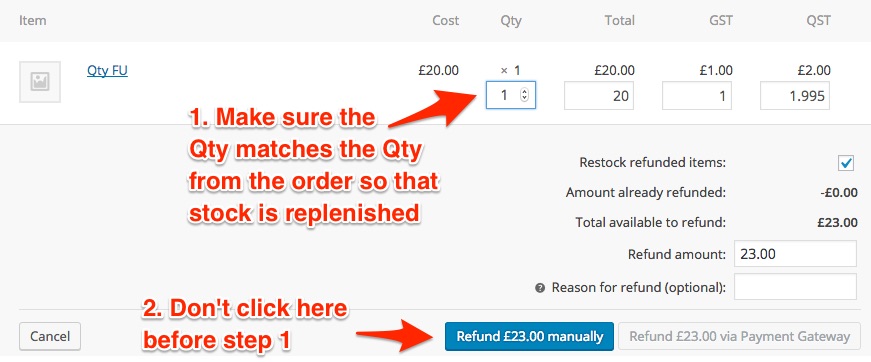
If method does not work for you, I would like to offer to investigate this a bit further.
Let me know how that goes.
Best regards,
Geoff B.MemberGood afternoon Andrea,
Thank you for writing back and for your patience.
Please, make a DB backup before attempting the following.Cause of the issue:
The parent post of the recurring events though and it’s translated counterpart, are registered properly in the icl_translations DB table (as a normal post would), along with their language_code.
But, the recurring event posts are not sent to the icl_translations DB table (as a normal post would).
As such, they don’t get assigned a language_code, which in turn means that they do not get returned for display because, according to the table WPML uses, they “don’t exist”.
Solution:
We need to force an entry in the icl_translations DB table FOR EACH post found in the wp_posts table, including the recurring events.
EACH entry created that way gets the default language assigned as its language_code.
To do that:
- Head over to WPML > Support and click on the “troubleshooting page” link.
- Scroll down to the Cleanup section
- Click on the “Set language information” button
Next, you need to correctly assign each recurring event post with the correct language values in the icl_translations DB table
To do that, you have a couple of options:
- Manually assigning the correct language to each recurring event post AND assigning each translation to it’s translated counterpart manually through the WP admin Events interface. This can take quite a while.
- Head over to PHP my admin and find the icl_translations DB table.
- Take a look at the last 4 columns in that table: “element_id”, “trid”, “language_code”, “source_language_code”
- element_id: the post_id of the event
- trid: which post_id it is a translation of
- language_code: sets the language of the post
- source_language_code: sets what language the original post is in
From there, you will need to manually set the info for those last 4 columns for all the recurring events that were freshly created from the previous step.
Let me know how that goes.
Best regards,
Geoff B.July 7, 2016 at 1:46 pm in reply to: To begin using Events Calendar PRO, please install the latest version #1136899MemberGood afternoon Kevin,
Thank you for sticking with us on this one.
We are sorry that the update process was not a smooth experience for you this time around. We apologize for any inconvenience this might have created.
I am mostly stoked that all is resolved for you now.
You are welcome back on our support forums any time ?
For now, I am going to close this thread.
Have a great week!
-
AuthorPosts