
Home › Forums › Ticket Products › Event Tickets Plus › Ticket Sold Counts Not Correct on Website
- This topic has 5 replies, 4 voices, and was last updated 10 years, 2 months ago by
Dean.
-
AuthorPosts
-
July 5, 2016 at 5:01 am #1135397
Dean
ParticipantHi,
Referencing this topic here: https://theeventscalendar.com/support/forums/topic/urgent-help-needed-ticket-sold-counts-not-correct-and-cant-launch-site/
I just want to say that I agree with the users on this subject and reference first hand feedback from our website.
When we promote an event that has X spaces on it and people book and pay for their ticket the total on the front end decreases which is correct.
When we have to manually cancel and refund a ticket (functionality which is still broken) the quantity on the front end does not increase automatically thus potentially robbing us of a place that is now free and could be sold again.
Our customers need to see the correct remaining tickets that can be bought without non technically minded admins having to manually alter it.
If the quantity figure on the front end of the site does not accurately reflect the available tickets to buy then that functionality is essentially broken – regardless of the thinking behind it’s coding.
We require this quantity figure to accurately reflect the remaining places available to buy. Please can you provide any further information as to when or if this is to altered? If it can’t be done then we need to know as we will have to look at a competitors solution.
Thank you.
July 5, 2016 at 10:22 pm #1135853Geoff B.
MemberGood evening Dean and welcome to the Events Calendar Support forum!
Thank you for reaching out to us.
I am sorry to hear about the stock count issues you have been dealing with. This is certainly unintended on our end.
I would love to help you with that.When we promote an event that has X spaces on it and people book and pay for their ticket the total on the front end decreases which is correct.
When we have to manually cancel and refund a ticket (functionality which is still broken) the quantity on the front end does not increase automatically thus potentially robbing us of a place that is now free and could be sold again.I absolutely understand what you are saying. Normally under most circumstances the amount of tickets shown should reflect the actual number of places left.
Could you share with me (in a private reply) the exact procedure you are currently using when refunding.
Could you also please provide us with your complete system information using the instructions found in the following link?
https://theeventscalendar.com/knowledgebase/sharing-sys-info/
This way I’ll be able to provide advice tailored to your situation.
Best regards,
Geoff B.
July 7, 2016 at 4:23 am #1136435ParticipantThis reply is private.
July 7, 2016 at 2:41 pm #1136958MemberGood afternoon Victoria,
Thank you for writing back, for providing details and for the system information.
I’m glad upgrading WooCommerce helped the totals work again.
As a first observation, I would recommend thinking about an upgrade of your PHP version (currently 5.3).
I have seen some pretty odd things happen with 5.3.x . In fact, WordPress officially recommends 5.6+But 5.4.x+ should be fine for now.
As per the refund procedure, both methods should normally work (unless there is some WooCommerce customization in your WordPress theme that prevents it from working properly).
My personal preference is method #1 as it shows the people that were refunded in the attendees list.
But if you would rather not have a trace of that person in the logs, then method #2 is probably a better solution.For method #1, just make sure to follow the steps described in the following screenshot
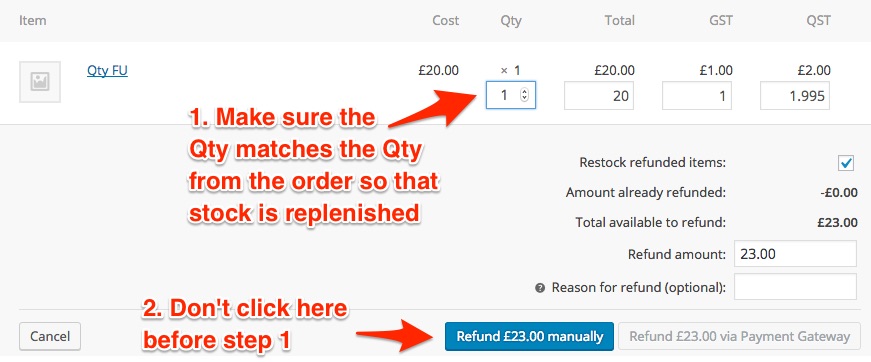
If method does not work for you, I would like to offer to investigate this a bit further.
Let me know how that goes.
Best regards,
Geoff B.July 22, 2016 at 9:35 am #1143017Support Droid
KeymasterThis topic has not been active for quite some time and will now be closed.
If you still need assistance please simply open a new topic (linking to this one if necessary)
and one of the team will be only too happy to help. -
AuthorPosts
- The topic ‘Ticket Sold Counts Not Correct on Website’ is closed to new replies.