

Forum Replies Created
-
AuthorPosts
-
Geoff B.
MemberGood evening Michael,
Thank you for writing back.
I believe I might have miscommunicated what I was trying to say.
Contrary to your Google search results findings, there is no current known conflict between Visual Composer and our plugins.Here’s what I meant:
- You asked “how do we remove the calendar list at the bottom of the page”
- My answer “make sure you look in your Visual Composer builder for that page in that specific row. You should be able to remove it there”.
Upon further reading, I think I misunderstood what you were asking.
If I understand this correctly, you don’t want the list/details of upcoming events to show under the mini-calendar.If you don’t want these to show up, you have to set the number of events to display at zero.
However, doing that makes the mini-calendar pretty useless.The good news is that it’s indeed possible to customize the mini-calendar’s behaviour.
You might want to read our Themer’s guide to get a sense of how that works.Would you mind telling me how you would like the mini-calendar to work instead ?
Best regards,
Geoff B.August 17, 2016 at 2:09 pm in reply to: TEC Pro: no widget events found in Google structured data testing tool #3 #1152829MemberGood evening Bark,
Does that mean the JSON script will be included in the widgets by default?
That is a great question and thank you for bringing this to our attention.
I checked with the developper and here’s his answer.
No, this does not have an option toggle at the present time.
From what I’ve understood the JSON LD information enriches what’s on the page adding information to it, not covering it.That being said, we are totally looking at adding that toggle in there after that was brought up.
The other “good news” is that apparently Google is no longer as sensitive as it used to be to that extra information.Best regards,
Geoff B.
MemberGood evening Karoliina,
Thank you for writing back.
If I buy the plugin now to get the other parts of my shop working, will it be easy enough to update to the version with this new feature later (without losing all the work i’ve done)?
Absolutely, the upgrade should not impact the work you have previously done.
That being said, as with any WordPress upgrade (plugin, themes, WordPress), it is highly recommended to do a backup of your Database before. That way, if anything unexpected happens, it’s easy to revert back.
Does this plugin require the ability to code? Or is it also for non-techies like me?
That’s a great question. The plugin is made to work out-of-the-box for everybody (coders and non-techie people).
So in short, you should totally be able to install and configure the plugin yourself.We even have a pretty simple quick start guide for that here: https://theeventscalendar.com/knowledgebase/new-user-primer-event-tickets/
And, if you bump into any issues while setting things up, the support team will be there to help you out!
The only instance where coding would be required is if you want to tweak behaviours of the plugin (via a customization / override). But even at that, we have a large quantity of existing snippets that cover a lot of different needs.
Let me know if that helps.
Have a great day!
Geoff B.
August 17, 2016 at 1:47 pm in reply to: Event ticket not showing the price (woocomerce) after creation of event/ticket #1152812MemberGood evening Benjamin,
It does not look like it’s the same issue although it looks similar.
That being said, I would need more info on your installation to be sure.My best recommendations to get things solved for you are:
- Read carefully and make sure you go through the following guide: https://theeventscalendar.com/knowledgebase/new-user-primer-event-tickets/ . Sometimes the Extra Tickets option is not displayed because one of these steps was not completed (e.g.: not installing an e-commerce plugin)
- If you don’t mind, I would recommend opening a separate thread for your issue. This way you’ll get a more personalized support. When you do that, I suggest sending us you complete system information in a private reply using the instructions found in the following linkhttps://theeventscalendar.com/knowledgebase/sharing-sys-info/
The majority of the time, save for that WPML incompatibility, we are able to get tickets working
Best regards,
Geoff B.
August 16, 2016 at 11:52 pm in reply to: The Events Calendar events not displaying across several sites #1152467MemberGood evening Rich and welcome to the Events Calendar Support forum!
Thank you for reaching out to us.
We are sorry to hear about the iCal not working as expected on your client’s websites.
I would love to help you with this topic.To keep things simple, I believe we will have to try to tackle each of the issues separately.
I turned program over to client, they logged in and made a post.
If I understand correctly, what you are doing is that you are:
- Creating a main calendar on http://rockytopwineries.com/
- Using that Calendar’s ics link (export month’s events) to input in the iCal importer installed on each of the other sites
Can you confirm if that’s the case. If not, could you provide me with a step-by-step breakdown of how what your process is ?
Nothing is going across.
This is linked to the previous question. It might sound like an over-zealous question, but are you positive that your client has followed the same exact procedure as yours ?
Coud it be possible to have a screenshot of the setting of your iCal import on one of the “child sites” (supposed to be receiving the info from the parent sites)
The calendar plug-in is missing featured images
Technically, the iCal protocol does not offer a field to carry a featured image.
That means, that the missing featured image is “normal”For now, the best way to export complete calendar info (including featured images).
You can read about it here: https://theeventscalendar.com/knowledgebase/csv-files-options-and-examples/and linked sites is missing the availability to search futuremonths
The answer to that will depend in large part to the previous answers. So hang in there.
Best regards,
Geoff B.
MemberThis reply is private.
MemberThis reply is private.
MemberGood evening Pedro,
Thank you for the system information, for answering my questions and for writing back!
You are right, by default, the RSVP ticket is set to a cost of 0$, hence the mention “free” in the price range.
There are a couple of ways to tackle this. You could:
- Simply remove or hide the price ranges altogether with a combination of template customization (single-event.php) and CSS
- Add a snippet in the functions.php of your child theme to change the following functions
- tribe_get_cost
- maybe_replace_cost_with_free( $cost ) (from the cost-utils.php file)
If you haven’t already done so, you might want to read our Themer’s guide to get a sense of how template customization works.
I just need to know what function or php code to include to print the price ariable into the email.
This is a great question since it’s related to the same function as above (the cost).
I would recommend reading the following excerpts to get you started on the right track:
- https://theeventscalendar.com/knowledgebase/adding-the-event-date-to-ticket-emails/
- https://theeventscalendar.com/support/forums/topic/displaying-fields-in-email-php-that-arent-included-in-the-default-template/#post-75798
- https://theeventscalendar.com/support/forums/topic/adding-the-amount-paid-into-a-the-ticket-email/
Let me know how that goes.
Best regards,
Geoff B.MemberGood evening Ken,
Thank you for writing back and for providing the system info.
Before we begin, as a disclaimer, I simply want to point out that officially we do not support QTranslateX as a multilingual solution compatible with our plugin.
That does not necessarily mean that they won’t work together (many of our customer have successfully done that). But it means that, at least for now, we are focusing our efforts on WPML compatibility as a multilingual solution.With that in mind, I would like to get you started on the right track.
The simplest way to do that would be to send me a copy of your WordPress theme / child theme in a .zip file link (via Dropbox or Google Drive) so that I can run some tests on my end ? Normally, the correct place to put the snippet would indeed be in your theme’s functions.phpWhat would also be super helpful is if you had an example (URL) of a ticket with additional attendee fields.
That way my advice would be more personalized.In the meantime, here is some recommended reading on that very topic: http://stackoverflow.com/questions/12993130/how-to-add-a-placeholder-attribute-if-value-field-is-empty
Best regards,
Geoff B.
MemberGood evening Rika,
Thank you for writing back!
I believe I have miscommunicated what I meant to say.
To clarify: the Events Calendar can absolutely handle a very large amount of events (provided it has an adequate server / WordPress configuration behind it).What I meant to say is that it seems very likely that your specific situation was caused by one or two recurring events “going out of control”.
The fastest way to find out which these are would be to use the suggested SQL query.If you don’t have access to an interface such as phpMyAdmin, you could always use a plugin such as: https://wordpress.org/plugins/miwosql/
The goal here being to fast track the process and establish if this is indeed the issue.
Another thing worth investigating is the type of Web Hosting plan you have with GoDaddy. Perhaps it’s an awesome plan, maybe it’s a basic shared hosting managed plan, I don’t know at this point. But it’s certainly worth taking into account to leave no stone unturned.
Let me know how that goes.
Best regards,
Geoff B.MemberGood evening Michael and welcome back!
Thank you for reaching out to us.
I would love to help you with this topic.As a first troubleshooting step, could you please provide us with your complete system information in a private reply using the instructions found in the following link?
https://theeventscalendar.com/knowledgebase/sharing-sys-info/
As for the list view displaying at the bottom, that seems to stem from your Visual Composer page builder for that page.
More specifically, from the second to last row (see screen shot).My best guesses are that there is a shortcode in a text block or some kind of widget area there.
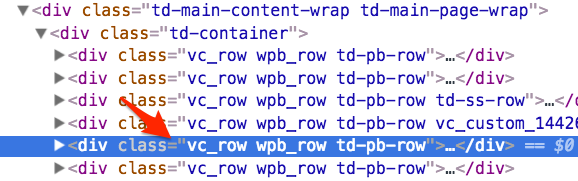
Let me know if that helps.
Have a great day!
Geoff B.
MemberGood evening Sarah and welcome to the Events Calendar forum!
Thank you for reaching out to us.
We are sorry to hear about the fatal error you are getting while clicking on “Customize”.
I would love to help you with this topic.The short answer to your question is that we always recommend making a Database backup of your website before attempting anything.
That way, if anything does not work to your liking you can easily revert back to your site as it was.That being said, normally, changing themes and deactivating plugins do not cause any destructive change to your website. In other words, nothing that reactivating the plugin or theme won’t fix.
A lot of our users prefer setting up a clone of their website (testing, staging or even local) to perform such tests.
Others simply temporarily activate a “Maintenance page” plugin as they are performing such tests (after a database backup of course).As a first troubleshooting step, could you please provide us with your complete system information in a private reply using the instructions found in the following link?
https://theeventscalendar.com/knowledgebase/sharing-sys-info/
Could you please send me a copy of your WordPress theme / child theme in a .zip file link (via Dropbox or Google Drive) so that I can run some tests on my end ?
Best regards and hang tight as we try to figure this one out,
Geoff B.
MemberGood evening Jorge and welcome back!
Thank you for reaching out to us.
We are sorry to hear about the issues you have encountered while customizing our template files.
I would love to help you with this topic.You are right, in most cases, it’s a simple matter of copying the view template files over to the /tribe-events/ folder of your child theme.
In your case however, because you are using the Avada theme, the procedure for template customization is slightly different.You see, Avada already includes a template customization for that very view. This is why your customization looks so different.
I would recommend heading over to /wp-content/themes/Avada/tribe-events/pro/map/ and copying the single-event.php from there over to your child theme as a basis for your customization.
Normally, this should fix the display.
Let me know how that goes.
Best regards,
Geoff B.MemberGood evening Karoliina and welcome to the Events Calendar forum!
Thank you for your interest in our products.
We’ll be glad to answer your questions.I see you don’t support that yet (single tickets or a ticket bundle for a recurring event). When will you release this feature? Are we talking weeks, months or a year, or more?
The short answer to that question is very soon.
We are currently testing this complex feature out and we would like to release it sooner than later.If all goes well, we might be talking weeks. If not, there might be a slight delay on this complex and exciting feature.
To make a long story short, it’s at the top of our list.
Keep an eye out for our announcements!
Best regards,
Geoff B.
MemberBonsoir Julye et bienvenue dans nos forums,
Merci de nous écrire. J’aimerais vous aider avec l’apparence de votre site.
Pour débuter, vous serait-il possible de me fournir vos informations système complètes? Vous n’avez qu’à suivre les instructions à partir du lien suivant: https://theeventscalendar.com/knowledgebase/sharing-sys-info/ et me répondre en privé.
Deuxièmement, je vous recommanderais d’expérimenter avec les 2 premiers réglages sous Evenements -> Réglages -> Affichage (le menu en bouton radio et le sélecteur “drop down”) afin de voir si cela n’améliore pas l’affichage.
Salutations,
Geoff B.
-
AuthorPosts