
Home › Forums › Calendar Products › Events Calendar PRO › Display Calendar Without Text Based Event Listing
- This topic has 8 replies, 4 voices, and was last updated 10 years, 1 month ago by
Michael Brennan.
-
AuthorPosts
-
August 16, 2016 at 3:47 pm #1152339
Michael Brennan
ParticipantHello,
I checked through a support search and was not able to locate what we’re experiencing or how to tweak it.
If you go to http://mitechnews.com/ and scroll down you’ll see the Event Calendar on the right side. That part works great.
Right below the calendar two event lists are showing up for the 18th and 23rd. How do we not have them show up? All we want there is the calendar.
Thanks for your help.
August 16, 2016 at 8:45 pm #1152420Geoff B.
MemberGood evening Michael and welcome back!
Thank you for reaching out to us.
I would love to help you with this topic.As a first troubleshooting step, could you please provide us with your complete system information in a private reply using the instructions found in the following link?
https://theeventscalendar.com/knowledgebase/sharing-sys-info/
As for the list view displaying at the bottom, that seems to stem from your Visual Composer page builder for that page.
More specifically, from the second to last row (see screen shot).My best guesses are that there is a shortcode in a text block or some kind of widget area there.
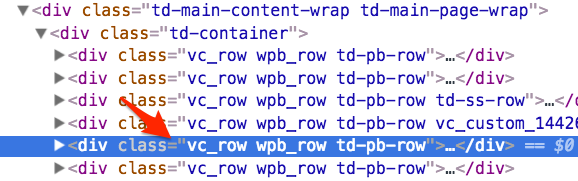
Let me know if that helps.
Have a great day!
Geoff B.
August 17, 2016 at 4:06 am #1152491ParticipantThis reply is private.
August 17, 2016 at 4:16 am #1152493ParticipantHi Geoff,
After you pointed the finger at Visual Composer I made two changes.
1. I removed the Events List that was further down the page…thinking there might be a conflift.
2. I changed the visual composer text box being used from a WordPress Text Box to a VC Text Box.Unfortunately, neither change corrected this problem with the lists showing up below.
I did find in Google’s search results there are several postings about conflicts between VC and Events Calendar. Not sure if this is one of those issues or if there is a small piece of code we can add to the functions.php file to correct this?
Thanks for helping out.
August 17, 2016 at 2:46 pm #1152840MemberGood evening Michael,
Thank you for writing back.
I believe I might have miscommunicated what I was trying to say.
Contrary to your Google search results findings, there is no current known conflict between Visual Composer and our plugins.Here’s what I meant:
- You asked “how do we remove the calendar list at the bottom of the page”
- My answer “make sure you look in your Visual Composer builder for that page in that specific row. You should be able to remove it there”.
Upon further reading, I think I misunderstood what you were asking.
If I understand this correctly, you don’t want the list/details of upcoming events to show under the mini-calendar.If you don’t want these to show up, you have to set the number of events to display at zero.
However, doing that makes the mini-calendar pretty useless.The good news is that it’s indeed possible to customize the mini-calendar’s behaviour.
You might want to read our Themer’s guide to get a sense of how that works.Would you mind telling me how you would like the mini-calendar to work instead ?
Best regards,
Geoff B.August 17, 2016 at 11:24 pm #1152984ParticipantHi Geoff,
Thanks for getting back to me and for helping to re-state the issue. Your comment starting with “Upon further reading…” is the direction we’re looking to investigate.
Before we go down the path of customization The Events Calendar through the Themer’s Guide, let me respond to your question.
The space we have on the site would be best to only display the mini-calender without any text-based listing below the mini-calendar. With the text-based listing below the mini-calendar, it is throwing off other sections further down.
In Visual Composer we selected a Text Block to place the shortcode [tribe_mini_calendar]. For this reason, there isn’t an option to limit the number of events to show. Perhaps we need to be using a different block element from Visual Composer?
Look forward to your response and then I think we can make a decision which direction to go to solve this.
p.s. since these forums are well indexed by Google, I noticed a typo in the Title of this forum post. Could you add “Text Based Event Listing” to the end of the title for this post? Thx.
August 18, 2016 at 2:53 pm #1153387MemberGood evening Michael,
Thank you for writing back.
I am glad I managed to pinpoint what you are looking to do.With that in mind, I believe my colleague Brian came up with the perfect snippet for you: https://theeventscalendar.com/support/forums/topic/hiding-events-list-by-default-in-pro-calendar-widget/#post-996057
I also fixed the page title as per your request.
Let me know how that goes.
Best regards,
Geoff B.September 9, 2016 at 9:35 am #1162100Support Droid
KeymasterHey there! This thread has been pretty quiet for the last three weeks, so we’re going to go ahead and close it to avoid confusion with other topics. If you’re still looking for help with this, please do open a new thread, reference this one and we’d be more than happy to continue the conversation over there.
Thanks so much!
The Events Calendar Support Team -
AuthorPosts
- The topic ‘Display Calendar Without Text Based Event Listing’ is closed to new replies.