Forum Replies Created
-
AuthorPosts
-
September 26, 2016 at 10:02 pm in reply to: ** For Geoff B. ** – As discussed – WPML batch duplication/ display #1169045
Geoff B.
MemberGood evening Greg,
As discussed in the previous thread, I ran some pretty extensive tests.
Full disclosure, there are still far too many irritants to my liking.My tests with the batch duplication tool were not perfect, but I think they are workable for now.
Basically, the batch duplication tool copies everything save for the Venue and the Organizer (as outlined in the updated KB post and the other thread).
In other words, once you batch duplicate, there are 4 things you need to do in the duplicated content:
- Click on “Translate independently”
- Assign the Venue manually from the dropdown
- Assign the Organizer manually from the dropdown
- Click on “Update”
As a side note, I received confirmation that we will be able to add the “Blog posts to display” functionality. However, this needs to go through the full dev cycle.
The good news is that, as you know, there is a great amount of effort being put forth in bringing this whole thing to the next level.I know it probably does not count for much, but I want to personally thank you for helping us really improve this aspect of our products.
Best regards,
Geoff B.
September 26, 2016 at 9:43 pm in reply to: ** For Geoff B ** – WPML translation – Google Map doesn't work #1169039MemberHey Greg,
Sorry for the delay answering. There are 2 reasons for this:
- I wanted to conduct complete and thorough testing on all of the WPML issues with all of your plugins installed, both with the new version of WPML, our current code and our upcoming code.
- I was unfortunately sick over the last couple of days since last week, my apologies for that
As for the specific venue issue, I am unfortunately unable to reproduce it.
- http://test4.monsiteoublog.com/fr/evenement/evenement-test/
- http://test4.monsiteoublog.com/event/test-event-from-cpmr-to-north-sea-with-file/
However, that lead me to update the documentation we have on venue and organizers (https://theeventscalendar.com/knowledgebase/creating-translations-for-events-using-wpml/)
So in a nutshell here is the state of things on this specific issue:
- There is a glitch that needs to be fixed regarding language assignment with Venues and Organizers. The only reliable workaround (as updated in the KB article above) is to create venues and organizers before creating the event and manually assigning them in alternate languages in spite of using the “overwrite with” option. This will also be true with 4.3, but we are working on fixing ASAP for the following maintenance release.
- In your specific case, and I am sorry about this, could you please try to create a brand new venue outside of the event (following the KB instructions and assigning it to an event) to see if that changes anything. I would recommend reusing the same Finland location.
If that does not change anything, I could you please send me a screenshot of your settings in WPML > Translation Management > Multilingual setup, specifically the custom field section after you click on the “Show system fields” option (see screenshot).
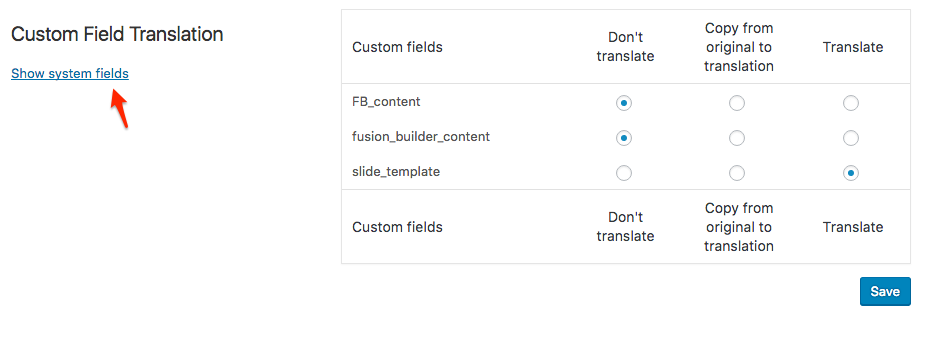
I wish I had a better answer for you, but for now it’s the best one I have.
Regards,
Geoff B.
MemberGood evening Michael and welcome back!
Thank you for your interest in our products.
We’ll be glad to answer your questions.1. Are there other modules (event calendar pro?) that are required to make this work? aka do i need Events Cal Pro to make Community Events work? Or will the above list suffice to enable a fully functioning system allowing registered users to establish events and ticketing for their event with minimal direct involvement?
The list above should be sufficient for what you are trying to do. Unless you are interested in some of the Events Calendar Pro’s features, you do not need it.
That being said, I believe you can save a bit of money by going for the following bundle: https://theeventscalendar.com/bundles/bundle-community-manager/
2. Will my users be able to setup the sale of their event and tickets to the event on their own with the right privileges without moderation? or will there always be an admin role required to connect the ecommerce solution?
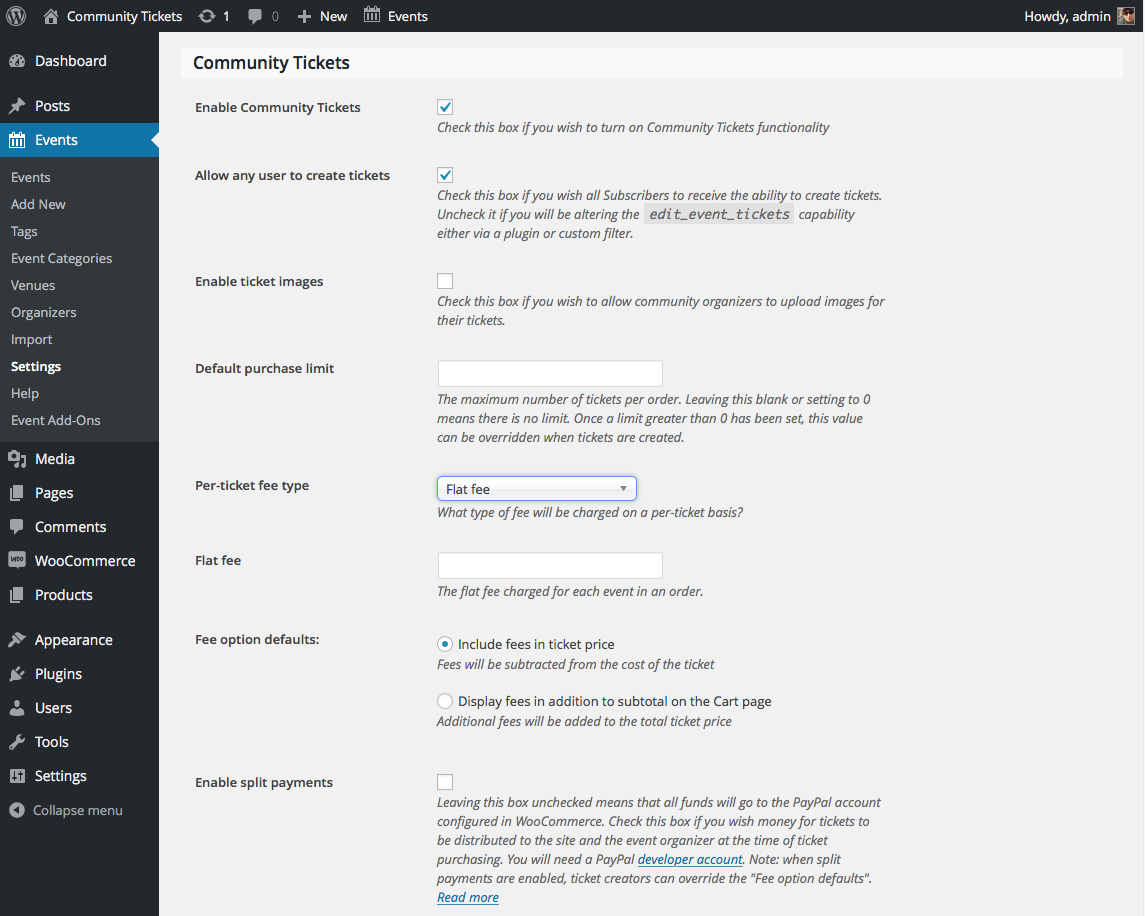
Yes, your users will be able to be autonomous in setting up their tickets. You control that via the following settings: https://theeventscalendar.com/content/uploads/2015/10/settings1.png
3. Is EventBrite required to sell tickets or just an option?
No, Eventbrite is not required to sell tickets. In fact they are not currently supported in the context of Community Tickets.
Furthermore, that is actually a completely separate premium add-on: https://theeventscalendar.com/product/wordpress-eventbrite-tickets/So in short, you do not need it 🙂
Please let me know if you have any additional question on this topic.
Best regards,
Geoff B.
MemberGood evening Alexandre and welcome to the Events Calendar forum!
Thank you for your interest in our products.
We’ll be glad to answer your question.The short answer is that you do not need to have the Events Calendar Pro to use our Community Events premium add-on.
That being said, it also works great with it 🙂
Let me know if that helps.
Have a great day!
Geoff B.
MemberGood evening Peter and welcome to the Events Calendar Support forum!
Thank you for reaching out to us.
We are sorry to hear about the language files disappearing on you.
I would love to help you with this topic.Our plugins actually do not touch the files located in the /wp-content/languages/ folder.
That being said, our plugin does give priority to the files located in that folder over the ones located in the /lang/ folder of our plugin.Can you confirm if you are putting your language files in the /wp-content/languages/ folder or if you are putting them in the the /wp-content/plugins/the-event-calendar/lang/ folder ?
Best regards,
Geoff B.
MemberGood evening Stephanie and welcome back!
Thank you for reaching out to us.
We are sorry to hear about the logo not having the same behaviour on the events page.
I would love to help you with this topic.Basically, what is going on is that, by default, our calendar uses the archive template.
It looks like the archive template of Divi does not honour your logo setting in Divi.However, I am pretty sure that if you go to Events -> Settings -> Display and change the setting under Events Template to Default Page template, this should work as expected.
Let me know how that goes.
Best regards,
Geoff B.MemberGood evening Catherine and welcome to the Events Calendar Support forum!
Thank you for reaching out to us.
We are sorry to hear about the error 500 message you are getting after clicking on “Add to cart”.
I would love to help you with this topic.I have tried reproducing this issue on Chrome while using both a Mac and a PC and I was not able to unfortunately.
Is it possible you have changed anything since you posted this question ?Secondly, could you tell me which version of Chrome and Windows you are using ?
Best regards,
Geoff B.
MemberGood evening Ben and welcome to the Events Calendar Support forum!
Thank you for reaching out to us.
We are sorry to hear about the license key tab missing from your install.
I would love to help you with this topic.The good news is that I believe you can solve that issue by following these instructions: https://theeventscalendar.com/knowledgebase/new-user-primer-eventbrite-tickets/
Let me know if that helps.
Have a great day!
Geoff B.
MemberGood evening xiaojing and welcome back!
Thank you for reaching out to us.
I would love to help you with this topic.The good news is that you can do exactly what you are looking for. You could event have links both at the top AND the bottom should you want to.
The proper way to do this is through a template customization. It is possible that you might already have one in your WordPress theme.
You might want to read our Themer’s guide to get a sense of how that works.
Basically, you need to make a copy of the the files that handle the list view over to a /tribe-events/ folder in your WordPress theme.
From there, you can edit these views to your liking, including moving the “Next and Previous events” buttons.Best regards,
Geoff B.
MemberGood evening Lynette and welcome back!
Thank you for reaching out to us.
We are sorry to hear about your site crashing while trying to tweak the submit an event form.
I would love to help you with this topic.Speaking of crashing, I think the code you tried to add this specific thread actually crashed it temporarily.
I actually had to request that it gets deleted to be able to read the content of your message.No harm done, but perhaps if you want to share the code you used, you could either put it in a .zip file, in gist or even in a screenshot so that I can get a better sense of what you are trying to accomplish.
By the way very sweet site you have!
Best regards,
Geoff B.
September 26, 2016 at 1:47 pm in reply to: Items in "Event Calendar" meta box not saving all of a sudden #1168896MemberGood afternoon Nathan and welcome back!
Thank you for reaching out to us.
We are sorry to hear about the recent inability to update items in the meta box.
I would love to help you with this topic.There could be many causes for this:
- Perhaps there is some glitch in the user role
- There could be some type of conflict (with a theme or a plugin)
- Perhaps there is something off at the database level
In any case, here are a couple of things to try to pinpoint the issue:
- Using that custom editor role, can you edit new events you create with that user ?
- Using an admin role, can you edit these events meta
- Can you go through our testing for conflicts procedure (preferably in a staging/dev environment or local install of your WordPress website) and let us know what you find out.
Basically the goal here is to revert back to a bare WordPress installation to see if the problem persists. It also allows us to pinpoint what the cause of the issue is.
But, before you do that, there are 2 things I would advise:
- Make a backup of your database
- Consider activating a “Maintenance Page” plugin if you are doing this on your live site (to minimize impact on your visitors)
Let me know how that goes.
Best regards,
Geoff B.MemberGood afternoon Malte and welcome to the Events Calendar forum!
Thank you for your interest in our products.
We’ll be glad to answer your question.You are right, by default our free plugin Event Tickets displays tickets as “free”.
However, even without our premium Event Tickets Plus add-on, you can tweak how the price is displayed.You can use one of the following approaches to do so:
- Use the following snippet in your theme’s functions.php to change that string: https://theeventscalendar.com/knowledgebase/change-the-wording-of-any-bit-of-text-or-string/
- Hide it via CSS
- Change the content of what is displayed using a template customization. You might want to read our Themer’s guide to get a sense of how that works.
You are welcome back on our support forums any time 🙂
For now, I am going to close this thread.
Have a great week!
Geoff B.
September 26, 2016 at 10:18 am in reply to: Email tickets and integration with PayPal Express checkout #1168815MemberGood afternoon Murray and welcome to the Events Calendar forum!
Thank you for your interest in our products.
We’ll be glad to answer your questions.Can I easily add these capabilities with your WooCommerce Extension product (I’m assuming that it’s compatible with the PayPal Express Checkout)?
The short answer is yes to all of these questions.
You will need to get a copy of our Event Tickets Plus premium add-on: https://theeventscalendar.com/product/wordpress-event-tickets-plus/
I would recommend reading the following to get a sense of how the process works: https://theeventscalendar.com/knowledgebase/managing-your-orders-and-attendees/
To summarize:
- Our plugin lets WooCommerce handle the transactional part completely. This is why the Paypal Express checkout will work.
- The tickets are sent as soon as the order is set to “Complete”. You can even tweak things so that the orders are automatically set to complete.
- The tickets have a unique ID and a QR code.
- You have a complete attendee list available and you can use the QR code to check-in attendees
Let me know if that helps.
Have a great day!
Geoff B.
September 26, 2016 at 10:09 am in reply to: Single Event Thimbnail & Title Not Showing on Events Page on Mobile #1168814MemberAs I was hitting send, I realized I forgot about your second question.
I am not sure which screenshot you are referring to on this page (as there are many).
But, the ones that have orange as the main highlight color is most likely based on twenty-thirteen.So in short you can probably achieve the same results (or very similar ones) while using Avada.
But that is likely to require a bit of CSS / Customization work on your end.I would also recommend playing with the first setting found in Events -> Settings -> Display (the radio button) to see if that helps.
Best regards,
Geoff B.
September 26, 2016 at 10:01 am in reply to: Single Event Thimbnail & Title Not Showing on Events Page on Mobile #1168812MemberGood afternoon Thomas and welcome back,
Thank you for reaching out to us.
We are sorry to hear about the event thumbnails and title not displaying on mobile.
I would love to help you with this topic.The issue comes from the CSS on your site. It’s hard to say from where exactly since the stylesheets are going through autoptimize.
In any case, the culprit is the following:
@media only screen and (max-width: 768px) {

.tribe-events-list .tribe-events-event-image {

float: left;

}

}
This needs to be changed to
@media only screen and (max-width: 768px) {

.tribe-events-list .tribe-events-event-image {

    float: none !important;

}

}
Best regards,Geoff B.
-
AuthorPosts