
Home › Forums › Calendar Products › Events Calendar PRO › ** For Geoff B ** – WPML translation – Google Map doesn't work
- This topic has 15 replies, 4 voices, and was last updated 9 years, 11 months ago by
Greg.
-
AuthorPosts
-
September 12, 2016 at 6:07 am #1162748
Greg
ParticipantOn single event post, right hand toolbar. Google Map works in English, but not French version.
Checked theme settings (Avada – Advanced theme settings) – Google maps scripts was not turned on for English or French anyway. But still worked in english. I turned it on for French, it still didn’t work
Checked Events Calendar settings – Enable Google Maps is checked.
So I’m out of ideas…
Many thanks
Greg
September 13, 2016 at 1:39 am #1163265Geoff B.
MemberGood morning Greg and welcome back!
I have run a few tests on this on my end.
Under certain circumstances, I have found that the translation of the Venue is not perfect.
When that was the case, it typically meant that the map did not display properly.Could you double-check your venue translation (especially the map related fields) and tell me if all fields are identical ?
Furthermore, could you confirm what is your current version of Avada ?
Best regards,
Geoff B.
September 13, 2016 at 1:57 am #1163274ParticipantHey Geoff,
Please see attached side-by-side comparison of the two venues. They look the same to me? – Other than title of course.
Avada is current version, 4.0.3.
Thanks hope this helps, let me know if you need login details to troubleshoot this or any of our other issues?
Greg
September 13, 2016 at 11:42 pm #1163809MemberGood evening Greg,
Could you try checking the “Use latitude + longitude:” checkbox in both languages ?
I believe this should solve your issue.
Let me know how that goes.
Best regards,
Geoff B.September 14, 2016 at 2:56 am #1163843ParticipantThis reply is private.
September 14, 2016 at 10:24 pm #1164443MemberThis reply is private.
September 15, 2016 at 2:32 am #1164498ParticipantThis reply is private.
September 15, 2016 at 11:03 pm #1164973MemberThis reply is private.
September 19, 2016 at 7:05 am #1165809ParticipantThis reply is private.
September 20, 2016 at 12:00 am #1166267MemberThis reply is private.
September 20, 2016 at 3:31 am #1166301ParticipantThis reply is private.
September 20, 2016 at 11:02 pm #1166813MemberThis reply is private.
September 26, 2016 at 3:03 am #1168652ParticipantHi Geoff,
How did you get on with this one? Any joy?
Thanks
Greg
September 26, 2016 at 9:43 pm #1169039MemberHey Greg,
Sorry for the delay answering. There are 2 reasons for this:
- I wanted to conduct complete and thorough testing on all of the WPML issues with all of your plugins installed, both with the new version of WPML, our current code and our upcoming code.
- I was unfortunately sick over the last couple of days since last week, my apologies for that
As for the specific venue issue, I am unfortunately unable to reproduce it.
- http://test4.monsiteoublog.com/fr/evenement/evenement-test/
- http://test4.monsiteoublog.com/event/test-event-from-cpmr-to-north-sea-with-file/
However, that lead me to update the documentation we have on venue and organizers (https://theeventscalendar.com/knowledgebase/creating-translations-for-events-using-wpml/)
So in a nutshell here is the state of things on this specific issue:
- There is a glitch that needs to be fixed regarding language assignment with Venues and Organizers. The only reliable workaround (as updated in the KB article above) is to create venues and organizers before creating the event and manually assigning them in alternate languages in spite of using the “overwrite with” option. This will also be true with 4.3, but we are working on fixing ASAP for the following maintenance release.
- In your specific case, and I am sorry about this, could you please try to create a brand new venue outside of the event (following the KB instructions and assigning it to an event) to see if that changes anything. I would recommend reusing the same Finland location.
If that does not change anything, I could you please send me a screenshot of your settings in WPML > Translation Management > Multilingual setup, specifically the custom field section after you click on the “Show system fields” option (see screenshot).
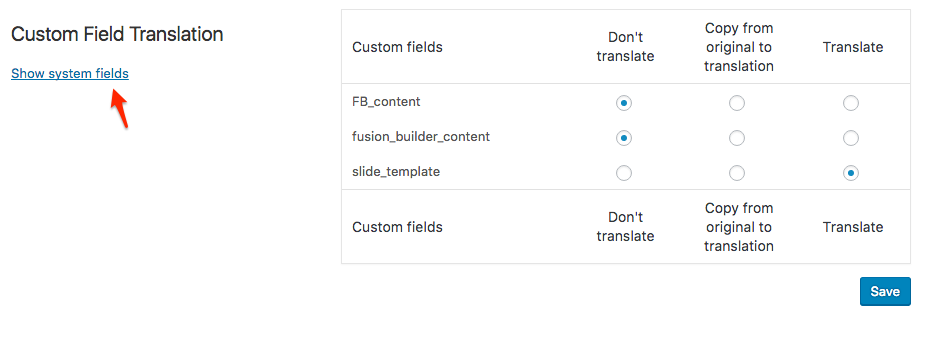
I wish I had a better answer for you, but for now it’s the best one I have.
Regards,
Geoff B.
October 18, 2016 at 9:35 am #1178497Support Droid
KeymasterHey there! This thread has been pretty quiet for the last three weeks, so we’re going to go ahead and close it to avoid confusion with other topics. If you’re still looking for help with this, please do open a new thread, reference this one and we’d be more than happy to continue the conversation over there.
Thanks so much!
The Events Calendar Support Team -
AuthorPosts
- The topic ‘** For Geoff B ** – WPML translation – Google Map doesn't work’ is closed to new replies.