

Forum Replies Created
-
AuthorPosts
-
Geoff B.
MemberBonjour Alexander,
Je suis navré d’apprendre que ces 2 étapes n’ont pas aidé.
Afin d’être bien certain de cerner le problème, pouvez-vous me confirmer que le tout se déroule lors de la création du billet (et non lors de l’achat)?
Sinon, la prochaine étape consisterait à passer à travers notre processus de test de conflits et de nous faire part de vos résultats.
Je vous invite à faire une sauvegarde de votre base de données avant et possiblement à utiliser un plugin de “maintenance page” tandis que vous faites vos tests.L’idéal serait carrément d’avoir une copie locale ou test de votre site pour éviter les impacts sur votre site durant ces tests.
Salutations,
Geoff B.
October 6, 2016 at 11:06 am in reply to: How to add Ticket Price in the Attendees Report in both front end and Dashboard #1173421MemberGood afternoon,
As promised, I have a snippet for you: https://gist.github.com/GeoffEW/14b29959e2eaf6601e4044a2c43a916e
Let me know how that goes.
Best regards,
Geoff B.MemberGood afternoon Jason,
I do believe Avada meant well in providing extensive color customization control for their amazing theme. But I have to side with you on this one, it is kind of confusing that this overrides the default WordPress customizer. The option of turning this on or off is a great idea (as I am sure many people love that feature as well).
In any case, about that last piece of CSS, adding a !important argument should make this work.
#tribe-events-content .tribe-events-tooltip h4, #tribe_events_filters_wrapper .tribe_events_slider_val, .single-tribe_events a.tribe-events-ical, .single-tribe_events a.tribe-events-gcal {

color: #fff !important;

}
Let me know how that goes.
Best regards,
Geoff B.MemberHey Pau,
Awesome! I am glad this works for you.
Do you have any other question for me today ?
Best regards,
Geoff B.
October 6, 2016 at 10:46 am in reply to: Change the label 'Near' and placeholder text 'Location' in the filter bar #1173402MemberGood afternoon K.,
As promised I had somebody take a look at it.
It turns out that the priority is too low on it. Just remove the “1,1” priority from the opening filter.
add_filter( ‘tribe-events-bar-filters’, ‘tribe_support_1043887’);
Let me know how that goes.
Best regards,
Geoff B.MemberGood afternoon Simon,
You are welcome back on our support forums any time 🙂
For now, I am going to close this thread.
Have a great week!
Geoff B.
MemberGood afternoon Krystle,
Thank you for the screenshots.
This allowed me to find out what the issue is: you need to have at least one option in checkbox fields (see screenshot).
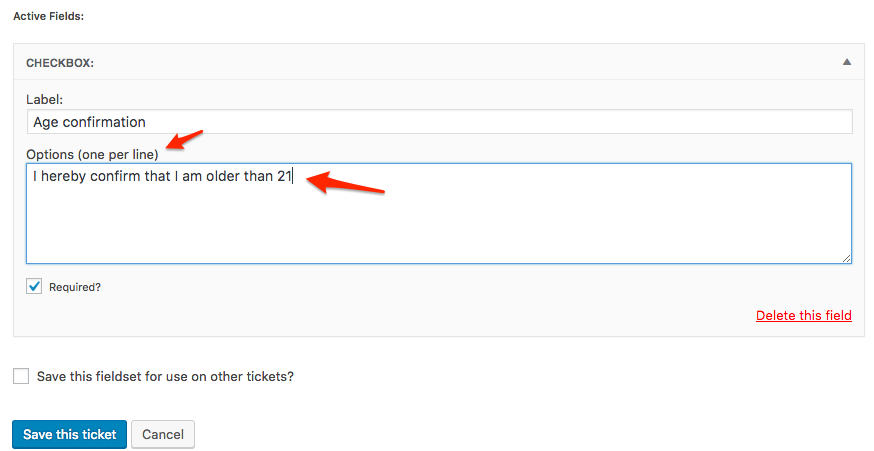
Let me know how that goes.
Best regards,
Geoff B.MemberGood evening Pau and welcome back!
Thank you for reaching out to us.
I would love to help you with this topic.You can remove this by:
- Doing a template customization on the day view to remove that title. You might want to read our Themer’s guide to get a sense of how that works.
- Use CSS
Try the following rule
.tribe-events-day .tribe-events-day-time-slot h5 {display:none !important;}Let me know if that helps.
Have a great day!
Geoff B.
MemberThis reply is private.
October 5, 2016 at 11:34 pm in reply to: How i save the custom code in the Events Tickets Plus after update this plugin? #1173088MemberGood evening Devon,
This is a great question. Without seeing your exact code, it’s hard to say.
I can’t promise you anything, but I would not mind taking a look at your customized files if you can send them to me in a .zip file (via a private reply).
Best regards,
Geoff B.
MemberHey Mathew,
Thank you for chiming in and bringing your Avada expertise to the table. It is much appreciated.
Have a great day!
Geoff B.
MemberGood evening TJ,
Thank you for the system information.
This allowed me to figure out that with your specific configuration, there is a conflict with WooCommerce.
We apologize for the inconvenience.The good news is that has been identified by other users as a legitimate bug which is now one of our top priorities.
Unfortunately, I cannot commit to a release date for a fix at this point.
But you will be contacted as soon as there is one.In the meantime, we do have a workaround for this (it’s far from perfect but it works).
If you temporarily deactivate WooCommerce (perhaps in combination with a maintenance page plugin), you should be able to edit your RSVP ticket quantities.Let me know how that goes.
Best regards,
Geoff B.MemberGood evening Jim and welcome to the Events Calendar Support forum!
Thank you for reaching out to us.
We are sorry to hear that we failed to meet some of your expectations with certain features.
I would love to help you with this topic.ability to post events that repeat irregularly
Actually, this feature is available and covers 99% of all possible scenarios.
You will need our Pro add-on for this: https://theeventscalendar.com/knowledgebase/pro-recurring-events/or in different venues
You are right on this one. Although this would make for an interesting feature, its popularity is not high for now.
You can vote for it here: https://tribe.uservoice.com/forums/195723-feature-ideas/suggestions/4214149-one-event-with-multiple-venuesThat being said, the feature to be able to have certain recurring events have their own details is now on our long-term roadmap: https://tribe.uservoice.com/forums/195723-feature-ideas/suggestions/6836617-option-on-recurring-events-which-allows-the-event
As you can imagine, we receive tons of feature requests and suggestions that are pretty awesome.
In fact, if you have not done so already, you might want to browse our User voice forums to see for yourself.Because of that, we do have to prioritize by popularity and we are definitely trying to include these great ideas as fast as we can.
Thank you for your comments and please feel free to spread the word about feature requests you think are worthy.
Best regards,
Geoff B.
MemberBonsoir Jean-Philippe,
Merci de nous réécrire.
La réponse courte et honnête est que notre calendrier n’est pas optimisé pour cet usage (gestion de ressources pouvant être réservées).
Certains de nos clients ont toutefois fait preuve d’astuce et créativité. Par exemple:
- Renommer et utiliser les billets en “places disponibles”. Chaque événement représentant une salle avec un stock de “1” par heure.
- Utiliser un plug-in spécialisé tel https://woocommerce.com/products/woocommerce-bookings/ et en afficher le produit via shortcode dans chaque événement.
J’aimerais avoir une meilleure réponse pour vous, mais pour l’instant, c’est la meilleure que je puisse vous offrir.
Salutations,
Geoff B.
MemberGood evening Jeanne and welcome back!
Thank you for reaching out to us.
We are sorry to hear about the orders not auto completing in spite of the use of the checkbox.
I would love to help you with this topic.As a first troubleshooting step, could you please provide us with your complete system information in a private reply using the instructions found in the following link?
https://theeventscalendar.com/knowledgebase/sharing-sys-info/
Full disclosure, on certain installations, that option does not work properly for unknown reasons.
You can try adding the following snippet in the functions.php of your WordPress theme to see if that works: https://docs.woocommerce.com/document/automatically-complete-orders/
Let me know how that goes.
Best regards,
Geoff B. -
AuthorPosts