
Home › Forums › Ticket Products › Event Tickets Plus › bug in insert ticket field set
- This topic has 8 replies, 5 voices, and was last updated 9 years, 11 months ago by
George.
-
AuthorPosts
-
October 5, 2016 at 5:18 am #1172637
Sallé Alexander
Participanthello,
i have a bug on inserting a ticket field set in a event.
i select the ticket field set but nothing appear …do u have a solution, it worked great before…
October 5, 2016 at 10:13 pm #1173067Geoff B.
MemberGood evening Sallé and welcome back!
Thank you for reaching out to us.
We are sorry to hear about the ticket field set not working as expected on your installation.
I would love to help you with this topic.As a side note, we can totally continue this conversation in French if you prefer.
i have a bug on inserting a ticket field set in a event.
i select the ticket field set but nothing appear …Just to confirm, this happens while you are trying to create a ticket, correct ?
By the looks of it, it sounds like there is a conflict going on. My 2 top suspects are:
- Event Rocket. This used to be a great plugin, but it has been retired and is known to cause issues with the Events Calendar Pro plugins 4+. Please try deactivating it.
- Your WordPress theme might have customizations that need updating or simply some form of conflict. Please try reverting back to a default WordPress theme temporarily (e.g.: twenty-fifteen) and see if the issue persists.
Let me know how that goes.
Best regards,
Geoff B.October 6, 2016 at 1:44 am #1173123Participantsalut,
en français, c’est mieux !
j’ai désactivé event rocket et mis le theme twenty fourteen, mais c’est toujours pareil, les champs n’appariassent pas sur le billet.
merci pour votre aide,
Alexander
October 6, 2016 at 11:16 am #1173431MemberBonjour Alexander,
Je suis navré d’apprendre que ces 2 étapes n’ont pas aidé.
Afin d’être bien certain de cerner le problème, pouvez-vous me confirmer que le tout se déroule lors de la création du billet (et non lors de l’achat)?
Sinon, la prochaine étape consisterait à passer à travers notre processus de test de conflits et de nous faire part de vos résultats.
Je vous invite à faire une sauvegarde de votre base de données avant et possiblement à utiliser un plugin de “maintenance page” tandis que vous faites vos tests.L’idéal serait carrément d’avoir une copie locale ou test de votre site pour éviter les impacts sur votre site durant ces tests.
Salutations,
Geoff B.
October 7, 2016 at 1:43 am #1173644ParticipantBonjour Geoff,
L’insertion dans la page fonctionne au moment de la création, c’est ok !
Par contre, j’ai un problème après quand l’utilisateur rempli ses champs au moment de la commande, les champs n’apparaissent plus sur le billet envoyé.
ça fonctionnait bien avec la version 4,2
Bonne journée,
Alxander
October 7, 2016 at 10:55 am #1173848MemberBonjour Alexander,
D’accord, merci de préciser.
Vous avez entièrement raison. Il s’agit d’un bogue qui s’est glissé dans la version 4.2.7
Nous allons corriger le tout lors d’une prochaine mise à niveau et nous vous contacterons dès que c’est fait.En attendant, j’ai une solution pour vous:
- Téléchargez le plugin suivant: https://theeventscalendar.com/content/uploads/2016/09/tribe-snippet-tickets-email-options-2016-08-30.zip
- Assurez-vous de bien cocher la case pertinente (voir capture d’écran)
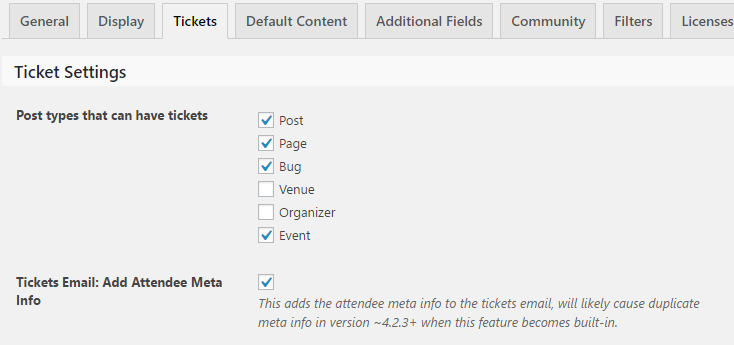
N’oubliez pas de désactiver ce plugin lorsque le bogue sera corrigé.
Salutations,
Geoff B.
October 29, 2016 at 9:35 am #1184879Support Droid
KeymasterHey there! This thread has been pretty quiet for the last three weeks, so we’re going to go ahead and close it to avoid confusion with other topics. If you’re still looking for help with this, please do open a new thread, reference this one and we’d be more than happy to continue the conversation over there.
Thanks so much!
The Events Calendar Support TeamNovember 2, 2016 at 4:22 pm #1186685ParticipantHello!
I wanted to post a quick note here that we have published a new Maintenance Release today that should address some of the problems reported in this thread.
You can read about the details of this release here → https://theeventscalendar.com/maintenance-release-events-calendar-4-3-2-event-tickets-4-3-2-premium-plugins/
I hope this update helps!
If issues persist, open a new thread in the forums and be sure to include your site’s complete, un-edited “System Information” as per the instructions in this knowledgebase guide.
Cheers,
George -
AuthorPosts
- The topic ‘bug in insert ticket field set’ is closed to new replies.