
Home › Forums › Calendar Products › Events Calendar PRO › Colour change and potentially a small bug?
- This topic has 13 replies, 4 voices, and was last updated 10 years ago by
Jason Thresher.
-
AuthorPosts
-
October 3, 2016 at 1:28 am #1171712
Jason Thresher
ParticipantHi support
I am having a problem changing the background color of the calendar. I thought this would be a simple operation, but have tried every different setting in your new customizing feature, nothing seems to change the background.
The other thing I notice, and this may be the small bug – When you select the general theme accent color, the view of the calendar does not change. IT does with the other setting changes leading me to believe this is not working correctly.
I have attached a screen shot.
Please let me know where the background color can be change so I can make the changes.
Many thanks
JasonOctober 3, 2016 at 11:02 pm #1172085Geoff B.
MemberGood evening Jason and welcome to the Events Calendar Support forum!
Thank you for reaching out to us.
We are sorry to hear about the changes of the background color not working as expected on your installation.
I would love to help you with this topic.Normally, the Customizer should display many other options (see screenshot), under Appearance > Customize
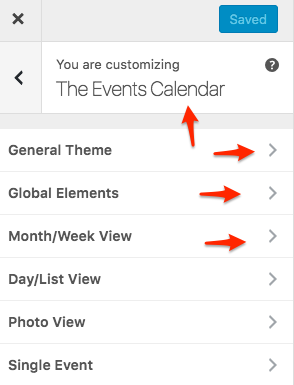
Could you try that and tell me if that impacts the colours as you would expect it to ?
If not, could you tell me which version of Avada you are using ?
Best regards,
Geoff B.
October 4, 2016 at 1:01 am #1172128ParticipantHi Geoff
Thanks for the reply.
I am using Avada v 4.0.3
I tried those changes and have attached a screen shot for you to look at.
Pretty much everything changes with teh exception of the dark grey background, and the accent colour is not applying either.
Thanks for the help
Jason
October 4, 2016 at 11:12 pm #1172570MemberGood evening Jason,
Thank you fro trying these out.
It does seem like something in Avada is interfering with the Customizer.The good news is that we are in the process of integrating the customizer in our plugins instead of in themes which should help with this type of issue.
In the meantime, you can always override this with CSS. Just go to Avada > Theme options > Custom CSS and use the following rules
#tribe-events-content .tribe-events-calendar td {

background-color: #fff;

}
#tribe-events td.tribe-events-present div[id*="tribe-events-daynum-"], #tribe-events td.tribe-events-present div[id*="tribe-events-daynum-"] > a {

background-color: #000;

color: #fff;

}
.tribe-events-calendar td.tribe-events-past div[id*="tribe-events-daynum-"], .tribe-events-calendar td.tribe-events-past div[id*="tribe-events-daynum-"] > a {

background-color: #000;

}
.tribe-events-calendar div[id*="tribe-events-daynum-"], .tribe-events-calendar div[id*="tribe-events-daynum-"] a {

background-color: #000;

}
.tribe-events-calendar thead th, .tribe-events-grid .tribe-grid-header .tribe-grid-content-wrap .column, .tribe-grid-header {

background-color: #000;

border-left-color: #000;

border-right-color: #000;

}
#tribe_events_filters_wrapper input[type=submit], .tribe-events-button, #tribe-events .tribe-events-button, .tribe-events-button.tribe-inactive, #tribe-events .tribe-events-button:hover, .tribe-events-button:hover, .tribe-events-button.tribe-active:hover {

background-color: #000;

}
Let me know if that helps.
Have a great day!
Geoff B.
October 5, 2016 at 1:30 am #1172591ParticipantHI Geoff
Thanks that code worked well.
Looking forward to the new color plugin.
One final question please – What would the code be to change the header color with the days in please? I think this final change will give me enough customization until your new plugin comes out.
Many thanks for your help, it is appreciated.
Regards
JasonOctober 5, 2016 at 2:01 am #1172601ParticipantHI Geoff
Sorry, just have one more question as per the screen shot please. If one hovers over the day should something display in the header?
Screen shot is attached.
Thanks
October 5, 2016 at 2:50 pm #1172961MemberGood evening Jason,
I am glad my CSS rules helped.
Try to keep an eye out for the customizer announcement.What would the code be to change the header color with the days in please?
.tribe-events-calendar thead th, .tribe-events-grid .tribe-grid-header .tribe-grid-content-wrap .column, .tribe-grid-header {

background-color: #83bc59;

}
If one hovers over the day should something display in the header?
Yes, this header should display the event title.
You can address this with the following rule:
#tribe-events-content .tribe-events-tooltip h4, #tribe_events_filters_wrapper .tribe_events_slider_val, .single-tribe_events a.tribe-events-ical, .single-tribe_events a.tribe-events-gcal {

color: #fff;

}
Let me know how that goes.
Best regards,
Geoff B.October 5, 2016 at 5:56 pm #1173011Mathew
ParticipantJason,
The CSS suggestions that Geoff B. has provided clearly demonstrates just how great the support that Modern Tribe’s provides to their customer.
As he mentions, Avada is interfering with the settings. This is intentional by Avada. If you look at the Avada Theme Options, you will see that it has control over MANY of the color and design elements of The Events Calendar, including the background and border color. There are controls in several different places within Avada’s Theme Options, so please take some time to familiarize yourself with them inside the theme.
Attached is a screenshot of some of the basic TEC settings in Avada.
Hope this helps.
October 5, 2016 at 11:32 pm #1173087MemberHey Mathew,
Thank you for chiming in and bringing your Avada expertise to the table. It is much appreciated.
Have a great day!
Geoff B.
October 6, 2016 at 12:55 am #1173114ParticipantHi Matthew
Thanks for the input. I found those settings yesterday and submitted a ticket with Avada. Their settings are indeed the problem and not working correctly at all with the Pro calendar. At the very least there should be an option to turn them off so that one can use the calendars default colour settings.
The support has been great, very appreciative of the time Geoff has taken to help us.
———————–
Geoff that second bit of code has unfortunately not worked, but I will also now check if there is a way to workaround the Avada settings that are causing the issues.
Many thanks
JasonOctober 6, 2016 at 10:59 am #1173418MemberGood afternoon Jason,
I do believe Avada meant well in providing extensive color customization control for their amazing theme. But I have to side with you on this one, it is kind of confusing that this overrides the default WordPress customizer. The option of turning this on or off is a great idea (as I am sure many people love that feature as well).
In any case, about that last piece of CSS, adding a !important argument should make this work.
#tribe-events-content .tribe-events-tooltip h4, #tribe_events_filters_wrapper .tribe_events_slider_val, .single-tribe_events a.tribe-events-ical, .single-tribe_events a.tribe-events-gcal {

color: #fff !important;

}
Let me know how that goes.
Best regards,
Geoff B.October 7, 2016 at 4:26 am #1173668ParticipantThanks Geoff
Adding the !Important has solved all the issues.
Many thanks for the help.
regards
JasonOctober 7, 2016 at 11:19 pm #1174009MemberGood evening Jason,
I’m super stoked that we found a solution for all of your issues.
You are welcome back on our support forums any time 🙂
For now, I am going to close this thread.
Have a great weekend!
Geoff B.
-
AuthorPosts
- The topic ‘Colour change and potentially a small bug?’ is closed to new replies.