

Forum Replies Created
-
AuthorPosts
-
Geoff B.
MemberGood evening Allyson and welcome to the Events Calendar Support forum!
Thank you for reaching out to us.
I would love to help you with this topic.the formatting of my list page looks different from the images I am finding on Google.
This is caused by a template customization that is built into the Avada theme.
If you temporarily revert back to a default WordPress theme such as twenty fifteen and look at the calendar’s appearance you will see what I mean.
You could bypass those customizations by doing a couple of things:
- Disable the /tribe-events/ folder by changing it’s name to something like /z_tribe-events/
- Play with the settings found under Events -> Settings -> Display (especially the first one).
Let me know how that goes.
Best regards,
Geoff B.October 11, 2016 at 9:49 am in reply to: Changing the "all" text in permalinks for recurring events #1175040MemberGood afternoon Stephane,
I’m super stoked that this worked for you!
You are welcome back on our support forums any time 🙂
For now, I am going to close this thread.
Have a great week!
Geoff B.
MemberGood afternoon Melanie,
Wow, the system really did make you work for that discount. Yikes!
I’m mostly glad, you found a solution for your specific situation.
Thank you for sharing!You are welcome back on our support forums any time 🙂
For now, I am going to close this thread.
Have a great week!
Geoff B.
MemberThis reply is private.
MemberGood evening July,
Thank you for sticking with us in spite of the English language challenge.
I am glad that the additional field works.
But I need it in this specific field on top. So I’ll can change between Costs and Donation.
I can help you with where it is displayed. For that I will need a couple of things from you:
- Could you send me a screenshot with an arrow for exact desired position of the additional field ?
- Is it possible to get a copy of your WordPress theme / child theme in a .zip file link (via Dropbox or Google Drive) so that I can run some tests on my end ? (you can use a private reply for that)Please ensure you are using the latest files as found on your actual website.
This way I will get access to any updates you might have made.
I’m a little bit astonished about this, because when I insert in the Cost-Field only Text like: Spenden erwünscht, it goes…
But I need text with the special prices.Before we continue, I would like to set expectations.
As you might know, the scope of our support is mostly to get our customers started on the right track and to help them in case of issues. We unfortunately do not provide complete support for customization.
With that in mind, the cost field is used in several other places in the code.
As stated before, since you have a very different use in mind for the cost field, I highly recommend using a brand new field that has no extra logic tied to it instead of trying to hack an existing field.I am looking forward to the 2 things above.
Have a great day!
Geoff B.
MemberGood evening Natalia and welcome to the Events Calendar forum!
Thank you for your interest in our products.
We’ll be glad to answer your questions.im interested in a calendar plugin that helps me to assign different events per user, i would like to have all users on my website to have their own calendar
That sounds like an interesting project.
Just to confirm my understanding of what you are trying to accomplish are you:
- Looking for a tool that let’s you do scheduling ? (e.g.: agenda/schedule for students)
- Looking for a normal event calendar with “ticket” (limited availability per event) capability, alongside the possibility to display the list of different events assigned to each user ?
- Will you be doing all the event “assignment” manually yourself or do you need people to register ?
Besides, i would like to know if there is a way to upload events from a file, it would be easier for me in order to upload multiple events for multiple users.
We do have built-in CSV import ability: https://theeventscalendar.com/knowledgebase/using-the-events-calendars-csv-importer/
Best regards,
Geoff B.
October 10, 2016 at 10:58 pm in reply to: How i save the custom code in the Events Tickets Plus after update this plugin? #1174790MemberGood evening Devon,
If all goes according to plan, the release should be this week.
Have a great day!
Geoff B.
October 10, 2016 at 10:55 pm in reply to: La liste des participants ne s'affiche pas sur la page evenement #1174789MemberRebonjour Alexander,
D’abord bravo pour la première partie de la solution que vous avez trouvée vous-même!
mais maintenant j’ai la liste de tous les évènements auxquels je suis inscris ( voir screenshot)
j’aimerais n’avoir que la liste des participants pour cet event.
Il semble que vous tentiez de faire plusieurs personnalisations, ce qui est très bien puisque nous avons conçu le plug-in avec cet objectif en tête.
Toutefois, comme vous l’avez constaté, cela entraîne parfois de petits bogues. Un peu comme si vous n’utilisiez pas le bon hook.
À ce propos, notre support au niveau des personnalisations se limite malheureusement à aider nos clients à démarrer. Nous n’offrons pas de support complet des personnalisations.
Ceci dit, sans rien promettre, je veux bien jeter un coup d’oeil à votre thème WordPress et à ses personnalisations, on ne sait jamais.
2/ En bas, il y a une phrase “view your billets” => où est-ce que je traduis cette phrase
Normalement, cette phrase devrait être traduite à même les fichiers de langue du plug-in Event Tickets (gratuit). Pour traduire, 3 étapes:
- Trouver le répertoire /lang/ pour event-tickets
- Chercher le fichier .pot et l’ouvrir à l’aide de Poedit
- Sauvegarder le fichier sans rien changer (il y aura un message de confirmation)
- Ouvrir event-tickets-fr_FR.po et mettre le catalogue à jour à partir du fichier .pot
- Chercher “view your” et corriger la traduction, puis sauvegarder
- Télécharger ce fichier à jour dans le répertoire /lang/ ou dans /wp-content/languages/plugins/
Une autre option est de simplement télécharger la version la plus récente ici: https://translate.wordpress.org/projects/wp-plugins/event-tickets/stable/fr/default
(Assurez-vous que le nom de fichier est correct, puis écraser les fichiers en place sur votre serveur)
3/ où est le template généré: c’est tikets.php ?
La liste complète de la provenance de ce qui est généré peut être trouvée dans notre Themer’s guide.
Mais, oui, cela provient du fichier tickets.php
Salutations,
Geoff B.
MemberGood evening Melanie and welcome back!
Thank you for reaching out to us.
I would love to help you with this topic.If my understanding is correct, there is an automatic discount that is applied to the whole cart total as you click on the “renew” button: https://theeventscalendar.com/knowledgebase/renewing-your-license/
In other words, the discount should still work for a license upgrade and that discount should be automatic.
In any case, you can safely test that for yourself by going through the process.
Please let me know if that does not work as intended.
Best regards,
Geoff B.
October 10, 2016 at 8:26 pm in reply to: Tickets Area – Ticket name, available tickets, ticket price, ticket overlapping #1174763MemberGood evening Victor and welcome to the Events Calendar Support forum!
Thank you for reaching out to us.
Apologies for the delay answering. Please note that our support forums are typically closed on weekends.We are sorry to hear about the display of the tickets not being great on your website.
I would love to help you with this topic.The issue you are experiencing is actually related to either:
- Your settings under Events -> Settings -> Display (Specifically the 2 first ones). You might want to try to play around with these to see if that helps
- The Avada theme CSS rules related to WooCommerce add to cart section (based on what I am seeing this is more likely).
Ideally I would need the direct URL of the ticket page to provide you with some CSS workaround for this.
Furthermore, to answer your other questions, yes, you can customize the display of these forms to your liking. You might want to read our Themer’s guide to get a sense of how that works.
As you will find out, Avada is already customizing a lot of things (hence the funky display in certain circumstances).
Best regards,
Geoff B.
MemberGood evening CDC and welcome back!
Thank you for reaching out to us.
I would love to help you with this topic.To make changes to any Calendar view, you need to do a template override.
-Add custom text above the ‘upcoming events’ title
You might want to read our Themer’s guide to get a sense of how that works (as this walks you through the different views and sections).
-Make the organiser’s name and details more prominent / a different colour – right now, with the default view I don’t there there are any organiser details until you actually click into an individual event page
For that, you will need to add the organizer information to the list view (still based on our Themer’s guide). Let me know if you need assistance figuring out how that works.
Best regards,
Geoff B.
MemberGood evening David and welcome back!
Thank you for reaching out to us.
I would love to help you with this topic.The easiest way to go about this would be to leave your license in there until it expires and let the new owners get their own license key.
As you can see here, there is very little consequence to a license expiring (aside from the unavailable updates).
Once the new site owners purchase their new licenses, they will simply need to go to Events -> Settings -> Licenses and punch-in their code. This will re-enable updates and most importantly, it will give them access to premium support.
Let me know if that helps.
Have a great day!
Geoff B.
October 10, 2016 at 7:54 pm in reply to: Excerpt to appear to the right of the photo in list view #1174754MemberGood evening Laura and welcome to the Events Calendar Support forum!
Thank you for reaching out to us.
I would love to help you with these topics.1) Not show the bullet to the left of the photos in list view
Actually, this stems from the Events Calendar plugin which is a third-party plugin. That being said, you can remove the bullets with CSS
.ecs-event-list, .ecs-event {list-style-type: none !important;}2) To have the excerpt wrap the photo…or appear to the right of the photo? I don’t like all that space to the right of the photos.
Here again, some simple CSS can do the trick
.ecs-event img {float:left; margin-right:10px;}Let me know how that goes.
Best regards,
Geoff B.MemberGood evening Jan and welcome to the Events Calendar Support forum!
Thank you for reaching out to us.
I would love to help you with this topic.The correct path to use is /wp-content/themes/my-theme/tribe-events/wootickets/tickets.php
In all fairness, I have asked for a clarification of our themer’s guide on this.
Let me know how that goes.
Best regards,
Geoff B.MemberGood evening Valentina,
Thank you for writing back.
Here is a screenshot of how you get that metabox to display.
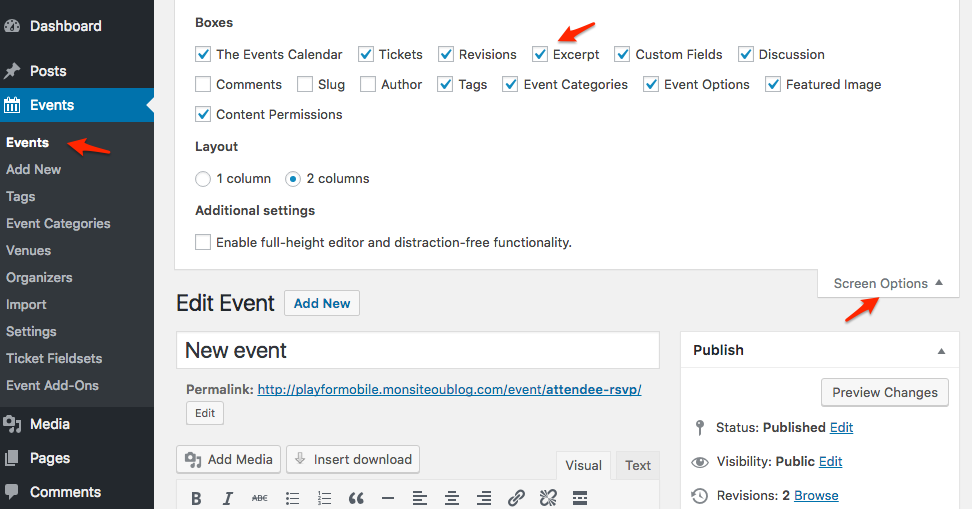
Let me know if that helps.
Have a great day!
Geoff B.
-
AuthorPosts