

Forum Replies Created
-
AuthorPosts
-
Geoff B.
MemberGood evening Gabriel and welcome to the Events Calendar Support forum!
Thank you for reaching out to us.
We are sorry to hear about the struggles you have experienced setting up recurring events.
I would love to help you with this topic.To accomplish the results above, you will need the following rules (see screenshot). You might have to adjust the duration.
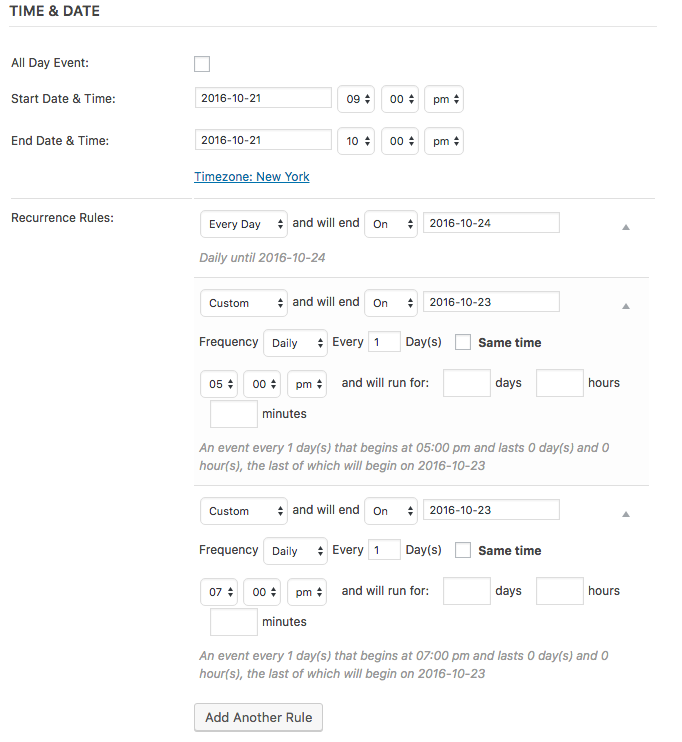
Let me know if that helps.
Have a great day!
Geoff B.
MemberGood evening Patrick and welcome back!
Thank you for reaching out to us.
I would love to help you with this topic.The correct path to use is /tribe-events/wootickets/tickets.php
Let me know if that helps.
Have a great day!
Geoff B.
MemberGood evening Pearl and welcome to the Events Calendar forum!
Thank you for your interest in our products.
We’ll be glad to answer your questions.– can Event Tickets Plus work with The Events Calendar free version?
Yes, absolutely. That being said, you will also need to install the free Event Tickets plugin in order for the Event Tickets Plus plugin to work.
– which license I need to purchase for Event Tickets Plus? for 1 site for 10 sites?
This is a great question.
You can see our prices here: https://theeventscalendar.com/product/wordpress-event-tickets-plus/
Keep in mind that whatever you end up buying, we always provide an upgrade path.
Furthermore you can totally install single licenses on individual domains of a multisite.
You might be interested in reading the following: https://theeventscalendar.com/knowledgebase/multisite-license/Let me know if that helps.
Have a great day!
Geoff B.
MemberGood evening Jason and welcome to the Events Calendar forum!
Thank you for your interest in our products.
I totally understand where you are coming from. Getting a good deal is always sweet.
As you know, most US based vendors tend to offer some kind of promotion for Black Friday.
That being said, I am unfortunately not at liberty to share what we have in store for this year 🙂
I wish I had a better answer for you, but for now it’s the best one I have.
Looking forward to having you as customer in the near future.
Best regards,
Geoff B.
MemberGood afternoon Michael and welcome to the Events Calendar Support forum!
Thank you for reaching out to us.
We are sorry to hear about the apparent plugin mix-up.
I would love to help you with this topic.Can you send me a screenshot of what you see when you go to the https://theeventscalendar.com/my-account/downloads/ page ?
Secondly, Event Aggregator is actually not a separate plugin. It is bundled within our the Events Calendar plugin.
To get it to work, simply do the following: https://theeventscalendar.com/knowledgebase/new-user-primer-event-aggregator/
Finally, in regards to the Javascript error, could you go through the following: https://theeventscalendar.com/knowledgebase/setting-up-your-google-maps-api-key/ and https://theeventscalendar.com/knowledgebase/google-maps-not-showing-up/ ?
Let me know how that goes.
Best regards,
Geoff B.October 21, 2016 at 12:33 pm in reply to: Mail before an upcoming event on a specific location #1180871MemberGood afternoon Mario and welcome to the Events Calendar forum!
Thank you for your interest in our products.
We’ll be glad to answer your questions.Hello there, we need something like this:
– users on our website choose preferred cities
– we select in which city we have an event
– users receive an automatic mail as a memo to the event in the city they chose on their profileBased on your requirements, I am not sure our plugin is a match for you.
If you take a look at http://wpshindig.com/events/ , you can see that you can search by location (or directly in a map in the map view) – This is how users select the city
Once the city is selected, we display events for that city.
This can also be done using Event Categories (in this case cities could also be categories).
Unfortunately, we do not yet offer an automated event reminder system by email, but we are working on one (hopefully to be released in the upcoming year).
I wish I had a better answer for you, but for now it’s the best one I have.
Best regards,
Geoff B.
MemberGood afternoon Paul,
I am stoked that this worked out for you!
You are welcome back on our support forums any time 🙂
For now, I am going to close this thread.
Have a great weekend!
Geoff B.
MemberGood afternoon Alex and welcome to the Events Calendar Support forum!
Thank you for reaching out to us.
We are sorry to hear about the word Archives sneaking up on your Calendar.
I would love to help you with this topic.This type of issue typically comes from the way your theme handles “archive” post types.
There are a couple of ways to fix this:
- Try different settings for “Events Template” under Events -> Settings -> Display to see if that helps
- Completely bypass our “Normal” events page and use a full calendar shortcode in a “normal” page instead: https://theeventscalendar.com/knowledgebase/embedding-calendar-views-tribe_events-shortcode/
- Edit your theme’s archive.php file to add a conditional (when archive type is tribe).
We are limited in the custom code we can provide, but I can still take a look at your theme if you want.
Could you please send me a copy of your WordPress theme / child theme in a .zip file link (via Dropbox or Google Drive) so that I can run some tests on my end ?
Best regards,
Geoff B.
MemberGood evening Kate and welcome to the Events Calendar forum!
Thank you for your interest in our products.
We’ll be glad to answer your question.The short answer is that you can achieve that result easily using the following third-party plugin: https://wordpress.org/plugins/the-events-calendar-category-colors/
Let me know if that helps.
Have a great day!
Geoff B.
October 21, 2016 at 12:15 pm in reply to: Fatal error brought down entire site after updating EC PRO to 4.3.1 #1180859MemberGood afternoon John and welcome back!
Thank you for reaching out to us and kudos for finding the fix before we could get back to you.
We are sorry about the fatal error you have experienced while updating our plugins.
I want to apologize for any inconvenience that this might have caused on your site.
As you know, since yesterday, we have released some patches for the Events Calendar and Event Tickets plugins.
As you also found out, we just released a patch to address the Events Calendar Pro issue specifically.
Best regards,
Geoff B.
MemberGood afternoon Paul and welcome back!
Thank you for reaching out to us and kudos for finding the fix before we could get back to you.
We are sorry about the fatal error you have experienced while updating our plugins.
I want to apologize for any inconvenience that this might have caused on your site.
As you know, since yesterday, we have released some patches for the Events Calendar and Event Tickets plugins.
We just released a patch to address the Events Calendar Pro issue specifically.
Best regards,
Geoff B.
MemberGood afternoon Lanette,
Just to confirm, did you use the following snippet ?
<!--?php <br ?--> add_action( 'init', 'tribe_fix_homepage', 11, 1 );

function tribe_fix_homepage() {

remove_action( 'parse_request', array( 'TribeEventsQuery', 'parse_request' ), 50 );

add_action( 'parse_query', 'tribe_fix_homepage_query', 51 );

}
In any case, I have checked on our end and as I suspected, we will need a fresh copy of the plugin to investigate further.
Best regards,
Geoff B.
MemberGood afternoon Matthew,
Thank you for trying things out on your end.
I did some additional testing and I have good news.There are actually 2 ways to handle this:
- Add some CSS rules (some of Divi’s CSS rules are not applied to “archive” pages, hence the footer breaking)
- Replace the default calendar URL slug under Events -> Settings -> General to something else (e.g.: calendar-page instead of events) and use a full calendar shortcode in a normal Divi page: https://theeventscalendar.com/knowledgebase/embedding-calendar-views-tribe_events-shortcode/
Here are the missing CSS rules
@media screen and (min-width: 981px) {

.tribe-events-style-full .footer-widget {

width: 22.75%;

}

.tribe-events-style-full .footer-widget {

margin: 0 3% 3% 0;

}
.tribe-events-style-full .footer-widget.last {
margin-right: 0;
}
}Let me know how that goes.
Best regards,
Geoff B.MemberGood afternoon Stephane,
Thank you for your understanding and I am glad the CSS code can buy us some time.
Hang tight as we hunt down this glitch.
Have a good week-end,
Geoff B.
MemberGood afternoon Thomas,
Thank you for writing back.
As I am not sure exactly which of our plugins you have installed on your end, I purposely made my solution “wide spectrum” to make sure to cover all bases.
To answer your question, both the Events Calendar and Event Tickets need to be at version 4.3.1.1 for your site to recover (following the instructions above).
Additionally, we have stumbled upon a glitch impacting all WordPress users that are using a version of PHP that is older than 5.6.
Fortunately, we have a temporary fix:
- You can head to line 97 of events-calendar-pro/src/functions/template-tags/venue.php from this: return ! empty( tribe_get_events( $args ) ); to this $tribe_events = tribe_get_events( $args );
return ! empty( $tribe_events );
We should be releasing a hot fix for this very shortly.
Best regards,
Geoff B.
-
AuthorPosts