

Forum Replies Created
-
AuthorPosts
-
Geoff B.
MemberGood evening Devon and welcome back!
Thank you for reaching out to us.
We are sorry to hear about the google Maps not showing on the venue page.
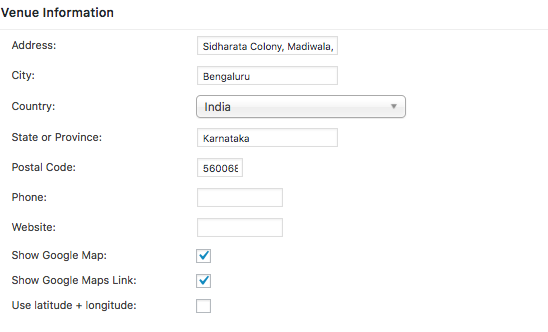
I would love to help you with this topic.I just ran a couple of tests and I have reason to believe that the issue is caused by the way the address is entered (compared to the Google Maps address).
Could you send me a copy of your Edit Venue screen ?
Based on what I found in Google Maps, here is what I came up with on my installation (and it worked)
Best regards,
Geoff B.
MemberGood afternoon Sarah and welcome back!
Thank you for reaching out to us.
I would love to help you with this topic.As a side note, should you prefer to, we can continue this conversation is French.
I believe the issue is caused by WPML: https://theeventscalendar.com/knowledgebase/wpml-support/
We are currently working on adding WPML support for Event Tickets Plus, but for now these 2 plugins do not play nicely together.
The symptoms are exactly as you describe: the ticket seems to vanish for the Event after saving it.
If you are only using french for now, there is a workaround possible.
After saving your ticket and your event, head over to WPML > Support > Troubleshooting page.
Once you are there, you will notice a bunch of buttons under the Cleanup section.
I would recommend using the first 7 buttons.Once you do that, the ticket should reappear in the event.
Unfortunately, for now, you will have to do this every time you create tickets.
Please note, that you will not be able to sell tickets in multiple languages for now (at least until we release that feature in 2017), but you should be able to do it just in French.
Let me know if that helps.
Have a great day!
Geoff B.
MemberGood afternoon Brian and welcome to the Events Calendar Support forum!
Thank you for reaching out to us.
I would love to help you with this topic.As you have figured out, there is no need to download a plugin for Event Aggregator, only the license key should suffice.
You are welcome back in our support forums any time 🙂
For now, I am going to close this thread.
Have a great week!
Geoff B.
December 15, 2016 at 10:59 am in reply to: Stylesheet overwriting styles for another plugin's admin panel #1206575MemberHey Rob,
I am super stoked that my colleague Brook’s updated snippet did it for you.
You are welcome back in our support forums any time 🙂
For now, I am going to close this thread.
Have a great week!
Geoff B.
December 14, 2016 at 9:39 pm in reply to: Can't update past version 4.2.7 without getting an INTERNAL SERVER ERROR #1206273MemberGood evening Rob,
Thank you once again for sticking with us on this one.
I would like to see this through with you.Incremental backups are absolutely worth a try.
However, before you do, I would like to recommend a more drastic approach to things:
- Deactivate and delete ALL of our plugins
- Reinstall them from scratch to the very latest versions of the plugins, starting with the Events Calendar free.
That should not impact anything in the database.
But, it is always advised to do a Database backup first.I would also advise having the regular Divi theme on while doing so.
I totally believe you when you say that the child theme has worked fine up to now.
However, sometimes, certain customizations found in Child themes need updating to work with the latest versions of our plugins (e.g.: deprecated functions).Hang in there!
Geoff B.
MemberGood evening Darren,
I agree.
This needs to be fixed so that everybody can fix their venue geolocation should they need to.
It has been placed in the next Maintenance release Dev cycle.
As you can guess, that means that it needs to also be tested thoroughly to prevent further issue.Thank you for your understanding.
Best regards,
Geoff B.
MemberGood evening Melanie,
Thank you for the detailed clarification.
We are in agreement, we need to troubleshoot this deeper.
Let me know how that goes, including perhaps reverting to the Beta of the plugin.
Best regards,
Geoff B.
MemberGood evening Matt and welcome to the Events Calendar forum!
Thank you for your interest in our products.
We’ll be glad to answer your questions.We would like to use a calendar plugin to allow our visitors to schedule a product demo. Does the Events Calendar Pro offer this functionality.
Actually, the Events Calendar Pro is not a booking plugin.
However, you could use either:
- Our Event Tickets plugin : https://theeventscalendar.com/product/wordpress-event-tickets/
- Our Event Tickets Plus premium add-on: https://theeventscalendar.com/product/wordpress-event-tickets-plus/
These work perfectly with the Events Calendar and, depending on your needs, could be used to book time slots (as long as these are tied to an actual Event).
If not, is there integration with an app like Calendly (https://calendly.com/)?
Unfortunately, no, we do not integrate with other calendar apps for the moment being.
Best regards,
Geoff B.
MemberGood evening Edward and welcome to the Events Calendar forum!
Thank you for your interest in our products.
We’ll be glad to answer your questions.We need help to make the plugin have all the events upcoming and past in one category view, similar to how if you click on a blog category, all posts show up – current to oldest.
The good news is that you can absolutely tweak any view in your calendar to your liking (e.g.: the photo view in your case).
You might want to read our Themer’s guide to get a sense of how that works.
I think it would require a custom query to show both past and upcoming events on the same page using the tribe_get_events() function in a new page template. We actually have a pretty nice tutorial that walks through how that function is used with examples that should help you get started.
Also, to have the event date and time on the excerpt would be great
Actually, that should normally be part of the Photo view. Could you give an example URL where that is not the case for you ?
somehow get the events from the plugin streaming through as blog posts, so the latest news widgets gets events too, this would help get those posts with visual composer.
This option exists under Events -> Settings -> General. Look for Include events in main blog loop.
Finally, if coding is not really your thing, you could hire one of our recommended customizers to do the customization for you.
Let me know if that helps.
Have a great day!
Geoff B.
December 14, 2016 at 5:05 pm in reply to: Recurring rules button not showing with crazy JavaScript error #1206220MemberGood evening Ron,
I am glad that the downgrade worked properly.
I absolutely agree that this is less than ideal and we will absolutely notify you as soon as the fix is out.
Thank you for your great patience on this one.
Best regards,
Geoff B.
December 14, 2016 at 5:00 pm in reply to: Redirect to Confirmation Page after Ticket Purchase #1206218MemberGood evening Jalin and welcome back!
Thank you for reaching out to us.
I would love to help you with this topic.I am not sure how customized you would like that page to be (e.g.: only for WooCommerce tickets), but:
- You can do customizations manually: https://nicola.blog/2015/01/21/customize-the-thank-you-page-in-woocommerce/
- You can use a third-party plugin such as: https://codecanyon.net/item/custom-thank-you-pages-per-product-for-woocommerce/10798449
Let me know if that helps.
Have a great day!
Geoff B.
MemberGood evening Sven and welcome to the Events Calendar forum!
Thank you for your interest in our products.
We’ll be glad to answer your questions.In order to be able to sell WooCommerce tickets you need:
- Our free Events Tickets plugin: https://theeventscalendar.com/product/wordpress-event-tickets/
- Our premium Event Tickets Plus add-on: https://theeventscalendar.com/product/wordpress-event-tickets-plus/
You do not need the Events Calendar installed (unless you want to)
Let me know if that helps.
Have a great day!
Geoff B.
MemberGood evening Ryan,
Thank you for writing back.
This is indeed very strange.
I know our plugin tends to use redirections intensively, but I have not heard of issues with the Redirection plugin before. In fact, I just did a couple of tests without any results.
Is it possible that there is a setting in your installation of the redirection plugin that might be causing this ?
Could you please send me a copy of the latest version of your WordPress theme / child theme via a link to a .zip file link (stored Dropbox or Google Drive) so that I can run some tests on my end ? I recommend a private reply for that purpose.
Please ensure you are using the latest files as found on your actual website.
This way I will get access to any updates or customizations you might have made.Best regards,
Geoff B.
MemberBonsoir Thierry,
Merci de nous écrire.
En ce qui concerne Members, je vous recommande de lire ceci: https://theeventscalendar.com/knowledgebase/admin-roles-and-permissions/
J’avais signalé aussi que l’affichage n’était pas complet après le scan. Ci joint la capture d’écran.
Je vois ce que vous voulez dire. Je vais ouvrir un billet pour ça.
Je vous invite à ajouter la règle CSS suivante sous /wp-content/plugins/event-tickets/src/resources/css/tickets-attendees.css après la ligne 39
@media screen and (max-width: 640px) and (orientation: portrait) {

#tribe-attendees-summary .welcome-panel-last {

padding: 10px 0px 5px 13px;

}

}
Salutations,
Geoff B.MemberGood evening Gabriel,
Thank you for writing back and for the system information.
You are absolutely right. The help menu disappears for our customers not using the Events Calendar. As you can imagine, this is completely non-intentional on our part.
In fact, a fix is pending release for that. You will be contacted as soon as it does.
But back to your issue for a second.
You should be able to access the additional attendee information, even without the Events Calendar.
To do this, please see the following screenshot
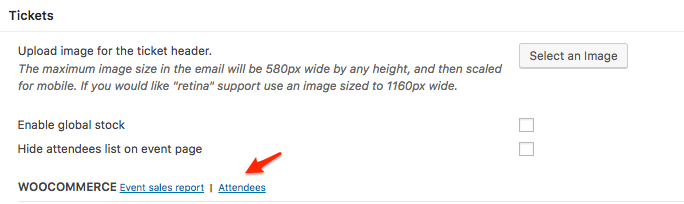
Once you are in the attendees report page, you can print or export your additional attendee info to your linking.
Additionally, we do have a plugin that adds that information to the WooCommerce emails as well, but that requires the Events Calendar to be installed: https://theeventscalendar.com/content/uploads/2016/10/tribe-ext-tickets-email-options-0-3-0.zip
Notice the additional options under Events -> Settings -> Tickets
Let me know if that helps.
Have a great day!
Geoff B.
-
AuthorPosts