
Home › Forums › Ticket Products › Event Tickets Plus › Ticket's Metadata Missing
- This topic has 7 replies, 5 voices, and was last updated 9 years, 9 months ago by
Nico.
-
AuthorPosts
-
December 13, 2016 at 6:12 am #1205143
Gabriel
ParticipantHi,
Everything is ok so far, except for the ticket’s info.
When the purchase info brings no reference for the metadata/info the was typed.When the ticket is purchased the user drops a line of text (can be lines too). I need this info to be accessible.
Supposed to be simple I guess. Am I wrong?Thanks in advance,
GabrielDecember 13, 2016 at 8:29 pm #1205691Geoff B.
MemberGood evening Gabriel and welcome to the Events Calendar Support forum
Thank you for reaching out to us.
We are sorry to hear about the ticket meta data missing.
I would love to help you with this topic.As a first troubleshooting step, could you please provide us with your complete system information in a private reply using the instructions found in the following link?
https://theeventscalendar.com/knowledgebase/sharing-sys-info/
Secondly, would you mind sharing some screenshots of what you are referring to so that I am sure we are talking about the same thing ?
Hang in there!
Best regards,
Geoff B.
December 14, 2016 at 4:53 am #1205755ParticipantHi, Geoff,
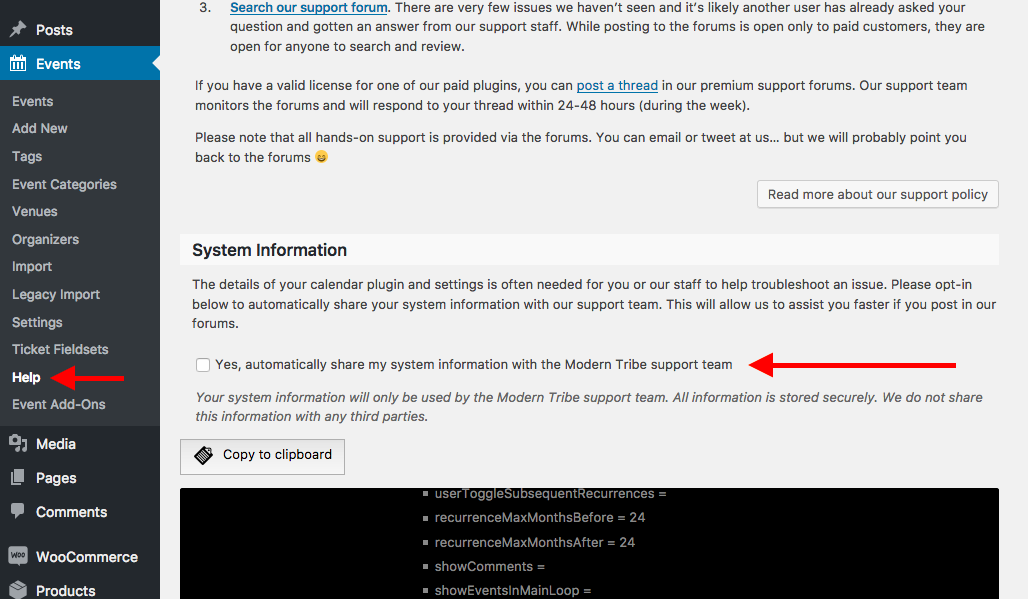
Well, would be a nice start to discover why I can’t see the screen pointed in the sharing-sys-info page (https://theeventscalendar.com/content/uploads/2015/05/Screen-Shot-2016-10-22-at-2.36.15-PM.png).
This options doesn’t exist for me. I’m attaching a screenshot of my backend for you to see.Maybe it’s more broken than I expected. Maybe you’ll be thinking that I was messing around the plugin. Nope!
What’s the next steps?
Best regards,
GabrielDecember 14, 2016 at 5:10 am #1205764ParticipantThis reply is private.
December 14, 2016 at 4:03 pm #1206204MemberGood evening Gabriel,
Thank you for writing back and for the system information.
You are absolutely right. The help menu disappears for our customers not using the Events Calendar. As you can imagine, this is completely non-intentional on our part.
In fact, a fix is pending release for that. You will be contacted as soon as it does.
But back to your issue for a second.
You should be able to access the additional attendee information, even without the Events Calendar.
To do this, please see the following screenshot
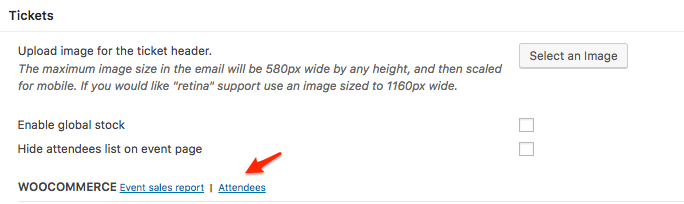
Once you are in the attendees report page, you can print or export your additional attendee info to your linking.
Additionally, we do have a plugin that adds that information to the WooCommerce emails as well, but that requires the Events Calendar to be installed: https://theeventscalendar.com/content/uploads/2016/10/tribe-ext-tickets-email-options-0-3-0.zip
Notice the additional options under Events -> Settings -> Tickets
Let me know if that helps.
Have a great day!
Geoff B.
January 5, 2017 at 8:35 am #1213825Support Droid
KeymasterHey there! This thread has been pretty quiet for the last three weeks, so we’re going to go ahead and close it to avoid confusion with other topics. If you’re still looking for help with this, please do open a new thread, reference this one and we’d be more than happy to continue the conversation over there.
Thanks so much!
The Events Calendar Support TeamJanuary 9, 2017 at 8:31 pm #1215545MemberHi there!
Just wanted to share with you that a major release of our plugins is out, which includes a fix for the help tab display issue 🙂
Find out more about the release → https://theeventscalendar.com/things-to-be-aware-of-in-version-4-4-of-the-events-calendar-event-tickets-and-premium-add-ons/
Best,
Nico -
AuthorPosts
- The topic ‘Ticket's Metadata Missing’ is closed to new replies.