
Home › Forums › Ticket Products › Event Tickets Plus › Google maps not showing on venue page.
- This topic has 7 replies, 4 voices, and was last updated 9 years, 9 months ago by
Devon Morris.
-
AuthorPosts
-
December 15, 2016 at 12:52 am #1206291
Devon Morris
ParticipantHi ,
Google maps not showing on India venue page While it showing in USA venue page?
Please check it ..
India Venue Event:
https://beardedeagle.com/event/certified-scrummaster-bangalore-csm-20170206-lm/December 15, 2016 at 11:44 am #1206601Geoff B.
MemberGood evening Devon and welcome back!
Thank you for reaching out to us.
We are sorry to hear about the google Maps not showing on the venue page.
I would love to help you with this topic.I just ran a couple of tests and I have reason to believe that the issue is caused by the way the address is entered (compared to the Google Maps address).
Could you send me a copy of your Edit Venue screen ?
Based on what I found in Google Maps, here is what I came up with on my installation (and it worked)
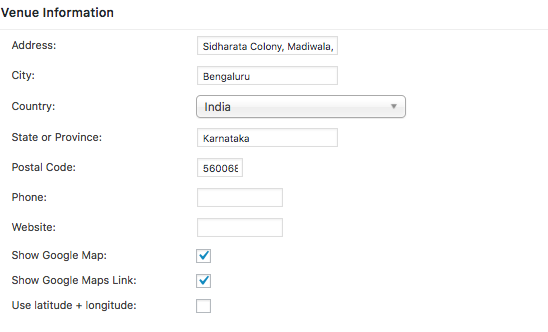
Best regards,
Geoff B.
December 15, 2016 at 8:43 pm #1206897ParticipantHI,
This is the Edit Venue Screen : Davanam Sarovar Portico Suites Hosur Main Road, Opp Madiwala Police station
Please Find the Attachment also.
and one thing also why latitude+longitude option is not showing in my edit venue screen?
December 16, 2016 at 10:03 am #1207142MemberGood afternoon Devon,
It looks like the event is no longer visible on your website.
In any case, I find that your best bet is to look up the venue on Google Maps and reuse the exact same address for better results.
For example, according to Google, the correct address for this venue is <span class=”section-info-text”>Opp Madiwala Police Station, Hosur Main Road, Koramangala, Bengaluru, Karnataka 560068, India</span>
Something else I am noticing is that it looks like you have a Google Maps error message in the Google Chrome Developer tools: You have included the Google Maps API multiple times on this page. This may cause unexpected errors
Perhaps that is related to the issue at hand ?
and one thing also why latitude+longitude option is not showing in my edit venue screen?
That is a great question.
As a first troubleshooting step, could you please provide us with your complete system information in a private reply using the instructions found in the following link?
https://theeventscalendar.com/knowledgebase/sharing-sys-info/
Let me know how that goes.
Best regards,
Geoff B.December 19, 2016 at 9:28 pm #1208004ParticipantThis reply is private.
December 20, 2016 at 7:53 pm #1208696MemberGood evening Devon,
Thank you for writing back and for the system information.
I agree for that i also getting same error: You have included the Google Maps API multiple times on this page
But How Google Map Working fine for USA ?That is a great question. I am going out on a limb here, but I believe Google Maps results might be slightly easier to get for US based results. Most probably because of variations in address format.
Simply put, if Google can’t recognize it, it won’t return a good result.
Can you tell me if you get better results if you use the exact format found in Google Maps when you search for a specific venue, as suggested in my previous reply ?
Just to be on the safer side of things, I would recommend making sure your Google Maps API is set up correctly as well: https://theeventscalendar.com/knowledgebase/setting-up-your-google-maps-api-key/
Other than that I can’t see anything obvious that would prevent the latitude and longitude settings to show up in the Edit Venue screen for you.
After an update to the latest version of our plugins, if the issue still persists, it looks like there is some type of conflict at play.
This is usually because of:- A conflict with another plugin
- A conflict with your WordPress theme
- A template customization for the Events Calendar that requires updating
A first quick test is to simply temporarily revert back to a default WordPress theme such as twenty-sixteen to see if the issue persists.
The next step would be to go through our testing for conflicts procedure (preferably in a staging/dev environment or local install of your WordPress website) and let us know what you find out.
Basically the goal here is to revert back to a bare WordPress installation to see if the problem persists. It also allows us to pinpoint what the cause of the issue is.
But, before you do that, there are 2 things I would advise:
- Make a backup of your database
- Consider activating a “Maintenance Page” plugin if you are doing this on your live site (to minimize impact on your visitors)
Let me know how that goes.
Best regards,
Geoff B.January 11, 2017 at 8:36 am #1216652Support Droid
KeymasterHey there! This thread has been pretty quiet for the last three weeks, so we’re going to go ahead and close it to avoid confusion with other topics. If you’re still looking for help with this, please do open a new thread, reference this one and we’d be more than happy to continue the conversation over there.
Thanks so much!
The Events Calendar Support Team -
AuthorPosts
- The topic ‘Google maps not showing on venue page.’ is closed to new replies.