

Forum Replies Created
-
AuthorPosts
-
December 16, 2016 at 9:38 am in reply to: The price fields do not appear in the event management area #1207135
Geoff B.
MemberGood afternoon Michel,
I am super stoked that this helped you solve your issue.
You are welcome back in our support forums any time 🙂
For now, I am going to close this thread.
Have a great weekend!
Geoff B.
December 16, 2016 at 9:35 am in reply to: Problem with Event tickets plus and Divi template #1207133MemberGood afternoon Jorge,
I am super stoked that this worked for you.
You are welcome back in our support forums any time 🙂
For now, I am going to close this thread.
Have a great weekend!
Geoff B.
MemberGood afternoon Sarah,
Thank you for writing back.
I am glad that my recommended steps helped out.
You are right. This will only need to be done upon ticket creation. The ticket will not disappear during the sale.
You are welcome back in our support forums any time 🙂
For now, I am going to close this thread.
Have a great weekend!
Geoff B.
December 15, 2016 at 11:35 pm in reply to: Can't update past version 4.2.7 without getting an INTERNAL SERVER ERROR #1206939MemberGood evening Robert,
I must say, I am really taken aback that none of these things have worked.
I really hoped they did.Out of curiosity, was the other website on the same server ? (in case this could be server related)
Could you also tell me what your PHP memory limit and max execution times are ?Since I am running out of solutions for you, I will escalate this issue that we both wish to be resolved badly.
Let me get another pair of expert eyes on this one.
Best regards,
Geoff B.
MemberGood evening Tirfari and welcome to the Events Calendar Support forum!
Thank you for reaching out to us.
We are sorry to hear about your test event not being visible.
I would love to help you with this topic.I believe the test event in question is http://igahu.com/event/3060/
I am able to see it on both the list view and the monthly view.
But, to see it on the monthly view, you have to fast forward 1 year in the feature since your event is in December 2017.Let me know if that helps.
Have a great day!
Geoff B.
MemberGood evening Mats and welcome back!
Thank you for reaching out to us.
We are sorry to hear about the permalinks no longer working for you.
I would love to help you with this topic.I would recommend going through the following and letting us know how that goes: https://theeventscalendar.com/knowledgebase/fixing-http-404-errors/
Best regards,
Geoff B.
MemberHey Geoffrey,
Thank you for writing back.
I see what you mean. The function you would probably want to use is https://theeventscalendar.com/function/tribe_is_event_category/
That being said, I am still pretty sure the issue comes from your theme’s archive.php
To test this out, you could temporarily switch to a default WordPress theme such as twenty-sixteen and look at the page title.
Let me know if that helps.
Have a great day!
Geoff B.
MemberThis reply is private.
MemberGood evening Edward,
Thank you for writing back.
The date and time is there, I didn’t realize it at first, but want to make sure the event venue and address show up in the excerpt too. regarding the date and time, the previous events, have venue and address data entered into them, but they don’t show it in the category / excerpt view.
That can be accomplished via a template customization with our themer’s guide.
I tried that setting for include the events in the blog loop, but for some reason, its not working
That is odd.
Could you please send me a copy of the latest version of your WordPress theme / child theme via a link to a .zip file link (stored Dropbox or Google Drive) so that I can run some tests on my end ? I recommend a private reply for that purpose.
Please ensure you are using the latest files as found on your actual website.
This way I will get access to any updates or customizations you might have made.is there a quick way you can check on those things, they should work automatically I would think, regarding the upcoming and past events, I may need to get someone to do that custom wise – for me, I don’t know if I would break it first before fix it lol
Just to set expectations,the scope of our support is mostly to get our customers started on the right track and to help them in case of issues.
We unfortunately do not provide complete support for customization.
So in other words, we have built our plugins so that they can be customized to the different people’s needs, but unfortunately, anything beyond the built-in features is a customization.
With that in mind, we constantly come up with snippets in our forums and extensions: https://theeventscalendar.com/extensions/
However, we do not tackle view customizations such as yours ourselves.
That will have to be done with the help of our themer’s guide or a recommend customizer (as can be seen in my previous reply).I would recommend giving the themer’s guide a shot, it’s actually not that bad and I could help you in the process. I would recommend doing that on a staging/test environment if you can.
Best regards,
Geoff B.
MemberGood evening Mark,
This is awesome news!
Kudos on finally solving this.
You are welcome back in our support forums any time 🙂
For now, I am going to close this thread.
Have a great week!
Geoff B.
December 15, 2016 at 12:29 pm in reply to: Thumbnail image dimensions changed on Monthly Event Tooltip after plugin upgrade #1206660MemberGood afternoon Susannah and welcome to the Events Calendar Support forum!
Thank you for reaching out to us.
I would love to help you with this topic.Normally, our plugin simply follows the WordPress thumbnail size.
This is set in WP-Admin under Settings > Media
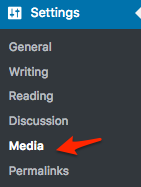
If I am correct about this, the discrepancy would be in the size of the thumbnails settings between your live site and your test site.
Once you fix the size of the thumbnails there, you might have to regenerate them using the following plugin: https://wordpress.org/plugins/regenerate-thumbnails/
Let me know how that goes.
Best regards,
Geoff B.December 15, 2016 at 12:08 pm in reply to: Prices not shown in events list (using photo view) #1206621MemberGood afternoon Maxime and welcome back!
Thank you for reaching out to us.
I would love to help you with this topic.As a side note, we can continue this conversation in French if you prefer.
Is it possible to have the price of events shown in events list ?
The short answer is yes. We have built our plugins so that you can customize pretty much any view you like.
You might want to read our Themer’s guide to get a sense of how that works.
So basically you:
- Find the view file you want to change
- Copy it over to your theme’s newly created /tribe-events/ folder (in the correct path)
- Change the view file and perhaps borrow from other view files (e.g.: the price in this case).
Let me know if that helps.
Have a great day!
Geoff B.
December 15, 2016 at 12:02 pm in reply to: Problem with Event tickets plus and Divi template #1206617MemberGood afternoon Jorge and welcome to the Events Calendar Support forum!
Thank you for reaching out to us.
I would love to help you with this topic.I am pretty sure you can fix your issue by going to Events -> Settings -> Display.
Once you are there look for the Events Template setting (dropdown).
Simply select a different template (e.g.: default events template), save your changes and the issue should be fixed.Let me know how that goes.
Best regards,
Geoff B.December 15, 2016 at 11:58 am in reply to: The price fields do not appear in the event management area #1206613MemberGood afternoon Michel and welcome back!
Thank you for reaching out to us.
I would love to help you with this topic.I believe what is going on is that you are using Event Tickets.
When this plugin is activated, it removes the cost field from the Edit Event screen.I believe you can fix this simply by using the following snippet: https://theeventscalendar.com/knowledgebase/use-the-event-cost-field-with-tickets-installed/
Let me know if that helps.
Have a great day!
Geoff B.
December 15, 2016 at 11:52 am in reply to: Events Tickets Plus and WooCommerce Memberships integration #1206607MemberGood afternoon Marcella and welcome to the Events Calendar forum!
Thank you for your interest in our products.
We’ll be glad to answer your questions.Is there any feedback from people that have used this combination of plugins? or a website to see how it works?
That is a great question. Although there is no special integration at play, from what our customers are telling us, it works for them.
The only exception being that there is currently a small glitch with % based discounts.
Everything works great still, but the “Overall” event price displays as the discounted price (in the header of the event and on the event list).A workaround for that is to add the “Starting at” label in front of the price.
$ based discounts work great.
Unfortunately, we did not conduct any of these tests ourselves, so I am afraid that I do not have a demo site for you.
Let me know if that helps.
Have a great day!
Geoff B.
-
AuthorPosts