
Home › Forums › Calendar Products › Events Calendar PRO › Thumbnail image dimensions changed on Monthly Event Tooltip after plugin upgrade
- This topic has 6 replies, 4 voices, and was last updated 9 years, 9 months ago by
ohsusannah.
-
AuthorPosts
-
December 14, 2016 at 8:09 pm #1206260
ohsusannah
ParticipantThumbnail image dimensions changed on Monthly Event tribe-events-tooltip after upgrading the two plugins …
The Events Calendar 4.2.1 upgraded to 4.3.4.2
The Events Calendar PRO 4.2.1 upgraded to 4.3.3The thumbnail dimensions prior to plugin updates were 150×150 :
<div class="tribe-events-event-thumb">
				<img src="http://www.my-site-redacted-here.com/event-image-150x150.jpg" alt="image alt">
			</div>
The thumbnail dimensions after upgrading plugins are 90×90 :
<div class="tribe-events-event-thumb">
				<img src="http://www.my-site-redacted-here.com/event-image-90x90.jpg" alt="image alt">
			</div>
I am trying to discover the source of data to change thumbnail dimensions back to 150×150, but I’m having no luck finding *where* these dimensions are set. I am a newb Re: JSON, so any pointers as to *where* to find this data in the “markup”, as per your comments in views/month/single-event.php, would be greatly appreciated.
We have the live site running with old plugin versions, and a test site is running new plugin versions. The thumbnail dimensions above is the only issue to be resolved.
I am pasting system info for both the test site and the live site…
Thank you.
December 15, 2016 at 7:17 am #1206408ParticipantHoping to get some assistance om this. Thanks
December 15, 2016 at 12:29 pm #1206660Geoff B.
MemberGood afternoon Susannah and welcome to the Events Calendar Support forum!
Thank you for reaching out to us.
I would love to help you with this topic.Normally, our plugin simply follows the WordPress thumbnail size.
This is set in WP-Admin under Settings > Media
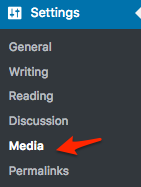
If I am correct about this, the discrepancy would be in the size of the thumbnails settings between your live site and your test site.
Once you fix the size of the thumbnails there, you might have to regenerate them using the following plugin: https://wordpress.org/plugins/regenerate-thumbnails/
Let me know how that goes.
Best regards,
Geoff B.December 16, 2016 at 10:55 am #1207164ParticipantThis reply is private.
December 17, 2016 at 12:50 pm #1207388MemberGood afternoon Susannah,
Thank you for writing back.
I believe I miscommunicated what I meant. My apologies.
You are right. I can totally see that HTML being generated on your site.
However, using a similar setup to yours, I still get thumbnails that are 150×150.So I am pretty confident that the issue comes from somewhere else.
I would be happy to work with you to find out where it is coming from.With that in mind, can you tell me what happens
- if you try to delete one of the featured images and put it back ?
- if you temporarily switch back to a default WordPress theme such as twenty-sixteen ?
- try running the suggested plugin above ?
Have a good weekend,
Geoff B.
January 8, 2017 at 8:35 am #1214862Support Droid
KeymasterHey there! This thread has been pretty quiet for the last three weeks, so we’re going to go ahead and close it to avoid confusion with other topics. If you’re still looking for help with this, please do open a new thread, reference this one and we’d be more than happy to continue the conversation over there.
Thanks so much!
The Events Calendar Support Team -
AuthorPosts
- The topic ‘Thumbnail image dimensions changed on Monthly Event Tooltip after plugin upgrade’ is closed to new replies.