

Forum Replies Created
-
AuthorPosts
-
Geoff B.
MemberGood evening Randy and welcome back!
Thank you for reaching out to us.
We are sorry to hear about the display not being to your liking.
I would love to help you with this topic.1. How do I correct that?
The issue here seems to be the great variance between image ratios and text lengths.
I would highly recommend reading the following to get a more even result: https://theeventscalendar.com/knowledgebase/change-photo-view-to-equal-height-grid/
2. How do shorten the summary of those events in map view?
There are quite a few ways to do this, but perhaps the simplest way is to use the Excerpt metabox of the Edit Event screen.
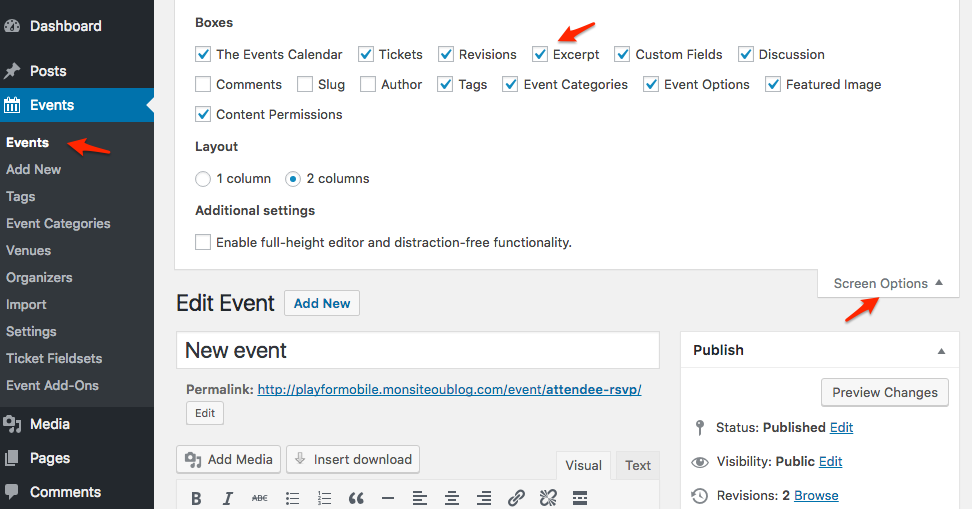
Let me know if that helps.
Have a great day!
Geoff B.
MemberThis reply is private.
December 26, 2016 at 9:25 pm in reply to: Can you add a short code to single venue view page #1210661MemberGood evening Tristan,
Thank you for writing back.
As you might have guessed, the scope of our support is mostly to get our customers started on the right track and to help them in case of issues. We unfortunately do not provide complete support for customization.
With that in mind, I would love to answer any other questions you might have to get started on this customization.
Have an awesome holiday season!
Cheers,
Geoff B.December 26, 2016 at 9:21 pm in reply to: Problems with the auto email for Confirming Orders & Issuing Tickets #1210659MemberGood evening Huiwen,
Thank you for writing back and activating the system information.
Unfortunately, it looks like I am still unable to get that information.
Would you mind simply pasting that in a private reply for now ?As you have guessed correctly, replies might be more sparse during the holiday season, but I would still love to help out.
As for order status history, where can I get such information? In order note, it says “Order status changed from Pending Payment to Completed.” – if that’s what you refer to?
Absolutely, that’s it!
Would be possible to get a couple of screenshots of these order notes. I am really interested in the timestamp on them.
Happy holidays!
Cheers,Geoff B.
December 26, 2016 at 9:15 pm in reply to: Woocommerce Multi Currency with WPML and WPML compatibility issue #1210658MemberGood evening Xavier,
Thank you for writing back.
I am sorry there is not much we can do for now.
The timeline for ticket support should be in the upcoming year. I wish I could be more precise. Unfortunately, that is not possible.
As I understand, TEC isn’t fully compatible with WPML.
Actually, that is not accurate. TEC and TEC Pro are fully compatible with WPML.
In fact, we have worked hard and continue to do so with the good folks from the WPMl team.I’ll gladly help setting things up for these 2 plugins should you want me to.
However, all of the other plugins in our suite are not compatible yet or not fully.
Can I ask for a refund ?
The good news is you are fully entitled to a refund if you want one since you are within 30 days of your purchase. To obtain the refund, you just need to follow the procedure described here.
Happy holiday season and stay tuned!
Cheers,
Geoff B.MemberGood evening Cindy,
Thank you for the files and screenshots.
I believe the issue is that you are trying to import venues at the same time as Events.
What you need to do is to first import all of your venues using this model http://theeventscalendar.com/content/uploads/2014/09/test-data-venues11.csv
It is important that venues have names and these are the same names used when importing events (under Venue name).
Have a good weekend,
Geoff B.
MemberThis reply is private.
December 23, 2016 at 11:53 pm in reply to: Can't update past version 4.2.7 without getting an INTERNAL SERVER ERROR #1210222MemberThis reply is private.
MemberThis reply is private.
MemberThis reply is private.
December 23, 2016 at 11:38 pm in reply to: Two questions: Event List in Alphabetical Order and Change Wording #1210217MemberGood evening Helen,
Thank you for writing back.
There are a few approaches to this, but the simplest is by adapting and using the code snippet found way at the bottom of the following link: https://theeventscalendar.com/knowledgebase/change-the-wording-of-any-bit-of-text-or-string/
Just make sure you don’t paste the opening <? php statement.
Have a good weekend,
Geoff B.
MemberGood afternoon Simon and welcome back!
Thank you for reaching out to us.
We are sorry to hear about the previous thread closed before it could get resolved.
I would love to help you with this topic.A snippet would be great (I have requested one – hopefully this can be added to the following extension: https://theeventscalendar.com/extensions/advanced-options-for-adding-events-to-the-main-blog-loop/).
In the meantime, you could cheat with CSS and add a display:none rule for all posts that have the tribe-recurring-event-child class in your blog loop.
Let me know if that helps.
Have a great day!
Geoff B.
December 23, 2016 at 7:05 pm in reply to: Problems with the auto email for Confirming Orders & Issuing Tickets #1210191MemberJust to get you started with the Organizer info, you simply need to create a template override for
/event-tickets/src/views/tickets/email.php.On line 393 they will see where it output the name for each organized, you can just output the website and so forth as well right there.
December 23, 2016 at 7:02 pm in reply to: Problems with the auto email for Confirming Orders & Issuing Tickets #1210190MemberGood evening Huiwen and welcome back!
Thank you for reaching out to us.
We are sorry to hear about the issues you have encountered in regards to the confirmation and ticket emails. I would love to help you with this topic.
1. When the purchase order is not fully completed – for example, when the buyer reaches his paypal page but decides to drop the deal, the system will still send an automatic email to the buyer confirming that “Your order is complete”, followed by another automatic email to the buyer issuing the ticket.
Normally, this should not be the case. It is the sign that either:
- There is a snippet in place that is preventing the order status to become “cancelled” instead of pending.
- Some of your settings are preventing the correct order status from being handled.
As a first troubleshooting step, could you please provide us with your complete system information in a private reply using the instructions found in the following link?
https://theeventscalendar.com/knowledgebase/sharing-sys-info/
Additionally, could you confirm what the order status history is for such orders ?
2. Meanwhile, for the event organiser (the vendor), it shows in the Attendee Report that one additional order is made, even though it is not. Same error shows in the Sales Report too. An automatic email titling “New Customer Order” is also sent to the vendor. There are also other minor errors in the Sales Report (such as number of tickets sold is always 0).
I am pretty sure we can handle this while handling problem number 1.
It sounds like another facet of the same issue.3. In the ticket issued by the system, there is no contact details of the event organiser (when it’s a repetitive event organiser I suppose). Ideally, the private information (email, phone, even venue) shall be masked or obfuscated in the listed event page, but only shown in the ticket to the buyer when the order is fully completed.
By default, only the organizer name should show up on the ticket.
To add the organizer info you will need to customize your ticket content.
This can be achieved using a template customization.
You might want to read our Themer’s guide to get a sense of how that works.Using the same approach will also let you control what organizer information is displayed (or not).
Have a good weekend,
Geoff B.
December 23, 2016 at 6:34 pm in reply to: Woocommerce Multi Currency with WPML and WPML compatibility issue #1210186MemberGood evening Xavier and welcome to the Events Calendar Support forum!
Thank you for reaching out to us.
We are sorry to hear about the struggles you have faced while trying to run Event Tickets Plus with WPML. I would love to help you with this topic.
What is going on is that these 2 products are not quite compatible yet unfortunately: https://theeventscalendar.com/knowledgebase/wpml-support/
The good news is that we are currently working on that compatibility. Unfortunately, I cannot commit to a release date at this point.
But stay tuned we are really looking forward to releasing this!
I create a product, set a ticket with price. On the event page and the listing or calendar pages, the price is always displayed with the default currency set in TEC settings.
For now, I believe your best bet would be to either:
- Hide the price generated by the Events Calendar
- Customize the list and single event views using our Themer’s guide .
If coding is not really your thing, you could hire one of our recommended customizers to do the customization for you.
When I’ve TEC, TEC Pro, ET, ET+ and Woocommerce activated, I can add Woocommerce tickets.
As soon as I activate WPML, when I add a Woocommerce ticket, a notification tells me the ticket has been saved, but I don’t see it on the Calendar event page (front page and edit page). As soon as I deactivate WPML, the ticket is everywhere. When I activate again WPML, all tickets are displayed as expected, but again I can’t create a new ticket (well, I can, but it will be hidden).
You are right, this is the main issue.
Even if not visible, the tickets are actually created.
Deactivating / Reactivating the plugin OR using the WPML > Support > Troubleshoot page (clicking on the clean-up buttons will also make the tickets appear back).For now, this is the only very annoying way to solve this issue.
The downside is that it is currently not possible to create a true multilingual ticket (even with the workaround). At best, you can create separate tickets for each language (that do not share stock for example).
I wish I had a better answer for you, but for now it’s the best one I have.
Have a good weekend,
Geoff B.
-
AuthorPosts