
Home › Forums › Calendar Products › Events Calendar PRO › Events page MAP view is not lining up correctly
- This topic has 11 replies, 3 voices, and was last updated 9 years, 9 months ago by
Randy.
-
AuthorPosts
-
December 24, 2016 at 11:14 am #1210342
Randy
ParticipantMy events page (default to map view) is not setting up correctly.
http://riteacademy.com/events/
It’s 3 across, and then 1 right aligned.1. How do I correct that?
2. How do shorten the summary of those events in map view?December 26, 2016 at 9:47 pm #1210664Geoff B.
MemberGood evening Randy and welcome back!
Thank you for reaching out to us.
We are sorry to hear about the display not being to your liking.
I would love to help you with this topic.1. How do I correct that?
The issue here seems to be the great variance between image ratios and text lengths.
I would highly recommend reading the following to get a more even result: https://theeventscalendar.com/knowledgebase/change-photo-view-to-equal-height-grid/
2. How do shorten the summary of those events in map view?
There are quite a few ways to do this, but perhaps the simplest way is to use the Excerpt metabox of the Edit Event screen.
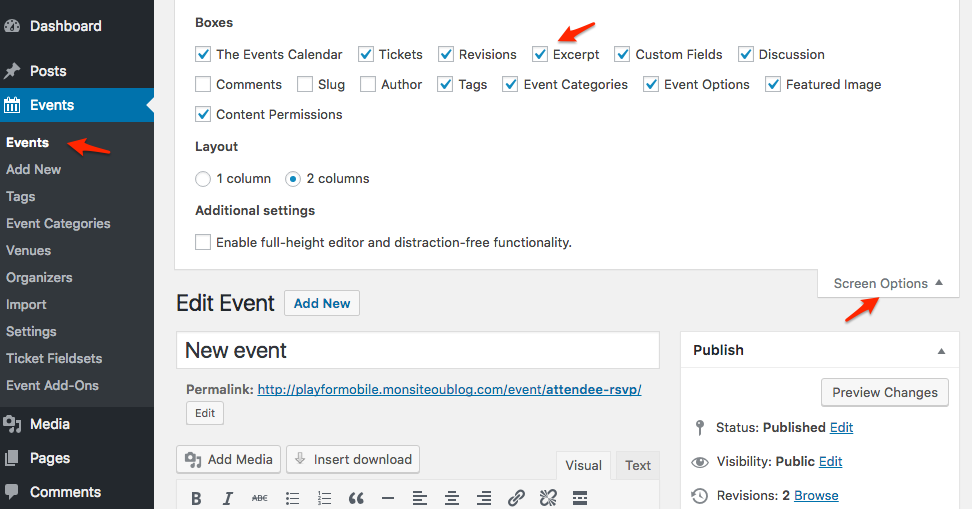
Let me know if that helps.
Have a great day!
Geoff B.
December 27, 2016 at 7:48 am #1210738Participant1. I am not comfortable changing the code and I don’t to mess it up completely.
There has to be an easier way to line up the pictures and information… ? It makes no sense that I have 2 across and then 1 right aligned, and 3 across again. How can I fix this? This is the reason I purchased the premium2. I have no idea where this is (that you say to create a summary) “use the Excerpt metabox of the Edit Event screen.”
December 27, 2016 at 11:01 pm #1210951MemberGood evening Randy,
Thank you for writing back.
1. I am not comfortable changing the code and I don’t to mess it up completely. There has to be an easier way to line up the pictures and information… ? It makes no sense that I have 2 across and then 1 right aligned, and 3 across again. How can I fix this? This is the reason I purchased the premium
I totally understand. Some people prefer not to tweak code at all.
And you are right, it does not make sense for the display to be the way it currently is.
The reason the display is acting up is because the images used all have different ratios and the different excerpts all have different lengths.
As a result the display rules are struggling to make everything nice and tidy.
The good news is that there are a couple of solution to this:
- The most robust one would be to tweak the code as suggested earlier. This has the advantage of making things “automatic” for you. In other words, you no longer need to concern yourself with things such as image ratio or excerpt length
- You could manually make sure that all images you are using as featured image have the same ratio. For example, 300×200 pixels or 600 x 400 pixels share the same ratio. You will also need to control the excerpt length manually (more on that below).
2. I have no idea where this is (that you say to create a summary) “use the Excerpt metabox of the Edit Event screen.”
What is going on is that, if you do not specify an excerpt, WordPress will randomly display the text it finds in the event’s description.
To control that, please refer to the screenshot from my previous reply.
In other words:
- From an Edit Event screen, click on “Screen options” in the top right corner.
- Look for the excerpt checkbox and check it (this is a one-time thing, you will never need to do this again).
- Now scroll down in your Edit Event screen until you find a new section called “Excerpt”. It should be blank (you might need to expand it).
- In that blank metabox, enter the text you want to appear. WordPress will now display that text instead of random content.
- Repeat for every event.
If all of the above is still on the cumbersome side of things for you, I would like to offer to implement the suggested fix for you.
In order to do that could you please send me a copy of the latest version of your WordPress theme / child theme via a link to a .zip file link (stored Dropbox or Google Drive) so that I can run some tests on my end ? I recommend a private reply for that purpose.
Please ensure you are using the latest files as found on your actual website.
This way I will get access to any updates or customizations you might have made.Best regards,
Geoff B.
December 28, 2016 at 10:03 am #1211141ParticipantThis reply is private.
December 28, 2016 at 11:05 pm #1211271MemberThis reply is private.
December 29, 2016 at 4:06 am #1211307ParticipantIt is on full styles
December 29, 2016 at 8:31 am #1211366ParticipantWhen i changed it to skeleton styles, the actual events page widened (correctly) but my main Events Dates tab went to Sh–. – see images below.
When i switch it to Full style, it cuts off the page again.
Very frustrated
Thanks for you help!December 29, 2016 at 11:41 pm #1211617MemberGood evening Randy,
Thank you for trying this out.
I am sorry to hear that it did not go smoothly as expected.
Try adding the following CSS rule to your style.css file or in your Custom CSS metabox:
.tribe-events-event-image+div.tribe-events-content {

width: 100% !important;

}
If CSS is not really your thing, you can add it simply by using the following plugin: https://wordpress.org/plugins/simple-custom-css/
Let me know if that helps.
Have a great day!
Geoff B.
December 30, 2016 at 8:00 am #1211723ParticipantWooHoo it worked!
I wasn’t sure if it would mess anything else up, but all looks good now!
Thank you so much and for not giving up on me! (I taught myself how to build WP sites, so still don’t know much compared to (anyone) those younger than me. 🙂
RandyDecember 30, 2016 at 9:55 pm #1211922MemberGood evening Randy,
I am super stoked that this worked for you.
We are always glad to teach new stuff to our awesome customers, no matter where they start from. Kudos on your website by the way, especially knowing that you are self-taught!
You are welcome back in our support forums any time 🙂
For now, I am going to close this thread.
Happy new year!
Geoff B.
-
AuthorPosts
- The topic ‘Events page MAP view is not lining up correctly’ is closed to new replies.