Forum Replies Created
-
AuthorPosts
-
Geoff B.
MemberGood evening Toko-pa,
I am super stoked that this worked for you.
You are welcome back in our support forums any time 🙂
For now, I am going to close this thread.
Have a great week!
Geoff B.
MemberGood evening Mike,
Thank you for taking the time to write back.
You do not necessarily need a developer to tackle this, but it is better to get a hold of somebody that is comfortable using phpMyAdmin at least.
With that in mind, if you still want to give it a shot, you need to:
- Learn how to make a database backup using phpMyAdmin (that software should be included in your CPanel interface from your webhost).
- Learn how to restore a database backup using phpMyAdmin. If you cannot get these 2 steps, I would definitely recommend getting a hand from a developer or a web person.
- Find the wp_posts table still using phpMyAdmin
- Try to filter or at least manually look for entries that are of the tribe_events post type. To do that you need to scroll to the right until you bump across the post_type column. It will look like the following screenshot
- You can select the rows that contain that post_type in batch. This is a lot like what you do in WordPress, except it will be much faster to respond and refresh
All of these should be manageable after a few YouTube videos and you will probably find it is not that bad.
That being said, you might not have the time or the desire to do that.
Let me know how that goes.
Best regards,
Geoff B.MemberGood evening Math,
I am glad that helped.
The black box is caused by another one of your theme’s CSS rules:
textarea[disabled], input[type="text"][disabled], input[type="password"][disabled], input[type="datetime"][disabled], input[type="datetime-local"][disabled], input[type="date"][disabled], input[type="month"][disabled], input[type="time"][disabled], input[type="week"][disabled], input[type="number"][disabled], input[type="email"][disabled], input[type="url"][disabled], input[type="search"][disabled], input[type="tel"][disabled], input[type="color"][disabled], textarea[readonly], input[type="text"][readonly], input[type="password"][readonly], input[type="datetime"][readonly], input[type="datetime-local"][readonly], input[type="date"][readonly], input[type="month"][readonly], input[type="time"][readonly], input[type="week"][readonly], input[type="number"][readonly], input[type="email"][readonly], input[type="url"][readonly], input[type="search"][readonly], input[type="tel"][readonly], input[type="color"][readonly], fieldset[disabled] textarea, fieldset[disabled] input[type="text"], fieldset[disabled] input[type="password"], fieldset[disabled] input[type="datetime"], fieldset[disabled] input[type="datetime-local"], fieldset[disabled] input[type="date"], fieldset[disabled] input[type="month"], fieldset[disabled] input[type="time"], fieldset[disabled] input[type="week"], fieldset[disabled] input[type="number"], fieldset[disabled] input[type="email"], fieldset[disabled] input[type="url"], fieldset[disabled] input[type="search"], fieldset[disabled] input[type="tel"], fieldset[disabled] input[type="color"] {

cursor: not-allowed;

background-color: #4c5859;

opacity: 1;

}
For our purpose, we’ll focus on the part that is causing trouble.
Try adding the following CSS rule to your style.css file or in your Custom CSS metabox:
input[type="number"][readonly] {

background-color: transparent !important;

}
Let me know how that goes.
Best regards,
Geoff B.MemberGood evening Sue,
Sure thing.
I just processed your refund.As you might know, this can take a few days through go through the Paypal process.
Best of luck with your projects,
Geoff B.April 27, 2017 at 7:08 pm in reply to: The Events Calendar PRO & WPML permalink always ?preview=true #1275526MemberGood evening Alex,
Thank you for writing back.
I just realized that the version of WPML you are using is several versions behind the current one (your version is at least from 2014).I know for a fact that our compatibility with WPML started after that point (some time in 2015) and that we had to work with the WPML team to achieve that.
So in short, unless you are willing to use a more recent version of WPML, I am afraid there is very little to be done in this case.
If you are up for it however and you are willing to test it out on another staging environment, we will gladly help you out.
Let me know if there is anything else I can help you with.
Best regards,
Geoff B.
April 27, 2017 at 9:45 am in reply to: Integrating The Events Calendar with Slider Revolution and Essential Grid #1275320MemberGood afternoon Settimo,
Thank you for writing back and running those tests.
So in short, this has to do with the specific formatted event date shortcode vs the different versions of the plugins present on your installation.
I will dig deeper and run some additional tests on that today on my end and get back to you tomorrow with my findings.
In the meantime, could you also share your exact version of Slider revolution (to leave no stone unturned), that would be super useful.
Hang in there!
Geoff B.
April 27, 2017 at 9:43 am in reply to: The Events Calendar PRO & WPML permalink always ?preview=true #1275319MemberGood afternoon Alex,
I am glad you found a workaround. Kudos.
After all, this is the most important part!That being said, I am rather curious to know what happened there because I want to make sure this does not happen to others.
Would you happen to have some kind of staging environment available that would allow us to investigate a bit closer ?
Otherwise, for now, I am not able to reproduce this issue unfortunately.
Let me know if we can continue this investigation.
Have a great day!
Geoff B.
MemberGood afternoon Tom,
Thank you for clarifying that.
To answer your question, no, you will not need Event Tickets Plus to do that.
This will be handled by either an extension or a code snippet.In all the threads on this topic I saw references to other people needing this requirement and the solution suggested was third party plugins and the ability to notify the organizer is on the “wish list”.
Actually, we used to offer this through an extension that is currently undergoing some maintenance.
We are also in the process of crafting a snippet specifically for that purpose.
It looks like it will be released within the next week if all goes according to plan.I just added a note to make sure you are notified the second it is out.
Is there anything else I can help you with on this topic today ?
Best regards,
Geoff B.
MemberGood afternoon Gianrene,
Thank you for writing back and for your great words 🙂
I am super stoked that helped you fix the issue!PS: there should really be a events check in user role to make the check in process smoother and a qr reader built-in. But, that’s just my wishful
thinking.Actually, there is a ticket for that!
As for the App, you can vote for it here: https://tribe.uservoice.com/forums/195723-feature-ideas/suggestions/11304501-develop-an-android-and-ios-app-for-qr-code-scannin
Is there anything else I can help you with on this topic ?
Best regards,
Geoff B.
MemberGood evening Jelina and welcome to the Events Calendar forum!
Thank you for your interest in our products.
We’ll be glad to answer your questions.1. Can we display event calendar using this ticket event ticket plugin ?
The 2 plugins ( the Events Calendar and Event Tickets Plus ) are 2 separate plugins that are autonomous. This means they can be used on their own.
For example, you could use Event Tickets Plus to sell tickets on a normal WordPress page or post.
But, they are also complementary.
This means that you can use the Events Calendar to display events that have tickets attached to them (and sell those tickets).2. Or we will use event calendar free plugin ?
I see what you mean.
Event Tickets Plus does not replace the Events Calendar.
This means that it does not contain any code that generates a calendar.If you want to integrate with a calendar, you will both the free the Events Calendar plugin AND Event Tickets Plus.
Finally, Event Tickets Plus actually extends our free Event Tickets plugin.
This means that you will need to have both Event Tickets and Event Tickets Plus installed whatever you do.Let me know if that helps.
Have a great day!
Geoff B.
April 26, 2017 at 3:16 pm in reply to: "All" not translated whereas everything else is translated #1274981MemberGood evening Yves and welcome back!
Thank you for reaching out to us.
I would love to help you with this topic.In any event article page, only the word “all” (before the word events) is not translated in my language. How is it possible ? (in french)
Absolutely. In fact the latest version of our french translation files should be translating that string (All %s).
When translation file strings are not kicking in, it is usually caused by one of the following things:
- Your translation files are not up to date
- You are using some customized translation files that have been placed in the /wp-content/languages/ or /wp-content/languages/plugins/ folder. These might not be updated and will override any other file.
The solution is to update your translation files using the pot file. You can do this by using the Poedit software and heading to Catalog > Update from pot file.
Let me know if that helps.
Have a great day!
Geoff B.
MemberGood evening Larissa and welcome to the Events Calendar forum!
Thank you for your interest in our products.
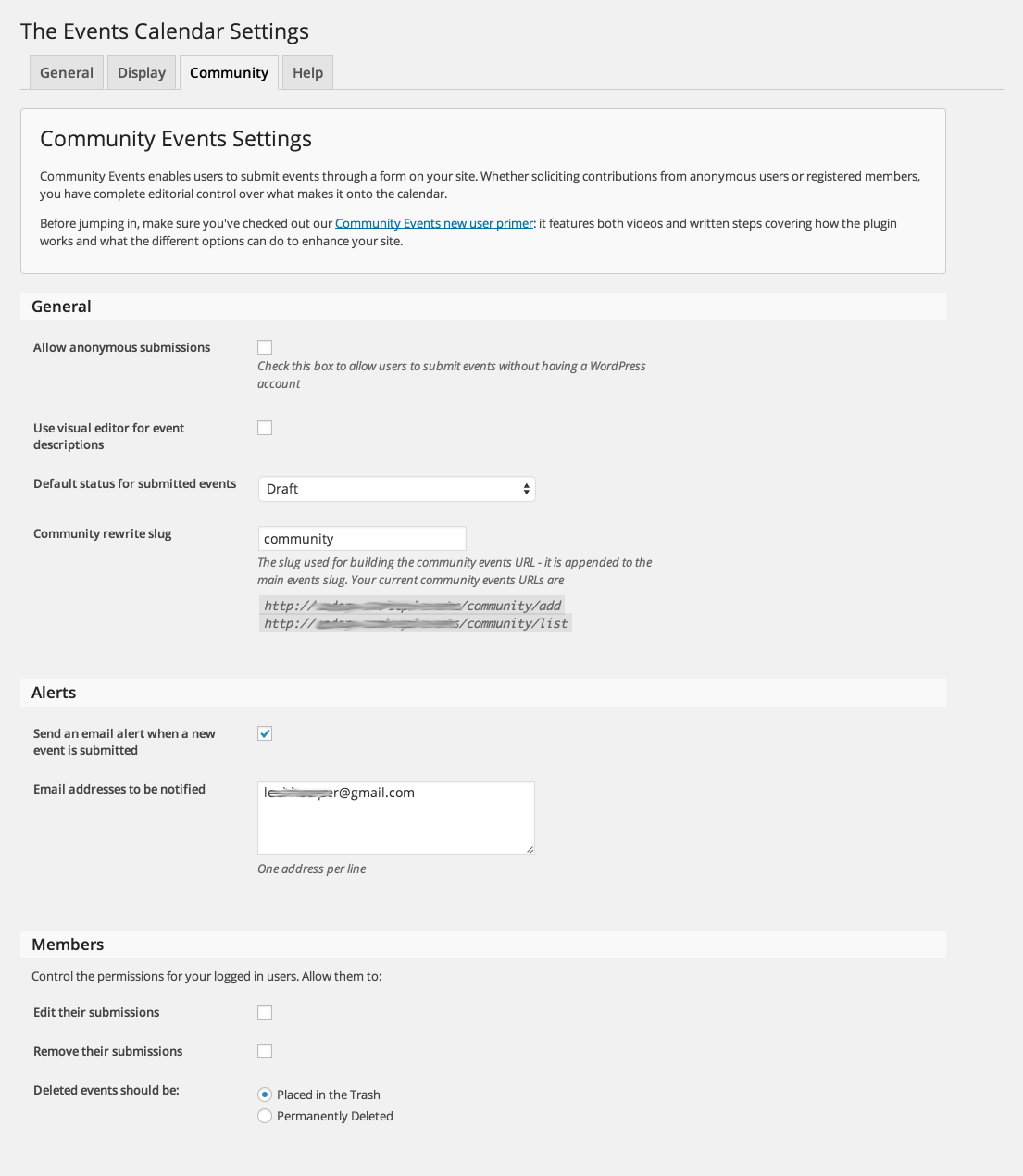
We’ll be glad to answer your questions.is there a way that a user submits an event but I (as admin) approve it before it is posted onto my website?
Yes, absolutely. This can be achieved by the default status setting of a submitted event.
You can see that feature in the Community Events page: https://theeventscalendar.com/product/wordpress-community-events/
More specifically, look at the following screenshot: https://theeventscalendar.com/content/uploads/2013/02/Community-Settings-1.png
Let me know if that helps.
Have a great day!
Geoff B.
MemberGood evening Gretel,
Thank you for writing back.
I am sure we can help out, alas the screenshot did not make it somehow 🙁
Could you please share it again using a Dropbox or Google Drive link ?
This way I will be able to make sure I point you in the right direction.Best regards,
Geoff B.
MemberThis reply is private.
MemberGood evening Paul (I guess that works for both of you),
Thank you for your interest in our products.
We’ll be glad to answer your questions.Is this possible out of the box with your application?
Yes, the functionalities to be able to sell tickets for different dates (and tie them to events) is possible using our Event Tickets Plus premium add-on: https://theeventscalendar.com/product/wordpress-event-tickets-plus/
However, if you absolutely want that exact layout, you will need to either customize one of the existing views or simply create a page template.
You can read about that here: https://theeventscalendar.com/customizations/
You should also know that Tickets are really Simple Virtual WooCommerce Products (that are hidden from the catalog by default). This means that you could simply list the WooCommerce products and make filters for them if you are mostly interested in the ticketing aspect of things.
Also do you have an API?
We do: https://theeventscalendar.com/knowledgebase/tribe-settings-api/
However, it sounds like you will most likely be interested in connecting with WooCommerce’s API (we hand off all of the transactional aspect of things to WooCommerce).
Let me know if that helps.
Have a great day!
Geoff B.
-
AuthorPosts