Forum Replies Created
-
AuthorPosts
-
Geoff B.
MemberGood evening Jennifer,
Thank you for your answer.
I think the issue is coming from the way the recurring events are showing up in the old site’s database.
That is possible.
The display here: https://theeventscalendar.com/content/uploads/2017/05/b90cf7534daed07f.png is a bit odd.This could be due to:
- Some template customization regarding recurring events that needs some updating. It is typically found either in the functions.php file of your theme or in it’s /tribe-events/ folder.
A quick test would be to temporarily revert back to a default WordPress theme such as twenty-sixteen and see if the display is better.
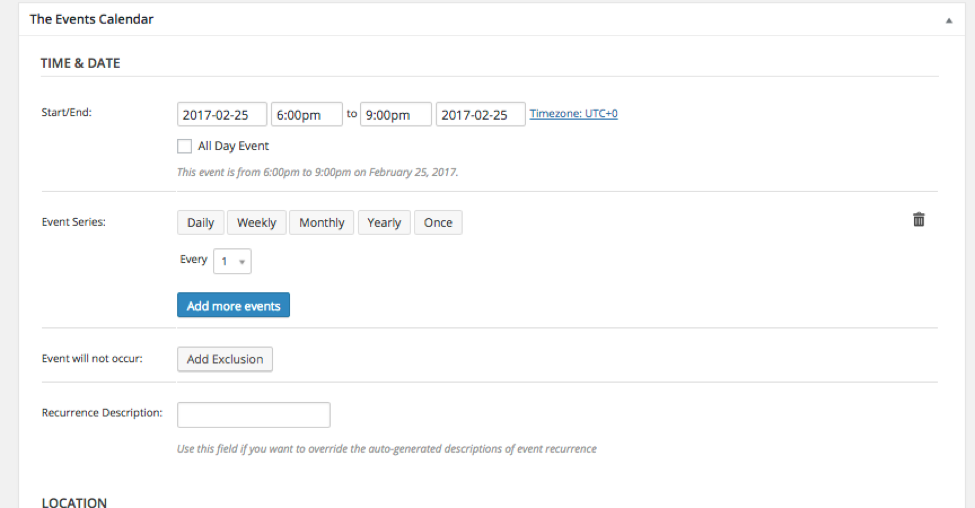
- Something might have gone wrong at the CRON job level when the recurring events were updated over time. Re-saving a recurring event usually solves this.
With that in mind, the rest of your user experience is “normal”.
What I mean by that is that by default, clicking on any event of an event series will have you edit the whole series.
However, when you hover over one event, you also get the option to edit the single occurrence (that specific date). Clicking on “Edit single” will bring you to the correct date.
I would definitely try the above before Event Aggregator.
Let me know how that goes.
Best regards,
Geoff B.May 8, 2017 at 11:37 pm in reply to: Event marker not displaying on Map view-Google API works fine for other events. #1280665MemberGood evening Cory,
Thank you for writing back and kudos for the troubleshooting!
Can you assist me in figuring out how to prevent plugin from adding API multiple times?
I am pretty sure you could simply adapt the following snippet in the functions.php file of your theme (without the PHP tag at the top): https://gist.github.com/cliffordp/ca3baf77c9be8b72f37db10c7c91783b
I also noticed that the map view seems to limit what events display by the current date range or by some form of pagination on upcoming events page.
That is correct, the map view will be a reflection of the events currently listed on screen.
You could apply the following snippet in the functions.php file of your theme (without the PHP tag at the top): https://gist.github.com/GeoffEW/27b1228b4dd425294a050df0fb63010e
That will display all the markers.
Let me know how that goes.
Best regards,
Geoff B.MemberGood evening Catherine,
Thank you for writing back.
If I update, will I need to make admin product/event changes manually?
Or, will the database sync automatically and I will not need to do additional data entry within the plugin?
It is always good practice to do a complete Database backup before attempting any major upgrade.
That being said, normally you should not need to make any admin product/event changes manually. Any necessary changes should be done automatically.
So in other words, if you follow the instructions above it should be a pretty smooth experience.
When all said and done, you will event be able to use the newer features as well.Let me know how that goes.
Best regards,
Geoff B.MemberGood evening Jaiden,
I am glad that helped out.
You are welcome back in our support forums any time 🙂
For now, I am going to close this thread.
Have a great week!
Geoff B.
MemberGood evening Marion and welcome back!
Thank you for reaching out to us.
We are sorry to hear about the issues you have met while attempting to implement the suggestions found here: https://theeventscalendar.com/knowledgebase/renaming-views/
I would love to help you with this topic.
You are absolutely right. Although the first snippet works like a charm, the second one (that deals with URL rewrites needs to be improved.
I will flag this for repair.
We apologize for the inconvenience caused by this glitch.
Alas, I cannot guarantee when it will be fixed, as it’s in the development team’s hands now.
They need to assign it, code it, test it, and schedule it for release.The good news is that you will be contacted as soon as a fix is available.
Thank you for your patience as we see this through.Best regards,
Geoff B.MemberGood evening Graham and welcome back!
Thank you for reaching out to us.
I would love to help you with this topic.This could be a cool feature to have, in fact, we have started working on it.
You can add your vote for it here: https://tribe.uservoice.com/forums/195723-feature-ideas/suggestions/5318027-month-view-have-multi-day-events-span-the-consHave a great day!
Geoff B.
MemberGood evening Dominic and welcome to the Events Calendar Support forum!
Thank you for reaching out to us and for sharing your solution.
With that in mind, I must say I am not able to recreate the issue on my end.
Just out of curiosity, can you tell me what your setting is for Events Template under Events -> Settings -> Display ?Furthermore, could you please provide us with your complete system information in a private reply using the instructions found in the following link?
https://theeventscalendar.com/knowledgebase/sharing-sys-info/
That way I can make sure we address any potential bug.
Thank you once again.
Best regards,
Geoff B.
MemberGood evening Erin and welcome back!
Thank you for reaching out to us.
I would love to help you with this topic.First off, in case you did not know, the Events shortcode plugin is not from us.
As such, as you might guess, we do not offer any type of support for it 🙂For that reason, things that work in the first shortcode will not necessarily work in the second one (which is ours).
With that in mind, there are a couple of things that can be done:
- You could use the following parameters https://theeventscalendar.com/knowledgebase/embedding-calendar-views-tribe_events-shortcode/ and see if that meets your needs
- You could also try our widget shortcodes: https://theeventscalendar.com/knowledgebase/pro-widget-shortcodes/ which offer different settings
If none of the above is precisely to your liking, you can always achieve your goals with a template override. You might want to read our Themer’s guide to get a sense of how that works.
Basically, in your case, you could alter any view (probably the list view) to show exactly the content you are interested in without the need for any parameters.
Let me know if you need a hand with that.
Best regards,
Geoff B.
May 8, 2017 at 9:47 pm in reply to: Can I Add Saved Ticket Fieldset to Multiple Single Events' Tickets #1280634MemberGood evening Carly and welcome back!
Thank you for reaching out to us.
I would love to help you with this topic.Is there a way to do a bulk action addition of a saved fieldset without going into each individual event?
Alas, there is no built-in solution to allow bulk update of that nature for the time being.
That being said, although it is unsupported, you could definitely consider to get an SQL query together for that purpose.
If coding is not really your cup of tea, you could always hire one of our recommended customizers to do the customization for you.
I wish I had a better answer for you, but for now it’s the best one I have unfortunately.
Best regards,
Geoff B.
MemberGood evening John and welcome to the Events Calendar Support forum!
Thank you for reaching out to us.
I would love to help you with this topic.You could apply the following snippet in the functions.php file of your theme (without the PHP tag at the top): https://gist.github.com/GeoffEW/4406403775fe4efab39b9d5baae757ae
Let me know how that goes.
Best regards,
Geoff B.MemberGood evening Thomas and welcome back!
Thank you for reaching out to us.
I would love to help you with this topic.How can I limit the users that can add tickets on the front end by user role?
This can easily be done with a plugin such as members.
You can read all about it here: https://theeventscalendar.com/knowledgebase/admin-roles-and-permissions/You will need to uncheck Allow any user to create tickets and add the edit_event_tickets capability to the roles of your choice.
Finally, you could also request that all submitted events are approved by you (which is another way to control that feature).
Let me know if that helps.
Have a great day!
Geoff B.
MemberGood evening Luis and welcome to the Events Calendar Support forum!
Thank you for reaching out to us.
We are sorry to hear about the week view not displaying properly on your site.
I would love to help you with this topic.Apparently you have managed to get the photo view embedded in the meantime. Kudos for that.
Would it be possible to see the broken code in action ? Perhaps on a Password protected page ?
Typically, when the dates are incorrect, it is usually because of:
- Date format incompatibility (the date format of WordPress, the Events Calendar and even Divi all need to be in sync)
- The use of improper quote marks (as described here: https://theeventscalendar.com/knowledgebase/embedding-calendar-views-tribe_events-shortcode/)
Hang in there!
Geoff B.
MemberGood evening Barbara and welcome back!
Thank you for reaching out to us.
We are sorry to hear about the calendar widget not displaying properly on your site.
I would love to help you with this topic.Since this is a rather thin sidebar, it looks like you might need to tweak the CSS a tad.
Try adding the following CSS rule to your style.css file or in your Custom CSS metabox:
body .tribe-mini-calendar-event .list-date {

    width: 20% !important;

}
.tribe-mini-calendar-event .list-date .list-dayname {

    padding: 0px !important;

}
.tribe-mini-calendar-event .list-info {

    width: 75% !important;

}
Let me know how that goes.
Best regards,
Geoff B.MemberGood evening Kevin and welcome to the Events Calendar Support forum!
Thank you for reaching out to us.
I would love to help you with this topic.There are 2 ways to go about this:
- Use the WordPress customizer: https://theeventscalendar.com/knowledgebase/wordpress-customizer/
- Use some CSS
Try adding the following CSS rule to your style.css file or in your Custom CSS metabox:
.tribe-mini-calendar-event .list-date {

background: #fff !important;

border: 1px black solid;

}
.tribe-mini-calendar-event .list-date .list-daynumber {
color: #000 !important;
}Let me know how that goes.
Best regards,
Geoff B.MemberGood evening Kray and welcome back!
Thank you for reaching out to us.
We are sorry to hear about the challenges you have faced trying to style the calendar.
I would love to help you with this topic.Typically, what you are describing can happen when the “Tribe Events Style” is selected under Events -> Settings -> Display. Switching that setting to anything else will make things much easier for you.
But even at that, you could most likely get around it simply with CSS or sometimes the Customizer: https://theeventscalendar.com/knowledgebase/wordpress-customizer/
I have not seen your changes. Alas, it seems that the screenshot you included did not make it somehow.
If you could resend:
- The screenshots
- An example URL of where that would be implemented
- A copy of the latest version of your WordPress theme / child theme via a link to a .zip file link (stored Dropbox or Google Drive) so that I can run some tests on my end ? I recommend a private reply for that purpose.
Please ensure you are using the latest files as found on your actual website.
This way I will get access to any updates or customizations you might have made.
That would allow me to give you the best approach to achieve your goal.
Probably adding some ID in your template customization should suffice (ID has priority over most CSS rules).Hang in there!
Geoff B.
- Some template customization regarding recurring events that needs some updating. It is typically found either in the functions.php file of your theme or in it’s /tribe-events/ folder.
-
AuthorPosts