

Forum Replies Created
-
AuthorPosts
-
Geoff B.
MemberGood evening Joe and welcome to the Events Calendar forum!
Thank you for your interest in our products.
We’ll be glad to answer your questions.The simplest way to have a waiting list is to make a second ticket for that event with no limit and call that ticket “Waiting List”.
Other than that, people can change their minds as long as they are logged in.
When you change your status to “not going” stock is added back to the quantity automatically after clicking on “View your RSVPs”.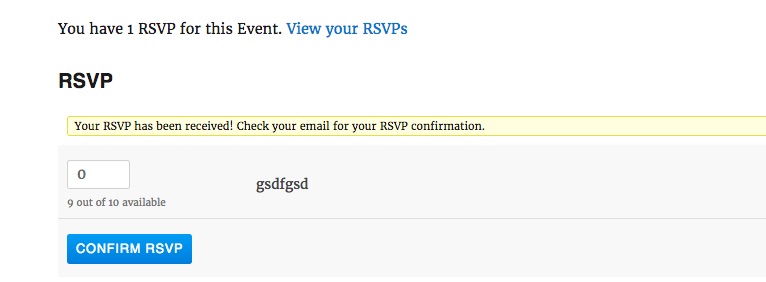
Let me know if that helps.
Have a great day!
Geoff B.
MemberGood evening Aeky and welcome back!
I would love to help you with this topic.
What might be going on is that some strings (depending on your setup) might come from the Events Calendar, the Events Calendar Pro, Community Events, WordPress and even your theme.
In short, after making sure they are updated, you will need to search through all of these language files in all possible locations.
When translation file strings are not kicking in, it is usually caused by one of the following things:
- Your translation files are not up to date
- You are using some customized translation files that have been placed in the /wp-content/languages/ or /wp-content/languages/plugins/ folder. These might not be updated and will override any other file.
- The strings are translated, but are considered “fuzzy”
In the first 2 cases, the solution is to update your translation files using the pot file. You can do this by using the Poedit software and heading to Catalog > Update from pot file.
In the last case, you will need to make them “unfuzzy” using Poedit.
Let me know how that goes.
Best regards,
Geoff B.MemberGood evening Breanna and welcome back!
Thank you for reaching out to us.
We are sorry to hear about the links no longer opening a new tab.
I would love to help you with this topic.The good news is that there are quite a few ways around this:
- https://wordpress.org/plugins/open-external-links-in-a-new-window/
- https://wordpress.stackexchange.com/questions/209506/how-do-i-make-images-open-in-a-new-tab-by-default
- https://wordpress.stackexchange.com/questions/230417/open-link-in-a-new-tab-checked-by-default-when-adding-a-new-link-in-visual-post
Let me know if that helps.
Have a great day!
Geoff B.
MemberGood evening Natalie and welcome to the Events Calendar forum!
Thank you for your interest in our products.
We’ll be glad to answer your questions.I believe you will find what you are looking for here: https://theeventscalendar.com/knowledgebase/can-you-have-multiple-calendars/
Let me know if that helps.
Have a great day!
Geoff B.
MemberGood evening and welcome back!
Thank you for reaching out to us.
I would love to help you with this topic.You could apply the following snippet in the functions.php file of your theme (without the PHP tag at the top): https://gist.github.com/GeoffEW/075787fd6b427e1c47be0d756ca5b26c
Let me know how that goes.
Best regards,
Geoff B.MemberGood evening Rick and welcome to the Events Calendar forum!
Thank you for reaching out to us.
I am super stoked that you found the cause of the issue and that you shared your findings for the benefit of our other users.
You are welcome back in our support forums any time 🙂
For now, I am going to close this thread.
Have a great week!
Geoff B.
MemberGood evening Melissa and welcome to the Events Calendar Support forum!
Thank you for reaching out to us.
I would love to help you with this topic.In order to gain full power on your site’s look and feel, I would highly recommend reading the following articles:
- https://theeventscalendar.com/knowledgebase/wordpress-customizer/
- https://theeventscalendar.com/knowledgebase/using-google-chrome-developer-tools/
- https://theeventscalendar.com/knowledgebase/changing-fonts-and-colours/
- https://theeventscalendar.com/knowledgebase/styling-events-widgets/
More specifically, in the screenshot you provided, it seems like you want to modify the appearance of featured events specifically.
Try adding the following CSS rule to your style.css file or in your Custom CSS metabox:
.tribe-events-list .tribe-events-loop .tribe-event-featured .tribe-events-list-event-title a, .tribe-events-list .tribe-events-loop .tribe-event-featured a {color: #fff !important}Let me know if that helps.
Have a great day!
Geoff B.
MemberGood evening Mary Ann and welcome back!
Thank you for reaching out to us.
I would love to help you with this topic.Try adding the following CSS rule to your style.css file or in your Custom CSS metabox:
.events-list .tribe-events-list .tribe-events-loop .tribe-events-event-image {

    width: 100% !important;

}
Let me know how that goes.
Best regards,
Geoff B.MemberGood evening Garry and welcome to the Events Calendar forum!
Thank you for your interest in our products.
We’ll be glad to answer your questions.The short answer is yes. You can use any QR code scanner app for that purpose.
You will need:
- the Events Calendar free: https://theeventscalendar.com/product/wordpress-events-calendar/
- Event Tickets free: https://theeventscalendar.com/product/wordpress-event-tickets/
- Event Tickets Plus (premium): https://theeventscalendar.com/product/wordpress-event-tickets-plus/
You can read about it here:
- https://theeventscalendar.com/knowledgebase/using-qr-codes-event-tickets-plus/
- https://theeventscalendar.com/knowledgebase/managing-your-orders-and-attendees/
Let me know how that goes.
Best regards,
Geoff B.MemberGood evening Neill and welcome back!
Thank you for reaching out to us.
We are sorry to hear about the colours not displaying correctly on your buttons.
I would love to help you with this topic.In order to gain full power on your site’s look and feel, I would highly recommend reading the following articles:
- https://theeventscalendar.com/knowledgebase/wordpress-customizer/
- https://theeventscalendar.com/knowledgebase/using-google-chrome-developer-tools/
- https://theeventscalendar.com/knowledgebase/changing-fonts-and-colours/
- https://theeventscalendar.com/knowledgebase/styling-events-widgets/
Try adding the following CSS rule to your style.css file or in your Custom CSS metabox:
.tribe-events-tickets td.woocommerce button {color: #fff !important;}As for the size of the quantity arrows, this is the default look of WooCommerce quantity buttons.
The good news is that there a quite a few options out there to tweak their appearance (e.g.: https://www.8theme.com/topic/quantity-button-styling-arrows/)
Let me know if that helps.
Have a great day!
Geoff B.
MemberGood evening Aeky and welcome back!
As a first troubleshooting step, could you please provide us with your complete system information in a private reply using the instructions found in the following link?
https://theeventscalendar.com/knowledgebase/sharing-sys-info/
When translation file strings are not kicking in, it is usually caused by one of the following things:
- Your translation files are not up to date
- You are using some customized translation files that have been placed in the /wp-content/languages/ or /wp-content/languages/plugins/ folder. These might not be updated and will override any other file.
- The strings are translated, but are considered “fuzzy”
In the first 2 cases, the solution is to update your translation files using the pot file. You can do this by using the Poedit software and heading to Catalog > Update from pot file.
In the last case, you will need to make them “unfuzzy” using Poedit.
Could you please send me a copy of the language files you are using so that I can take a look at them ?
Hang in there!
Geoff B.
MemberGood evening Mario,
I am super stoked to hear that everything is now working correctly for you.
You are welcome back in our support forums any time 🙂
For now, I am going to close this thread.
Have a great week!
Geoff B.
MemberGood evening George,
First off I want to apologize for the delay answering.
I am sorry that my answer generated more confusion. This certainly was not my intent.1. Which language files should i update via Poedit? i provided you with 3 sets of languages in my last response. I open all 3 files in Poedit and all look ok. What do you mean by fuzzy?
To update a language file via Poedit, please watch the following video: https://www.youtube.com/watch?v=Jz8MY_K1P38
Both the Events Calendar and the Events Calendar Pro language files you have provided are in need of an update. They look “OK”, but when you update them with the latest pot file, you will notice that hundred of strings are in either obsolete or new.
Fuzzy strings are explained very well here: https://www.gnu.org/software/gettext/manual/html_node/Fuzzy-Entries.html
2. I do not have such a path /wp-content/languages/plugins/. I only have on folder under wp-content/languages which is “themes”.
I had assumed that you had sent me the language files found in /wp-content/languages/ or any of it’s subdirectory. The reason for this is because I had specifically asked for that here: https://theeventscalendar.com/support/forums/topic/incorrect-language/#post-1297032
Since it appears that you are not using that folder at all for your translations, we can forget about that option altogether. However, please note that if there are any files in there at a later time and these files pertain to the Events Calendar priority, they will have top priority over the others.
3. I do not want to translate the string in WPML usting string translation in any case. This is the reason we are using language files
I totally understand what you want to do (although I must say, this would be the fastest way to fix things).
The issue you are facing here is your setting in WPML (see screenshot)
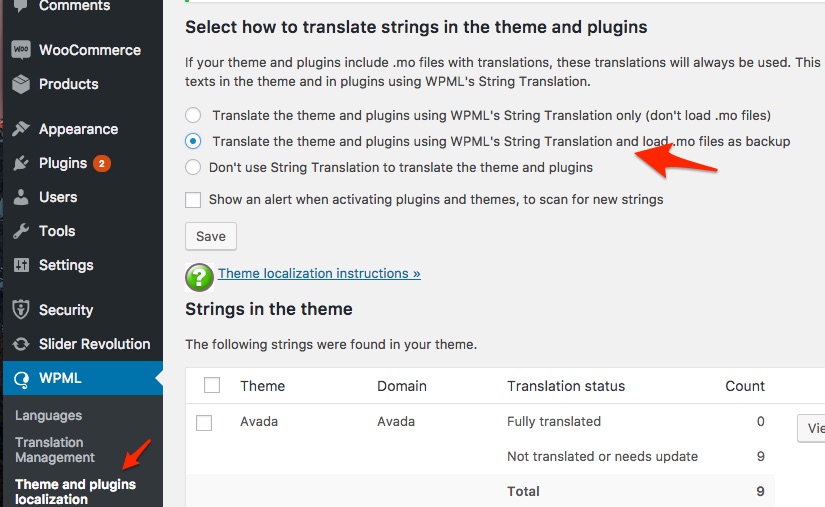
The way this is set up, WPML WILL look at string translation first and try to resort to the language files if it can’t find anything.
The combination of this setting AND the language files not being updated is probably what is causing issues here.
So the solutions remain the following:
- Use a different setting under theme and plugins localization (the last one) AND make sure you are using the latest version of our language files OR an update language file
- Use the same setting as currently AND make sure you are using the latest version of our language files OR an update language file
- Using string translation will instantly fix your issue.
Either way, as I was previously mentioning, there is little to be gained from the fact that this works well on other installs. In fact, it’s really not recommended to just carry language files over from one install to the next unless you are really comfortable with updating the language files.
Perhaps you might benefit from watching a few videos to get a hang of how Poedit and language files with WordPress work. It’s not that involved and you could become a true language files ninja in no time.
Best regards,
Geoff B.
Just to clarify, I am truly looking forward to resolution (just as much as you are).
MemberThis reply is private.
MemberGood evening Michael,
Thank you for the theme files.
This allowed me to conduct some tests and I am glad to report this worked fine on my end.By the sound of it, it looks like there is some type of conflict at play.
This is usually because of a conflict with another pluginWhen it comes to that type of issue, it is preferable to troubleshoot in a staging environment if you have one.
The next step would be to go through our testing for conflicts procedure and let us know what you find out.
Basically the goal here is to revert back to a bare WordPress installation to see if the problem persists. It also allows us to pinpoint what the cause of the issue is.
But, before you do that, there are 2 things I would advise:
- Make a backup of your database
- Consider activating a “Maintenance Page” plugin if you are doing this on your live site (to minimize impact on your visitors)
Let me know how that goes.
Geoff B.
-
AuthorPosts