

Forum Replies Created
-
AuthorPosts
-
June 23, 2017 at 3:29 pm in reply to: Problems with calendar main page translation using WPML #1302617
Geoff B.
MemberThis reply is private.
MemberHello again Dirk,
You are correct, the 2 files mentioned are the ones you need to modify AND they both are made out of HTML code (wrapped in a PHP file – so no actual PHP knowledge is required).
Basically you need to tweak those two files to your liking and save them back in your child theme’s /tribe-events/ folder under the correct path.
You might want to read our Themer’s guide to get a sense of how that works.
To customize HTML code, you could totally use something like an online editor (e.g.: https://codebeautify.org/htmlviewer/)
Just to set expectations, the scope of our support is mostly to get our customers started on the right track and to help them in case of issues.
We unfortunately do not provide complete support for customization.
As per your last question, our users usually do not share their customizations with us alas.
If coding is not really your cup of tea, you could always hire one of our recommended customizers to do the customization for you.
I wish I had a better answer for you, but for now it’s the best one I have unfortunately.
Have a good weekend,
Geoff B.
MemberGood evening Børge,
I am stoked to hear this helped out!
As for your community events questions:
1.I just purchased the Community Events plugin. I am unable to change the text of the submit new entry button. Text looks ok, but the button is to small for the text – so I would like to change the text.
You could either make the text smaller or make the button bigger.
Both of which can be accomplished via CSS.
Could you send me the URL of your Community Events page (and perhaps a temporary front-user login) so that I can take a look ?In order to gain full power on your site’s look and feel, I would highly recommend reading the following articles:
- https://theeventscalendar.com/knowledgebase/wordpress-customizer/
- https://theeventscalendar.com/knowledgebase/using-google-chrome-developer-tools/
- https://theeventscalendar.com/knowledgebase/changing-fonts-and-colours/
- https://theeventscalendar.com/knowledgebase/styling-events-widgets/
2. On the Event Calender page I cant translate a few strings, see attached foto. Do I need a new updated file for the the-events-calendar-nb_NO also? Or will I be able to translate this somewhere else?
Each of our plugins has its own set of language files.
Community events’ can be found here /wp-content/plugins/the-events-calendar-community-events/lang/
Have a good weekend,
Geoff B.
June 23, 2017 at 3:09 pm in reply to: Events Calendar Pro + Event Ticket Plus with Woo Membership & Subscription #1302591MemberGood evening JJ and welcome to the Events Calendar forum!
Thank you for your interest in our products.
We’ll be glad to answer your questions.I believe you will find what you need in the following articles:
- https://theeventscalendar.com/knowledgebase/making-members-calendar/
- https://theeventscalendar.com/knowledgebase/admin-roles-and-permissions/
Let me know if that helps.
Have a great day!
Geoff B.
MemberGood evening Sakthivel and welcome to the Events Calendar forum!
Thank you for your interest in our products.
We’ll be glad to answer your questions.is there any possibility to change the price of the event based on the Membership Plans.
The short answer is most likely yes.
It all depends if you want to sell the plans themselves (WooCommerce products) in events or if you are looking at selling tickets at different prices (depending on the membership level).
If you simply want to sell tickets at different prices, I would recommend looking into a role-based WooCommerce pricing plugin (e.g: https://wordpress.org/plugins/woocommerce-role-based-price/) – there are several of them out there.
Let me know if that helps.
Have a great day!
Geoff B.
MemberGood evening Iain and welcome back!
Thank you for reaching out to us.
We are sorry to hear about the venue field not displaying on your site’s Community event screen. Yikes!
I would love to help you with this topic.
By the sound of it, it looks like there is some type of conflict at play.
This is usually because of:- A conflict with another plugin
- A conflict with your WordPress theme
- A template customization for the Events Calendar that requires updating
When it comes to that type of issue, it is preferable to troubleshoot in a staging environment if you have one.
A first quick test is to simply temporarily revert back to a default WordPress theme such as twenty-sixteen to see if the issue persists.
I would also try temporarily deactivating the “Notes” plugin which seems to be causing some Javascript error in the Google Chrome Developer Tools.
The next step would be to go through our testing for conflicts procedure and let us know what you find out.
Basically the goal here is to revert back to a bare WordPress installation to see if the problem persists. It also allows us to pinpoint what the cause of the issue is.
But, before you do that, there are 2 things I would advise:
- Make a backup of your database
- Consider activating a “Maintenance Page” plugin if you are doing this on your live site (to minimize impact on your visitors)
Let me know how that goes.
Geoff B.
June 23, 2017 at 2:46 pm in reply to: Map View doesn't show any results/points, and starts in Africa #1302563MemberThis reply is private.
MemberGood evening Tarjei and welcome back!
Thank you for reaching out to us.
I would love to help you with this topic.This could be a cool feature to have, you can suggest it in our User Voice forum.
That way other customers can vote for it!In the meantime, the short answer is yes.
You could do just that with some customization.Just to set expectations, the scope of our support is mostly to get our customers started on the right track and to help them in case of issues. We unfortunately do not provide complete support for customization.
With that in mind, you can read about that here: https://theeventscalendar.com/customizations/
More specifically, you might want to read our Themer’s guide to get a sense of how that works.
If coding is not really your cup of tea, you could always hire one of our recommended customizers to do the customization for you.
Have a good weekend,
Geoff B.
MemberGood evening Florian,
Thank you for the system information.
The first thing you should know is that we do not fully support Event Tickets Plus integration with WPML yet: https://theeventscalendar.com/knowledgebase/wpml-support/
This feature is scheduled to be release later this year. Initially we planned for spring, but there was some pushback.
In the meantime, you could get it to partially work, but this is unsupported.
To achieve that, you will need:
- WooCommerce multilingual
- Some manual intervention
After creating the ticket AND saving the event, head over to WPML > Support > Troubleshooting page.
Once you are there, you should see several cleanup buttons. I would recommend:
- Clearing WPML cache
- Using the button that forces language assignment to items (which is what is creating the issue). This can also be accomplished by deactivating and reactivating WPML.
Your ticket will now magically appear.
The only downside is that the tickets you create in other languages are not really translations of the initial ticket. They are completely independent new tickets.
Let me know if that helps.
Have a great day!
Geoff B.
MemberGood evening Antar and welcome to the Events Calendar forum!
Thank you for your interest in our products.
We’ll be glad to answer your questions.1) Is it possible to turn off the requirement to add an “End Time” to an event? Most of the events I will be adding do not have an end time.
There are many things you could do (depending on your exact needs).
Bear in mind, that there are 2 layers:
- Having an end-time as part of the event data
- Choosing how and when the end time is displayed (or not) in the different views
In such circumstances would it be possible, instead of selecting an end time, to select an option such as “Until late” – or something similar?
The first step would be to decide which calendar view(s) you are interested in.
Once that is done, you can simply make a custom template for the view(s) you are using.
You might want to read our Themer’s guide to get a sense of how that works.That should enable you to replace the date-based end time display with either nothing or “Until late”.
2) I appreciate this software was developed in the USA – which is probably why when choosing a venue the “United States” appears at the top of the list of countries. UK, my option is right the way down the bottom! Can I bump it to the the top?
You could probably tweak how the dropdowns values are displayed.
However, provided you snag a copy of the Events Calendar Pro ( https://theeventscalendar.com/product/wordpress-events-calendar-pro/ ), you get access to several awesome features and views.
One of those features is that you get to choose what the default values for dropdowns are.
Have a good weekend,
Geoff B.
June 23, 2017 at 12:33 pm in reply to: RSVP public attendees list: attendants not in list when same email #1302475MemberGood afternoon Dirk,
I am so glad you like the override.
You could probably tweak it to sort things alphabetically, however, that level of customization is beyond the scope of our support unfortunately.
You could give it a shot after you read about that here: https://theeventscalendar.com/customizations/
If coding is not really your cup of tea, you could always hire one of our recommended customizers to do the customization for you.
Have a good weekend,
Geoff B.
MemberGood afternoon Paula,
Well done.
Basically once the plugin is installed you can head over to the attendee list in wp-admin and click on the attendee info you want to change.
Once that is done hit “enter”.
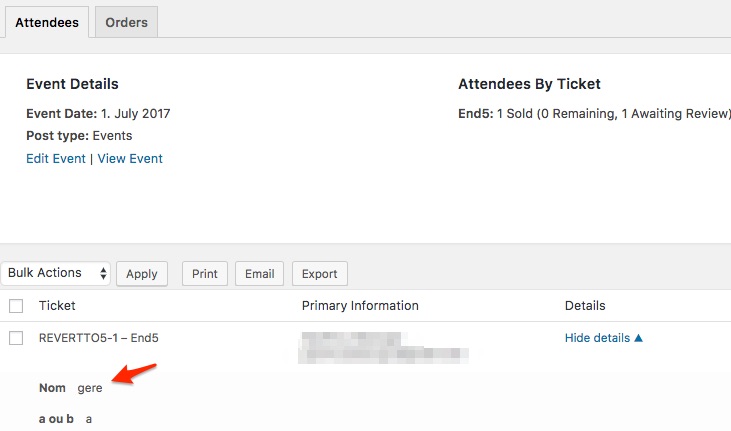
Let me know how that goes.
Best regards,
Geoff B.June 23, 2017 at 12:12 pm in reply to: Display wrong language after searching ora clicking on next events #1302467MemberThis reply is private.
MemberGood afternoon and welcome to the Events Calendar forum!
Thank you for your interest in our products.
We’ll be glad to answer your questions.The only ways to achieve what you are looking for are:
- The snippet you tried (I just tested it and it works – I am suspecting you might have either in the wrong spot of your functions.php file OR that you did not remove the opening < ?php tag)
- Using a redirection plugin where you manually input each single event URL and where you want it to redirect to
You might consider setting up a staging / testing clone of your site to experiment.
Have a good weekend,
Geoff B.
MemberGood afternoon Patrick and welcome back!
Thank you for reaching out to us.
We are sorry to hear about the display being real wonky on your site.
I would love to help you with this topic.As a first troubleshooting step, could you please provide us with your complete system information in a private reply using the instructions found in the following link?
https://theeventscalendar.com/knowledgebase/sharing-sys-info/
Secondly, I would recommend trying to head out to Events -> Settings -> Display and trying out different settings for the Events Template option.
Finally, try temporarily reverting back to a default WordPress theme such as twenty-sixteen and see what happens with the layout of the single event.
Let me know how that goes.
Best regards,
Geoff B. -
AuthorPosts