

Forum Replies Created
-
AuthorPosts
-
Geoff B.
MemberGood evening Rick and welcome to the Events Calendar forum!
Thank you for your interest in our products.
We’ll be glad to answer your questions.I was wondering if it’s possible to aggregate calendars into one?
Absolutely! All you need is to grab a license for our Event Aggregator service: https://theeventscalendar.com/product/event-aggregator/
This license can be used across all your sites 🙂
Let me know if that helps.
Have a great day!
Geoff B.
MemberGood evening Michael and welcome to the Events Calendar forum!
Thank you for your interest in our products.
We’ll be glad to answer your questions.The showcase example you pointed out uses a customized week view.
In other words, the programmer of that website added some code to our week view to make it their own (which is why you cannot see that specific feature in our demos).This is something we actually encourage people to do.
You can read about that here: https://theeventscalendar.com/customizations/
If coding is not really your cup of tea, you could always hire one of our recommended customizers to do the customization for you.
Best regards,
Geoff B.
MemberThis reply is private.
MemberGood evening Darpan,
I am glad that was helpful to you.
Yes, if you are planning on using Community Tickets, you will also need to purchase Community Events and Event Tickets Plus.
We have a bundle available in case you are interested: https://theeventscalendar.com/bundles/bundle-community-manager/
Best regards,
Geoff B.
MemberGood evening Ryan and welcome to the Events Calendar forum!
Thank you for your interest in our products.
By the looks of it, you are running into a page template issue.
This can be easily fixed by heading over to Events -> Settings -> Display.
Once you are there, try different settings for Events Template. That should fix things.
Let me know how that goes.
Best regards,
Geoff B.MemberGood evening Steven and welcome back!
Thank you for reaching out to us.
I would love to help you with this topic.Is there a way we can capture attendee names associated with additional block ticket purchases so that if someone purchases 4 tickets we get the 4 names of the people associated with each ticket not just the purchaser?
Absolutely. To achieve this you need to use Event Tickets Plus’ additional attendee information feature.
Any additional attendee information field added in this way (i.e.: Attendee name in your case) will be multiplied by the number of tickets purchased.
You can read all about it here: https://theeventscalendar.com/knowledgebase/collecting-attendee-information/
Let me know if that helps.
Have a great day!
Geoff B.
MemberGood evening Karen and welcome back!
Thank you for reaching out to us.
We are sorry to hear about the display of your Edit Events screen being wonky. Yikes!
I would love to help you with this topic.What is going on is that there are too many columns fighting for space on that screen (typically as a result of the SEO plugin).
The good news is that this can easily be fixed.
What you need to do is head over to the Screen Options menu (located at the top right of that screen) and uncheck unnecessary boxes. The display should return to normal.
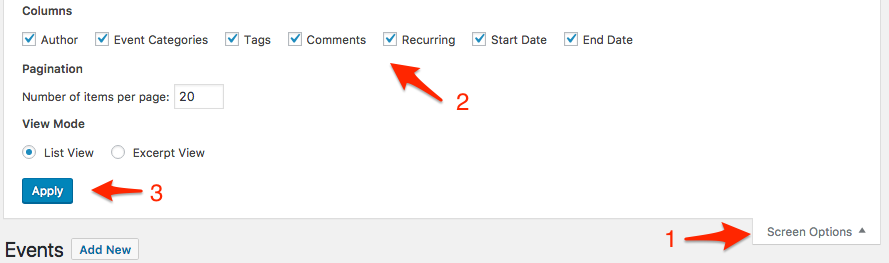
Let me know how that goes.
Best regards,
Geoff B.MemberGood evening David and welcome to the Events Calendar forum!
Thank you for your interest in our products.
We’ll be glad to answer your questions.Is it possible to COPY an event in Events Calendar?
Yes, it is. You will need a third-party plugin to do so.
Basically, any plugin that is able to duplicate custom post types will work.There is even one out there with the Events Calendar in mind: https://wordpress.org/plugins/duplicate-tec-event/
Do I understand correctly that you cannot ticket recurring events in PRO?
That is mostly accurate (for now – that deceptively complex feature has been on our roadmap for a while now).
You can create tickets for recurring events, but the caveat is that these tickets will be shared by all of the recurring events in the series. In other words, each recurring event does not get its own ticket, they all come from the same pool of tickets.
So, if you don’t mind a shared pool of tickets, then this might work.
Let me know if that helps.
Have a great day!
Geoff B.
MemberGood evening Marc and welcome back!
Thank you for reaching out to us.
We are sorry to hear about Quickmark not working for you.
Major kudos for finding a workaround!You did not hear this from me, but we are actually working on an app to make Event check-in a sinch. This should put an end to all incompatibilities.
You are welcome back in our support forums any time 🙂
For now, I am going to close this thread.
Have a great week!
Geoff B.
MemberGood evening Karl and welcome back!
Thank you for reaching out to us.
We are sorry to hear about the struggles you are experimenting.
I would love to help you with this topic.The fastest way to help you out would be to get a copy of your WordPress theme and child theme via a link to a .zip file link (stored Dropbox or Google Drive) so that I can run some tests on my end ? I recommend a private reply for that purpose.
Please ensure you are using the latest files as found on your actual website.
This way I will get access to any updates or customizations you might have made.Hang in there!
Best regards,
Geoff B.
MemberGood evening Darpan and welcome to the Events Calendar forum!
Thank you for your interest in our products.
We’ll be glad to answer your questions.Can we restrict organisers access to backoffice only to their respective events?
You could achieve with some custom user roles that, but that is unsupported, unfortunately.
The good news is that Community Events offers something much better: Organizers never go to the backend. They always stay on the front-end AND they only see their respective events.
If you have not already done so, I would highly recommend reading the 3 following articles:
- https://theeventscalendar.com/knowledgebase/new-user-primer-community-events/
- https://theeventscalendar.com/knowledgebase/managing-community-events-submissions/
- https://theeventscalendar.com/knowledgebase/community-events-settings/
This should give you a pretty complete overview of the possibilities and the control you have with Community Events.
Let me know if that helps.
Have a great day!
Geoff B.
MemberGood evening Steve and welcome back!
Thank you for reaching out to us.
I would love to help you with this topic.Is there a way for a site visitor to submit an event without requiring a login?
The short answer is yes. All you need to do is to check the “Allow anonymous submissions” option under Events -> Settings -> Community
The only recommendation I have for you is to keep a close eye on this as this might generate spam.
Let me know how that goes.
Best regards,
Geoff B.MemberHello again Flor,
It looks like this is a duplicate of this ticket https://theeventscalendar.com/support/forums/topic/shortcode-question/
Therefore, I will close this one to avoid any confusion.
Have a great day!
Geoff B.
MemberGood evening Flor and welcome to the Events Calendar forum!
Thank you for your interest in our products.
We’ll be glad to answer your questions.if I add a calendar shortcode to a page, will it look like how the Events Page looks “out-of-box”?
Absolutely! Using a full calendar view shortcode will replicate exactly the look of your the Events Calendar.
If you have not already done so, you can see how to use that type of shortcode here: https://theeventscalendar.com/knowledgebase/embedding-calendar-views-tribe_events-shortcode/
Our main goal is to avoid changing the page template. Or client LOVES how the plugin looks, but they would like to add a sidebar for advertising space.
That will totally work as long as you paste the shortcode to a page template that contains such a sidebar.
Let me know how that goes.
Best regards,
Geoff B.MemberHey Arthur,
I am super stoked you were able to sort things out.
You are welcome back in our support forums any time 🙂
For now, I am going to close this thread.
Have a great week!
Geoff B.
-
AuthorPosts