

Forum Replies Created
-
AuthorPosts
-
Geoff
MemberPlease do keep me posted!
Does the other thread sound like the same issue to you? It seems to describe the same thing and I was able to replicate the issue the way it was reported there.
Geoff
MemberHi Tim,
Great question! We are indeed working on that feature right this very moment and hope to have it out in our 4.1 release of Event Tickets Plus, barring any unforeseen issues. Stay tuned for sure. 🙂
Cheers,
GeoffJanuary 8, 2016 at 2:34 pm in reply to: Can Event Tickets Plus handle registrations that require approval? #1052845MemberHi Doug, I just responded to another one of your threads that should clear things up a bit. I’ll see you there and will leave this thread open for Abby. 🙂
MemberHi Doug,
You will need three plugins from us in order to create events and tickets for those events, only one of which is paid:
If you already have a license for WooCommerce Tickets (which I see you do), then you can log into your account here on this site, head to My Account > Downloads, and pick up Event Tickets Plus free of charge since it replaces WooCommerce Tickets.
Does this help clarify things a bit? Please let me know. 🙂
Cheers!
GeoffMemberHowdy Wolfgang, thanks for reaching out and checking out the calendar. 🙂
My suggestion would be to register a new custom taxonomy (category) and make it applicable to both Posts and Events.
There’s more info on how to register a custom taxonomy and assign it to post types in the WordPress Codex. You might also do a search for a custom taxonomy plugin–there’s bound to be some of those available and might be easier than having to code the taxonomy yourself. 🙂
Does this make sense and will it work for you? Please let me know.
Cheers!
GeoffMemberHey there and thanks for reaching out!
Solid question. We do indeed provide support for the exact things you mention, regardless of what theme you use.
What we cannot support is when there are conflicts with themes. We will often try to check it out with you, but it’s often better for the theme author to review the conflict, particularly when that issue is not present in a default WordPress theme, such as Twenty Sixteen.
Does this help clarify things a bit? Please let me know. 🙂
Geoff
January 8, 2016 at 2:20 pm in reply to: Does the plugin have a feature to display the remaining seats/tickets? #1052832MemberHey Marina and thanks for getting in touch!
Good question. There is no feature to show the remaining number of tickets at the moment, but you could accomplish that by customizing the event template and using the tribe_events_count_available_tickets() function to show that number.
Also, if all tickets have been sold out, can the plugin display ‘Sold out’ instead of the ‘Register’ button?
Yes! The ticket form on an event will display a sold out notice if there are no remaining tickets. 🙂
Does this help answer your questions? Please let me know and I’d be happy to help.
Cheers!
GeoffMemberOK, so I actually ran into another thread with this same issue — where the the links for recurring events on the /all/ page were not linking to the events themselves.
Through a bunch of troubleshooting (much like here in this thread) we’ve found that the issue happens when the”Use the sitewide timezone everywhere” setting is enabled in Events > Settings.
If you disable that on your live site (not the clone), do you notice a difference?
You can see more context for the troubleshooting here:
Thanks!
GeoffMemberThat’s really odd that you be unable to switch timezones on a per-event basis. Does that mean these controls in the event editing screen are not visible or working for you?
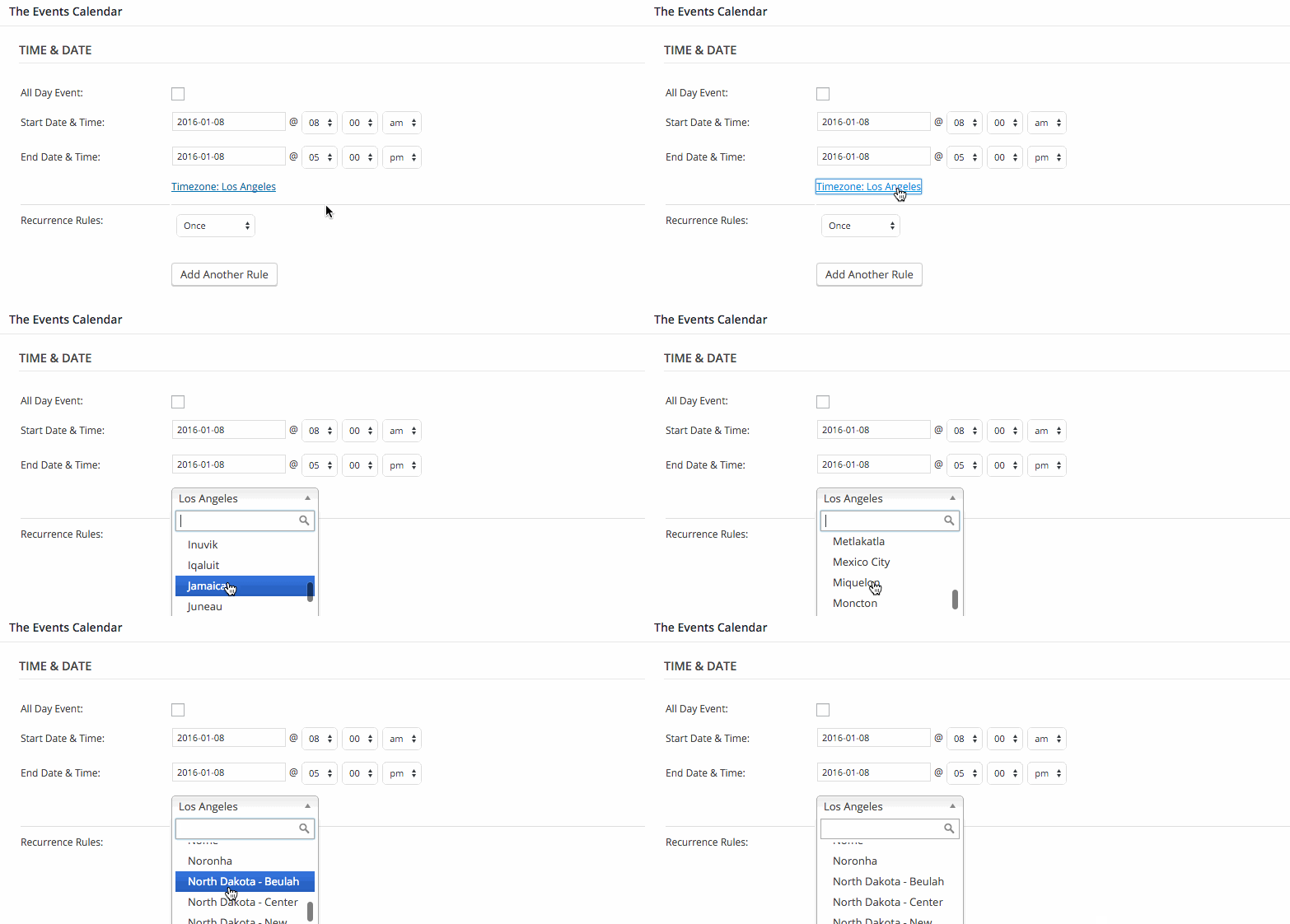 January 8, 2016 at 2:03 pm in reply to: Can Event Tickets Plus handle registrations that require approval? #1052820Member
Hi @caldiatech and thanks for chiming in!
Event Tickets Plus works with PRO just as WooCommerce Tickets did–the glaring exception being the support of recurring events, of course. That is something we’re working on though. 🙂
Geoff
MemberGood question! We are indeed working on it. While I don’t have an exact date, we are hoping this will be part of our 4.2 release, barring any unforeseen circumstances.
Geoff
MemberHey Jacob, I see Mira marked my last answer as the correct answer — did you have any other questions that I can help with? Please let me know. 🙂
Geoff
January 8, 2016 at 10:47 am in reply to: Activation of Event Ticket Plus returns white page #1052732MemberYAY! That’s awesome. I’m so glad to hear we were able to get things back up and running.
The Avada theme has customized the page layout so that tickets appear in the sidebar. You will need to reach out to them directly in order to move it into the main content area, since they know the customizations best. I had a quick look myself and wasn’t able to immediately latch onto something.
I’ll go ahead and close this thread, but please do open a new one if another question pops up–we’d be happy to help. 🙂
Cheers and thanks again for working with me on this!
Geoff
January 8, 2016 at 7:38 am in reply to: Facebook Import permissions now more restrictive in version 4.0.x #1052590MemberRight on, that’s awesome to hear! Thanks a ton for following up and feel free to hit us with a new thread if any questions surface–we’d be happy to help. 🙂
Cheers,
GeoffMemberMy pleasure–happy to help!
I’ll go ahead and close this thread, but it might be worth reaching out to the theme developer before ditching the theme altogether. It looks like theme uses Javascript for loading pages and my bet is that the conflict is somewhere near there. If the theme developer is able to isolate the error and provide a way to perhaps dequeue the script for calendar pages, then you may be able to keep the theme and the plugin together–win, win. 🙂
And, of course, feel free to hit us with a new thread if any other questions–including any from the theme developer–come up and we’d be happy to help as best we can.
Cheers and thanks again for reaching out!
Geoff
-
AuthorPosts