
Home › Forums › Calendar Products › Events Calendar PRO › Timezones are behaving inconsistently.
- This topic has 14 replies, 2 voices, and was last updated 10 years, 8 months ago by
Geoff.
-
AuthorPosts
-
January 3, 2016 at 11:38 am #1049465
Jason
ParticipantI’ve made a website for a non-profit in California for events that they host regularly. The time display of the the Events Calendar is giving us problems. For some of us the times display at UTC, no matter the browser, for others the times are converted to the local time of the timezone they’re in.
I get this error message: “The following plugins are out of date: Events Calendar PRO 3.12.4. All add-ons contain dependencies on The Events Calendar and will not function properly unless paired with the right version.” But I’m not given the option to update the plugin, it appears to be up to date (blue).
Some events are ‘Online Events’ and might be viewed in other timezones. Sometimes the events disappear from the upcoming events list before, or as soon as the events start. This is frustrating for users looking to join these events. Ideally we’d like the events to display on the upcoming list until the end of the day, so that users can find them even if they missed the list, is there a way to do this? This is the main problem.
Please help, you’re my only hope.
January 4, 2016 at 5:37 pm #1050130ParticipantStill having this issue, I tried changing the timezone settings in ‘settings’ no effect.
Now, after updating, I’m experiencing this issue: in the list view the formatted event description placed in the ‘excerpt’ section of each event is not longer displaying, instead there is an unformatted, abbreviated version. http://www.opencirclecenter.org/events/category/east-bay/ This is a major problem!
Please help.
January 6, 2016 at 7:48 am #1051202MemberHi Jason,
Thanks for reaching out — sorry for the delays as we’ve been catching up from the holiday break. I know how crummy it is to wait for an initial reply, so my sincere apologies!
The update from 3.0 to 4.0 is a major one. I see you have the latest version of The Events Calendar (4.0.4) installed. That’s a great start.
From there, I see you have Events Calendar PRO 3.12.4 installed. Will you please update it to the latest version — currently at 4.0.3? You can download the plugin by logging into this site and heading to My Account > Downloads. From there, you can follow these instructions to install the update.
Lastly, I also see that a plugin called The Events Calendar Shortcode that is installed. Will you please deactivate it before activating the other plugins? That plugin isn’t from us and I want to make sure it doesn’t conflict with the latest versions.
Let’s start here and see what we find.
Thanks,
GeoffJanuary 6, 2016 at 4:26 pm #1051489ParticipantI understand. Ya’ll must be busy, if I could bring you guys coffee and donuts I totally would.
Okay, I’ve done that.
Can’t see if it fixed the issues I was having before because:
Today I experienced another issue. The whole site went down and I got this error:
file_get_contents(http://ipinfo.io/74.174.236.84): failed to open stream: HTTP request failed! HTTP/1.1 429 Too Many Requests in /home/vrinda/opencirclecenter.org/wp-content/plugins/the-events-calendar/src/functions/template-tags/date.php on line 32 Fatal error: Call to undefined function custom_die() in /home/vrinda/opencirclecenter.org/wp-content/plugins/the-events-calendar/src/functions/template-tags/date.php on line 47
So I disabled the Event’s Calendar and that brought the site back up. Now I have it reactivated and I have the Pro plugin updated as you suggested. But I get 404 messages on all events and category pages. The only time the event’s display is on the homepage where I’m using the Event Calendar Shortcode plugin.
We’d love to figure this out as quickly as possible. People are coming to the site for information about our events.
January 6, 2016 at 4:33 pm #1051492MemberHey Jason,
Thanks for the donut offer–we would love that for sure. 🙂
Today I experienced another issue. The whole site went down and I got this error:
Ack! Just to make sure, that error has gone away, right? Or are you still seeing that? If so, let’s circle back to that (or perhaps open a new thread) so we can look at that as well.
Now I have it reactivated and I have the Pro plugin updated as you suggested. But I get 404 messages on all events and category pages. The only time the event’s display is on the homepage where I’m using the Event Calendar Shortcode plugin.
404s can be the result of a few things. We do have a few methods for resolving those listed here. Will you please run through those steps and let me know if it helps make a difference in the 404s?
Thanks so much!?
GeoffJanuary 7, 2016 at 8:44 am #1051988ParticipantThanks, the site errors are fixed and the 404 errors are fixed.
But we’re still experiencing the issues with times and dates of the event. Currently we’re only able to put in UTC times, even though all events are PST. But then that causes display issues, like sometimes we’ll have to put events in for the next day UTC to get them to display on the correct date, but then they won’t be in the correct location on the Calendar.
January 7, 2016 at 9:11 am #1051998MemberAwesome, glad to hear the errors and 404 issues have been resolved!
Will you please head to Events > Settings and click the “Update Timezone Data” button at the bottom of the screen? There could be some conflicting data between The Events Calendar settings and the WordPress settings and this could clean that up.
If it doesn’t for some reason, will you please send me a fresh copy of your system info now that things have been updated. You can post that as a private reply and I’ll check it to see your timezone settings.
Thanks!
GeoffJanuary 7, 2016 at 11:54 am #1052087ParticipantThis reply is private.
January 7, 2016 at 2:16 pm #1052138MemberHey Jason,
Thanks for the extra info–this is helpful!
Currently we’re only able to put in UTC times, even though all events are PST.
Just to confirm, are you not able to set the timezone on a per-event basis? I see that your settings are such that you should be able to.
I only have timezone mode and show timezones and neither of those functions seem to work.
Cool, that means there was no data to clean up and that’s a good thing. On that same note, changing the setting to “Use the sitewide timezone everywhere” would not necessarily update existing events. Will you please try switching to that settings, saving the changes, then creating a new event to see if it displays in the correct timezone?
Thanks,
GeoffJanuary 8, 2016 at 8:29 am #1052613ParticipantJust to confirm, are you not able to set the timezone on a per-event basis? I see that your settings are such that you should be able to.
That’s right
Cool, that means there was no data to clean up and that’s a good thing. On that same note, changing the setting to “Use the sitewide timezone everywhere” would not necessarily update existing events. Will you please try switching to that settings, saving the changes, then creating a new event to see if it displays in the correct timezone?
that has no affect
January 8, 2016 at 2:08 pm #1052822MemberThat’s really odd that you be unable to switch timezones on a per-event basis. Does that mean these controls in the event editing screen are not visible or working for you?
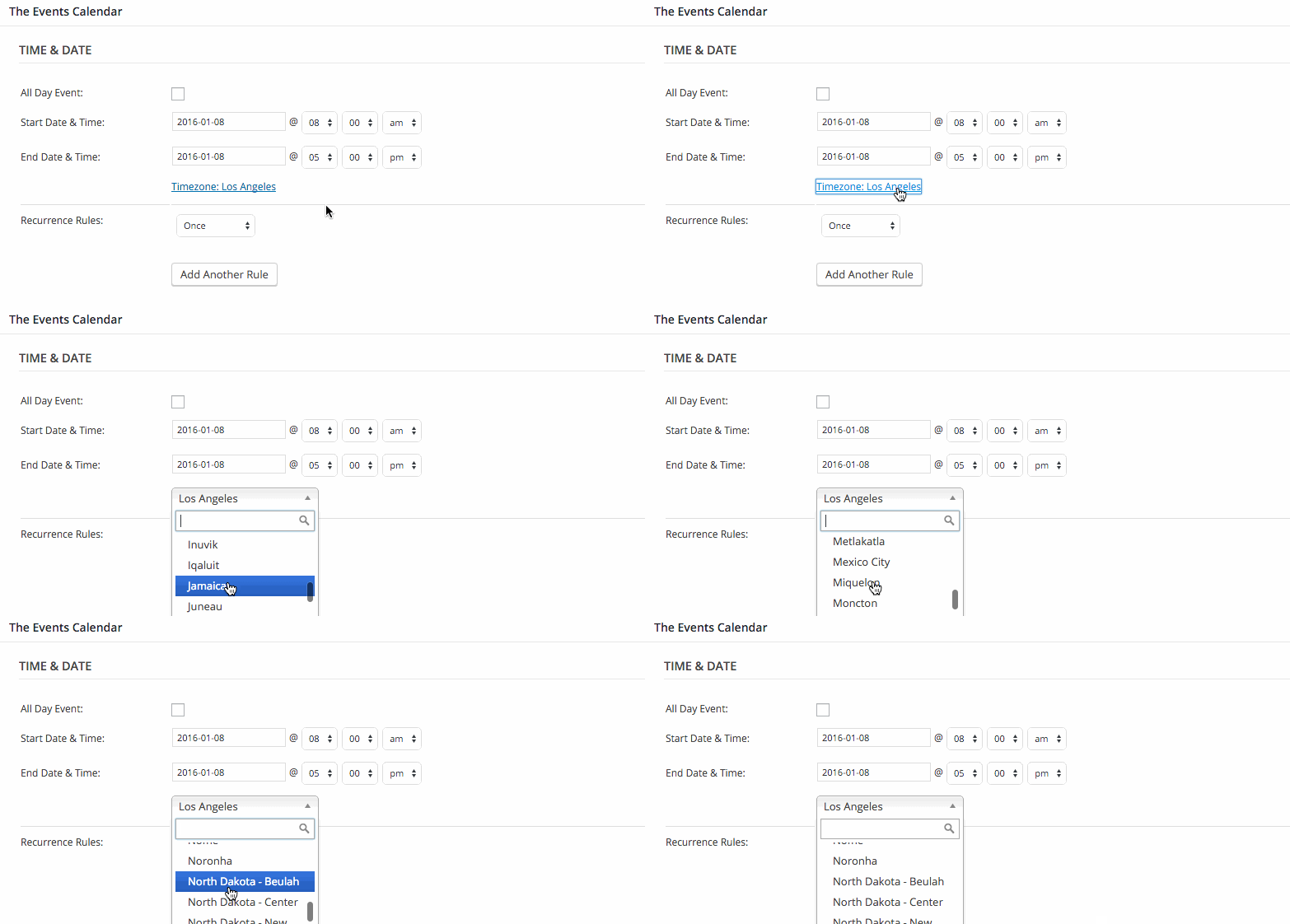 January 19, 2016 at 9:40 am #1058751Participant
That’s right. They don’t work for me.
Sorry for the late response. I’m having someone help me with the development, I’m having them take over the conversation from here.
I’m also still having this issue where the excerpts on the event list are cut off at the end. It wasn’t functioning like this when I set it up.
January 21, 2016 at 7:54 am #1059963MemberNo worries Jason–thanks for following up.
I’m also still having this issue where the excerpts on the event list are cut off at the end. It wasn’t functioning like this when I set it up.
Let’s circle back to the original issue that was reported because I want to make sure we stick to that topic and open any other possible issues in another thread to avoid any confusion:
I get this error message: “The following plugins are out of date: Events Calendar PRO 3.12.4. All add-ons contain dependencies on The Events Calendar and will not function properly unless paired with the right version.” But I’m not given the option to update the plugin, it appears to be up to date (blue).
This has been resolved, correct? Or is that message still popping up?
You had also asked this in your original post:
Some events are ‘Online Events’ and might be viewed in other timezones. Sometimes the events disappear from the upcoming events list before, or as soon as the events start. This is frustrating for users looking to join these events. Ideally we’d like the events to display on the upcoming list until the end of the day, so that users can find them even if they missed the list, is there a way to do this? This is the main problem.
Just to reiterate the answer, events will be removed from the upcoming events list when the event begins. There could be a way to configure things so that events remain in the upcoming list until the end time has been reached, but that would require custom development that I’m afraid we are unable to provide here in the forums.
Does that help answer the questions from your original post? Please let me know!
Cheers,
GeoffJanuary 23, 2016 at 12:28 pm #1061097ParticipantYes, this helps, I think our developer has resolved these issues. I’ll start a new thread for the event descriptions issue.
January 25, 2016 at 7:34 am #1061804MemberRight on! Thanks for following up and for helping me sort out the timezone and error message issues. We’ll see you in the other thread. 🙂
Cheers,
Geoff -
AuthorPosts
- The topic ‘Timezones are behaving inconsistently.’ is closed to new replies.