

Forum Replies Created
-
AuthorPosts
-
Geoff
MemberHey Lars, hope all is well!
Good question. It definitely does depend on a site-by-site basis. Some sites may very well have one and publicly promote it on the site. Others, by contrast, may have them an not say anything at all about how to access it.
The Events Calendar adds an iCal address to a site uniformly so that it can be found at: [your-site]/events/ical. But that doesn’t mean other sites will employ it the same way.
Sorry I don’t have a concrete answer for you here, but I do hope this at least help clarify why it’s tough to tell.
Thanks,
GeoffMemberHey Magnus! I’m so glad to hear you’re checking out Filter Bar and I hope it’s a great fir for your site. 🙂
1) The sky is the limit with how many parameters I choose to sort, right?
That’s correct. Events Calendar PRO allows you to create custom fields for events and those fields can, in turn, be used in the Filter Bar settings.
2) Is it possible to have the sorting bar above the events, not in the sidebar as on your demo site:http://wpshindig.com/events/ Do you have a demo with the sorting bar on top?
The Filter Bar can definitely be in either vertical or horizontal layout. Here’s a site where it is in horizontal: http://thismonthinsocal.com/events/
3) One of the parameters I want to sort is appropriate age, and it would be great to have a slider for this, such as there is by default for price in Woocommerce. Is that possible with your Filter bar?
I’m afraid it’s a no on this one. Filter Bar gives you three different options for the type of control a field uses (dropdown, checkbox, autocomplete), but slider is not one of them.
4) Your demo http://wpshindig.com/events/ is broken. I can only see the month view. I want to see the list view.
We just noticed the same thing late last week! We’re working on it now, but I appreciate the heads up. For now, you can visit the List View directly here:
http://wpshindig.com/events/list/
Does this help answer your questions? Please let me know. 🙂
Cheers,
GeoffMemberHello Ali and thanks for getting in touch. These are great questions and I’m happy to help answer them.
1. Is there any way to allow my customers/users, while booking any of the Xs (let’s say X1), to choose whether or not they would like a return trip?
There is a way to collect additional information when someone selects a ticket. I will point out, however, that the additional information would not be capable of allowing someone to select an additional ticket if they were to select an option for wanting a return trip.
2. Is there any way to make the displayed/actual price of the product (i.e. ticket) depend on who is using the website?
I do believe this is possible, but it would take a fair amount of custom development to make it happen. For example, if you create multiple price fields for events, then you could customize the calendar template (more on this in our Themer’s Guide) by wrapping the cost field in a conditional statement that checks for a visitor’s logged in status and show different fields based on the result of that check.
3. If a customer chooses “2 adults” and “1 child” while booking, can it be made so that the extra passengers’ names be required, as well, and then added to a name list that is extracted?
4. Can name lists be extracted on a per-event (or item/product…) basis?
Absolutely. The person purchasing the tickets can select the number of tickets and then be prompted to add the name (and any other information you would like) before checking out. That information goes into a report you can export as a spreadsheet, and those reports are on a per-event basis. Those reports also allow you to break down sales on a per ticket basis.
Hey, one more question: can we hide the available number of tickets?
Yes, you can certainly do that. I would suggest using CSS to hide it with something like:
.tribe-tickets-remaining {
display: none;
}
Does this help answer your questions? Please let me know. 🙂
Cheers,
GeoffMemberMy pleasure! Thanks again for the heads up and let us know if any other questions pop up. 🙂
Cheers,
GeoffMemberMy pleasure. 🙂
MemberOh, gotcha — thanks for clarifying! Sorry, there is currently no way for an event seller to check on the reports of other seller events. Well, you could if you made an event seller an admin on your site, but that’s probably not what you would be looking for.
Thanks!
GeoffMemberHey folks, Josh is out today but I wanted to follow up in his place.
We’ve been seeing multiple reports of this issue and have opened a ticket for us to patch it up in a future release. I don’t have the exact date in hand, but we are in the process of working on version 4.2 and will likely be able to fit this in the very next release, if all goes according to plan.
In the meantime, we will follow-up with you directly here when we know more.
Thanks so much for helping us pinpoint the issue and we look forward to getting a fix for you as soon as possible!
Geoff
MemberHey Brian, thanks for following up!
Oh yeah, you can definitely do that. For example, adding a custom field would open it up so you could fetch and use the field in the full calendar view.
So, for example, if you have a custom field called “Theme” then you could grab that like this:
<?php Tribe__Events__Pro__Custom_Meta::get_custom_field_by_label( 'theme', $eventID ); ?>Will this help you get started? Please let me know. 🙂
Geoff
MemberHowdy Guillaume!
You should be able to grab any and all of your custom fields and use them in a template using this format to fetch the custom field by label:
Tribe__Events__Pro__Custom_Meta::get_custom_field_by_label( $label, $eventID );So, for example, if you have a custom field called “Theme” then you could grab that like this:
<?php Tribe__Events__Pro__Custom_Meta::get_custom_field_by_label( 'theme', $eventID ); ?>Will this help you get started? Please let me know. 🙂
Cheers!
GeoffMemberHello Shannon,
I wanted to jump back in here and see if I can lend a helping hand in getting things back on track. We are definitely interested in and committed to helping you with this and are doing our best to do just that.
I do want to address one thing before we dig in:
Someone is lying.
I do not care who it is at this point. I am simply stunned that a product team that gets paid for its work would blatantly lie to a paid customer, then blow them off by proxy in a forum.
There is clearly a miscommunication here as no one is intentionally trying to mislead or hide anything from you.
As it stands, you contacted us asking about a detail in the calendar and how to get it to appear. That detail–regardless of whether it was ever available in a previous version–is accomplishable using the method Cliff provided. That method has been vetted by others on the team and has been tested by me personally. Here is a screenshot of the change once I’ve added it to my local installation of WordPress using only the Twenty Fourteen theme.
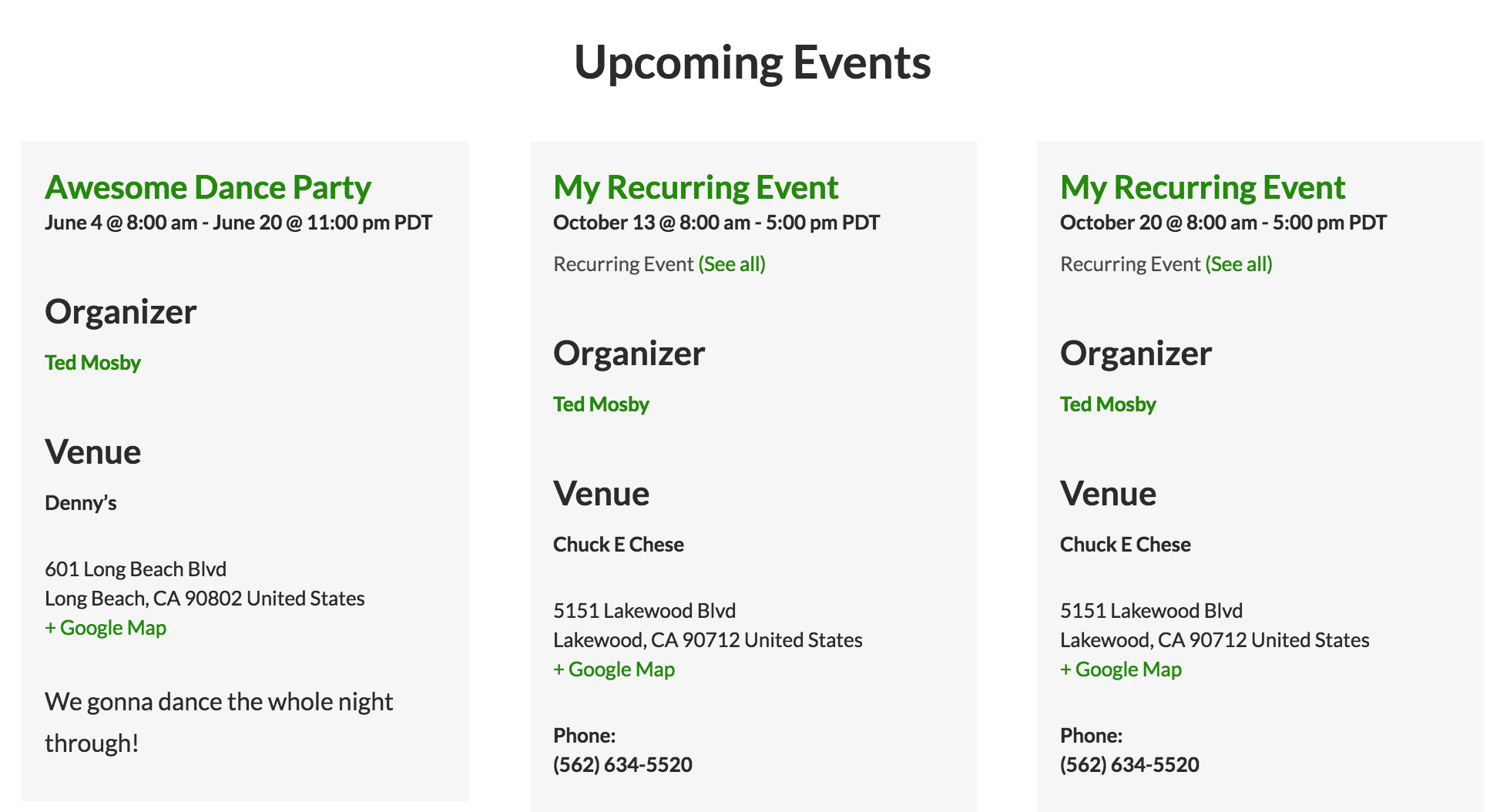
Note the “Organizer” and the “Venue” sections. These are the details that Cliff’s code adds to the template.
Just to confirm: these are the details you want added to your template, correct? In other words, you want the Organizer and Venue details to show up in the event information when viewing the calendar in Photo View?
Let’s start with answering that question, because it will (1) confirm whether the code we are trying to provide is what you are looking for and (2) allow me to proceed with detailed instructions for how to implement it.
Thanks so much!
GeoffMemberHello @nnyorker, welcome back to the forums!
Good question. Those are actually notices in the console and do not signify any errors–in other words, it’s diagnostic information about the calendar’s assets and performance and has no impact on your actual site.
That said, we know it’s not highly ideal to see those messages in the console, so we are looking at removing them in a future release. In the meantime, however, rest assured they will have no impact on your site.
Does this help answer your question? Please let me know. 🙂
Cheers,
GeoffMemberHello Fabrice, thanks for reaching out!
Sorry, no update on that issue at the moment. I have added this thread to the ticket, however, and will be sure to follow-up with you directly here when we know more.
As it currently looks, it is a high priority ticket so I imagine it will be slotted into one of our upcoming releases very soon, most likely the release coming up right after version 4.2. Again, we’ll keep you posted as we know more.
Thanks so much for checking in!
Geoff
MemberHowdy Joe!
Absolutely. You should be able to hide the custom fields from the Community Events submission form by adding this to either your theme’s style.css file or using the Simple Custom CSS plugin:
#event_custom {
display: none;
}
Will that work for you? Please let me know. 🙂
Cheers!
GeoffMemberHi Joe and welcome back. 🙂
Good question. When the default-template.php file is added to the theme, then it will assume your custom template is what you want to use for the calendar instead of one of your theme’s page templates.
You can get the sidebar into the template by adding the sidebar code for it in the template. If you open up one of your theme’s page templates (e.g. page.php) then that likely will contain the code you are looking for and you can add it to the calendar template where you would like it to appear.
Will this help you get started? Please let me know.
Cheers!
GeoffMemberHello Chiara,
Do you happen to have a link to your site you would be willing to share? That will help us see what you’re referring to and be able to make a recommendation from there.
It is worth noting that there is a
.events-archiveclass on the body tag of any archive page and that can be used to hide the element on those pages.Also, I see this thread is posted in our Translations forums, but I’m going to move it over to our Events Calendar PRO forum. Just wanted to give you a heads up because you will need to sign into your account to reply. 🙂
Cheers!
Geoff -
AuthorPosts