
Home › Forums › Calendar Products › Events Calendar PRO › Missing fields in Photo View after update.
- This topic has 25 replies, 3 voices, and was last updated 10 years, 5 months ago by
Geoff.
-
AuthorPosts
-
May 11, 2016 at 8:06 am #1113204
Cliff
MemberShannon, I hope this code snippet is beneficial to you:
https://gist.github.com/cliffordp/69e9440d344e923c8f326b7ed846b04f
Here’s a GIF preview of the result on Twenty Sixteen: http://cl.ly/0R2r0Q0F0L03
Please let me know how else you think I may be of service to you.
May 11, 2016 at 9:14 pm #1113582Shannon
ParticipantThis snippet breaks my site.
I use twentyfourteen for my base theme.
May 12, 2016 at 8:12 am #1113774MemberHi. Here’s a GIF of that snippet in effect on TwentyFourteen: http://cl.ly/1i2r412X2N1q
Please try the snippet with all other plugins and theme customizations deactivated and let me know how things go for you.
If you think it does break your site, please provide screenshots and/or links to your site.
May 25, 2016 at 1:36 pm #1118860ParticipantGeoff said:
“We have dug back several versions of the plugin dating to early last year, read through the release notes and confirmed with developers who have worked on the plugin throughout that time but have simply been unable to find any reference to showing either Organizer or Venue information in the calendar’s Photo view.”Someone is lying.
I do not care who it is at this point. I am simply stunned that a product team that gets paid for its work would blatantly lie to a paid customer, then blow them off by proxy in a forum.
I have been an internet service delivery professional for almost 20 years (https://www.linkedin.com/in/shannono), and never ever in my career have I seen a configuration issue of any kind expose data that was not coded to be displayed. There is simply no believable explanation for this other than a code change. I made NO CHANGES to my site between the time this data was shown and when it wasn’t, other than to update existing plugins, including yours.
Further, I am furious that you would then attempt to push some amateur untested code written by someone outside the development team as a ‘fix’.
Cliff has done nothing but consistently insinuate that this entire problem is something I made up, or is because of something I have done wrong with my site. I would appreciate not hearing from him ever again, unless his response does not start with the baseline assumption that it is my fault. I have been quite reasonable about taking down my high volume site for troubleshooting, but I simply cannot afford to do it much more without impacting user traffic in a very negative way, so please do not ask me to do so again unless you have some very specific goal or purpose.
It has taken me this long to calm down enough to compose this reply. I would appreciate a professional answer about this issue from anyone but Cliff.
I had completely intended to purchase other add ons from your group for my site, such as facebook and eventbrite integrations, but given the level of support I have received here I no longer see the value.
May 25, 2016 at 8:48 pm #1119006ParticipantI have downloaded all previous versions available to me, and tried them on my site – none of them displayed the Organizer or the Venue in Photo View.
I am not crazy, and I know this information was displayed. I absolutely am at a loss to understand any of this.
May 25, 2016 at 9:01 pm #1119016ParticipantScreenshots of my site with all plugins except TEC and TEC PRO and twentyfourteen theme AND the single-page.php file provided by Cliff.
As you can see, it does not work.
-
This reply was modified 10 years, 5 months ago by
May 25, 2016 at 9:03 pm #1119019ParticipantThis using Cliffs single-page.php with all plugins disabled, but using my very lightly modified child theme (no events displayed)
-
This reply was modified 10 years, 5 months ago by
May 25, 2016 at 9:17 pm #1119024ParticipantThis is Cliffs file in twentyfourteen/tribe-events/pro/photo/single-event.php, twentyfourteen active with no other customizations, and all plugins except TEC and TECPRO off.
May 27, 2016 at 10:30 am #1119843MemberHello Shannon,
I wanted to jump back in here and see if I can lend a helping hand in getting things back on track. We are definitely interested in and committed to helping you with this and are doing our best to do just that.
I do want to address one thing before we dig in:
Someone is lying.
I do not care who it is at this point. I am simply stunned that a product team that gets paid for its work would blatantly lie to a paid customer, then blow them off by proxy in a forum.
There is clearly a miscommunication here as no one is intentionally trying to mislead or hide anything from you.
As it stands, you contacted us asking about a detail in the calendar and how to get it to appear. That detail–regardless of whether it was ever available in a previous version–is accomplishable using the method Cliff provided. That method has been vetted by others on the team and has been tested by me personally. Here is a screenshot of the change once I’ve added it to my local installation of WordPress using only the Twenty Fourteen theme.
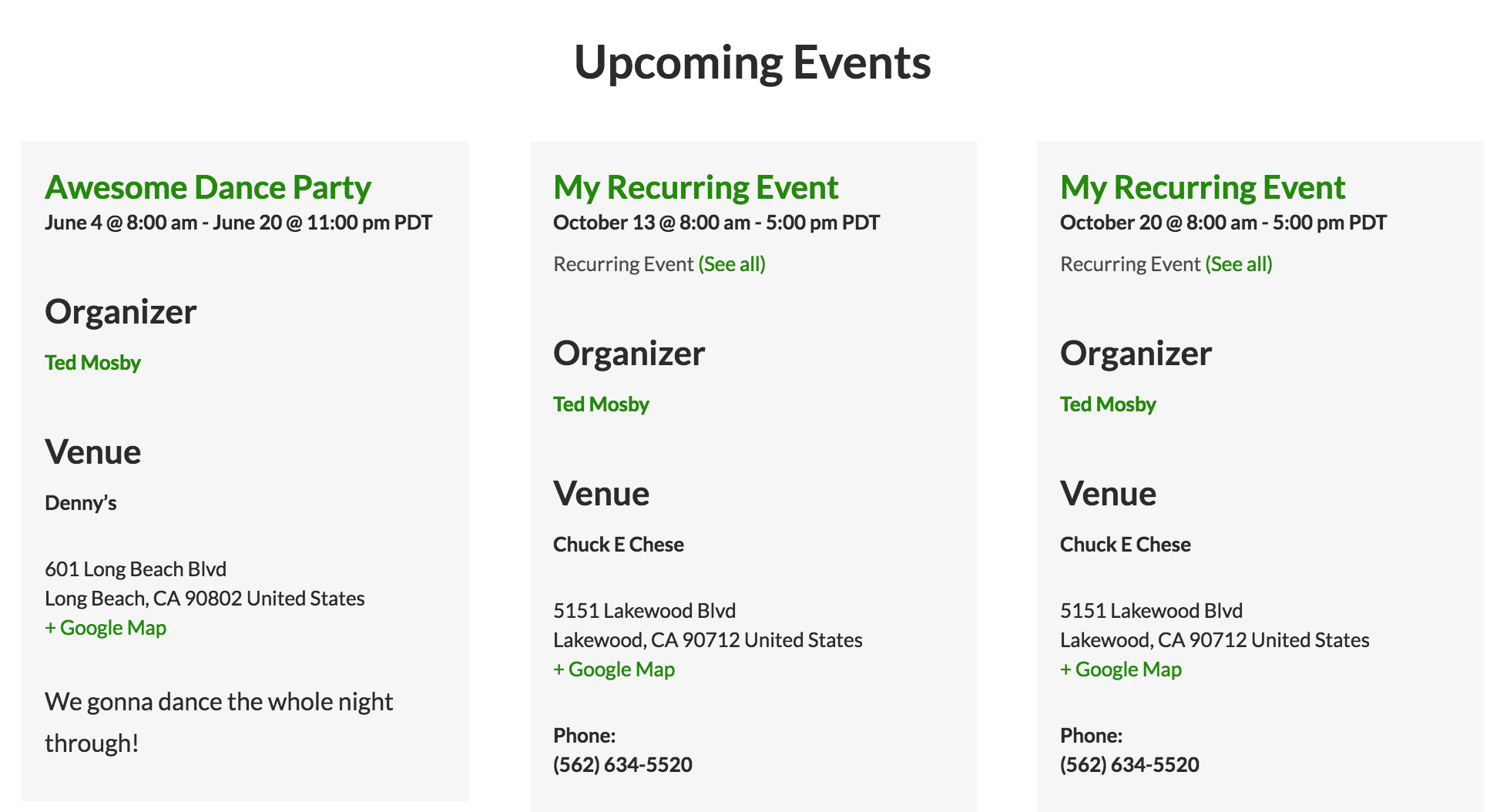
Note the “Organizer” and the “Venue” sections. These are the details that Cliff’s code adds to the template.
Just to confirm: these are the details you want added to your template, correct? In other words, you want the Organizer and Venue details to show up in the event information when viewing the calendar in Photo View?
Let’s start with answering that question, because it will (1) confirm whether the code we are trying to provide is what you are looking for and (2) allow me to proceed with detailed instructions for how to implement it.
Thanks so much!
GeoffMay 27, 2016 at 6:21 pm #1119973ParticipantThe output of that hack, which doesnt work for me as I have already shown, is frankly quite ugly and looks nothing like details shown in any other view.
Fortunately for you and I, I have fixed this problem. Added lines (mostly) taken from the list view single-event.php, preceded with a +, leading and trailing lines added for context.
—————–
wp-content/themes/MYCHILDTHEME/tribe-events/pro/photo/single-event.php:
if ( ! defined( ‘ABSPATH’ ) ) {
die( ‘-1’ );
}
+ // Setup an array of venue details for use later in the template
+ $venue_details = tribe_get_venue_details();
+ // Organizer
+ $organizer = tribe_get_organizer();
?><?php echo tribe_events_event_schedule_details(); ?>
</div>
+ <?php if ( $venue_details ) : ?>
+ <!– Venue Display Info –>
+ <div class=”tribe-events-venue-details”>
+ <?php echo implode( ‘, ‘, $venue_details ); ?>
+ </div> <!– .tribe-events-venue-details –>
+ <?php endif; ?>
+ <?php if ( $organizer ) : ?>
+ Produced by: <?php echo $organizer ?>
+ <?php endif; ?>
+
</div><!– .tribe-events-event-meta –>—————
This fix is now live on my site.
I cannot believe you could not provide this simple and thematically consistent solution yourselves.
I will admit to the probability that I made this change myself once before (as it seems quite familiar) but did not place it in my child theme. The Twentyfourteen theme did update in the timeframe that this disappeared, so, you are not liars; my bad.
Cliff however, is awful. Thank you for taking the time to respond thoughtfully, Geoff, even though I was not very nice. I appreciate your time.
May 31, 2016 at 8:54 am #1120671MemberHi Shannon,
Thanks for following up. While I realize the path to an answer was not ideal for you, I really am glad that you arrived at one and I appreciate you sharing it here with us.
I do hope we have another chance to work with you again soon and that, when we do, the experience will leave a much better taste in your mouth. I believe there were miscommunications here in this thread (on both sides) and I’m confident the next time through will be better, just as it was in your first thread.
I’ll go ahead and close this thread but please do feel free to open a new one if any other questions come up and we’d be more than happy to help you there.
Best,
Geoff -
This reply was modified 10 years, 5 months ago by
-
AuthorPosts
- The topic ‘Missing fields in Photo View after update.’ is closed to new replies.