

Forum Replies Created
-
AuthorPosts
-
October 24, 2016 at 12:46 pm in reply to: Attendee list, eventbrite, front-end event creation #1182078
Geoff
MemberHi Michele,
Excellent questions! Let’s hit them one at a time. 🙂
1. Can members of my site create and upload their own events from the front-end of the site without being redirected to a WP dashboard?
Absolutely. We have a plugin called Community Events that extends our free The Events Calendar plugin so that visitors can submit events to your calendar without accessing the WordPress admin. You can enable or disable anonymous submissions and also choose whether you want an event to be published on submission or reviewed as a draft first.
2. How exactly does the RSVP or “Attending” aspect of this plugin work? Does the plugin have to sync with Eventbrite or can members simply “commit/rsvp” without buying tickets?
RSVPs are actually a functionality of another (free) plugin of ours called Event Tickets. Once that plugin is installed, it allows you to accept RSVPs from the visitors on your site.
I do want to note that Event Tickets does not integrate with Eventbrite. So, for example, an RSVP made on an event will not sync over to Eventbrite.com. Instead, Event Tickets is an alternative to Eventbrite for accepting RSVPs for events.
If you ever were interested in selling paid tickets for your events, then you could install Event Tickets Plus, which allows you to sell tickets directly on your site using WooCommerce without the need for an outside service like Eventbrite.
then again (and at the expense of possible making things more confusing), we do have another extension for The Events Calendar called Eventbrite Tickets. This will import the events you create on Eventbrite.com into The Events Calendar on WordPress and display your RSVP/Tickets on your site while allowing the check-in and purchase process to be handled completely on Eventbrite.com instead of your site.
3. When members create and submit their own events can they sync their event to their own Eventbrite account or is the Eventbrite ticketing only through the site admins account?
I’m afraid not. Events that are submitted through the Community Events form go straight to The Events Calendar and cannot be pushed out to a specific user’s Eventbrite account.
4. Having an attendee or “Who’s going” list is very important and is a complicated feature to setup the way I need it in “Events Manager” right now.
Event Tickets Plus does indeed have a feature that allows you to display who is attending an event. It’s an option that can be set whenever you create tickets for an event (screenshot). Once someone has registered for an event, the person’s photo (which is pulled from Gravatar based on their email address) will be displayed on the event (screenshot). I’m afraid the level of detail in the Who’s Attending list is not as extensive as you might be looking for, but it is certainly possible to customize the template file for it with some custom development.
Does this help answer your questions? Please let me know. 🙂
Cheers!
GeoffMemberHi Waseem,
Thanks for getting in touch and sorry for the troubles with logging into your account!
Will you please visit our Contact page and select the “Help accessing my account” option? That will allow us to continue the conversation over email so we can help set you up with either a new password or new account without having to discuss it in an open forum.
Thanks so much and we look forward to continuing this conversation over email!
Geoff
MemberYou as well! Happy to be of service and please do let us know if any other questions come up — we’d be more than happy to help. 🙂
Cheers,
GeoffMemberYou bet! We’ll certainly be communicating those changes — in the meantime, please do either follow us on Twitter or subscribe to our newsletter so you’ll be sure to get the news immediately when it’s available.
I’ll go ahead and close this thread but please do let us know if any other questions come up and we’d be more than happy to help. 🙂
Cheers!
GeoffMemberHowdy @hilllibrary and welcome to the forums!
I checked your account and it looks like you had been using the Facebook Events plugin with The Events Calendar. The Events Calendar is our core (and free) plugin that allows you to create, edit and manage events in a calendar format on your WordPress site and Facebook Events allows you to import events from Facebook into WordPress so they are displayed in the calendar.
Your Facebook Events license has indeed expired. You are absolutely able to renew it if you still want to continue importing events from Facebook into The Events Calendar and can do so by logging into this site and heading to My Account > Licenses. Here are more detailed instructions for how that works.
I do want to note that we just released a new product last week called Event Aggregator that does the same thing as Facebook Events but also includes the ability to import events from other sources as well. Event Aggregator will likely replace Facebook Events in the future, so it would give you an early jump on that transition.
Let me know if you have any follow-up questions here and I’d be happy to help as best I can. 🙂
Cheers,
GeoffOctober 24, 2016 at 10:53 am in reply to: HOW DO I REMOVE 'ARCHIVE' TITLE FROM MY EVENTS PAGE #1182007MemberHello Che and welcome to the forums. 🙂
Good question. The word “Archives” is actually coming from either your theme or another plugin.
One thing you may want to try is to head to Events > Settings > Display and make sure the calendar template setting is set to “Default Events Template” (screenshot).
Another option is to hide the page title altogether using CSS. For example, adding something like this to your theme’s style.css file or using the Simple Custom CSS plugin:
.tribe_events .title_subtitle_holder {
display: none;
}
Will this work for you? Please let me know. 🙂
Cheers!
GeoffMemberHi Thierry and welcome back to the forums. 🙂
i wouldlike to know how to set the QR code READER?
Great question. Any QR reading app should do the trick. In other words, as long as the app can read QR codes, you should have no problem checking people in for your events.
When a QR code is scanned, it will open up the WordPress admin and change the status of an attendee to Checked In. Here is more detailed information about hoe QR check-ins work and what you can expect when scanning a QR code:
i want to see name of event and how many ticket sale and cheking ?
Once you create an event with tickets, you can view reports of sales and check-ins directly in WordPress. Here are step-by-step instructions for how to access those reports for your events:
https://theeventscalendar.com/knowledgebase/managing-your-orders-and-attendees/#attendee-list
The app QR will be connected at the back offfice evry time?
The QR reader app will always be able to check in an attendee as long as the device you are using is connected to the internet and you are logged into the WordPress dashboard. 🙂
Does this help answer your questions? Please let me know.
Cheers!
GeoffMemberHey André,
Thanks for reaching out and I hope you had a great weekend!
I appreciate the feedback on Event Aggregator. I know the plugin hasn’t been a perfect match for some folks, but it’s also been extremely well-received. But, to your point, there was indeed a critical bug that went out in the first release and we made sure to tackle it and release a patch just a couple of days after the report. We gladly stand by the quality of the product and will continue to support, develop and maintain it aggressively.
There is indeed chatter around the team here about how to approach the import limits. We’re looking at different options and will definitely be releasing new import quantity tiers. I wish I had a specific date to offer but I’m uncomfortable putting one out until we’ve committed to something. That said, I know that is an active conversation we are having now and we want to get something put together because we absolutely agree that higher limits are needed on a good number if sites, like your own.
Sorry I don’t have a concrete answer for you here, but I hope this at least helps provide some context for what we’re discussing here as a team and assure you that we are working on it and have prioritized it high on our radar.
Thanks,
GeoffMemberNo worries at all! Thanks for following up and for finding the other reported thread as well — that’s awesome and much appreciated.
I’ll go ahead and close this thread but do let us know if any other questions come up and we’d be happy to help. 🙂
Cheers!
GeoffMemberHi Tom and thanks for reaching out — I hope you had a great weekend!
Great questions. Let’s tackle them one at a time. 🙂
1) I am looking to use this plugin on a website and the goal is to sell memberships that also give a discount on Event tickets.
I have heard from folks who have reported success selling memberships and providing discounts to members with WooCommerce and its premium extensions. However, I will say that Event Tickets (or Event Tickets Plus) has not been designed specifically to work directly with those premium extensions. In other words, any compatibility between Event Tickets and those extensions is more a happy coincidence than anything else.
The best recommendation I’ve found is to download everything and give it a test drive on your site. We do offer a full refund on all our plugins within 30 days of purchase, so that should provide a good amount of time to see what the best combination of plugins is for you and which e-commerce platform is best suited for the site.
2) Is there any way to limit the number of tickets for non-members? This way more tickets are available to paying members.
Not that I am aware of. If there is, it would be a setting in the membership plugin being used to manage memberships.
That said, it’s certainly possible to achieve this with some custom development. For example, you can override the template for the ticket for (more on template overrides in our Themer’s Guide) and add a max attribute to the numeric selector (e.g. max=”5″) that is only present for specific WordPress user roles.
3) The plugin description mentions a QR code to expedite ticket check-in. How do we read this codes to mark them as a paid member?
You can use any QR reading app on a smartphone to read the code. The QR code, once scanned, opens up the web browser, accesses the WordPress admin, and changes an attendee’s status to Checked In.
I’m not really sure how the QR code would work to mark someone as a paid member. The code will simply check people in as it is scanned but will not make any other modifications to an attendee when scanned.
4) The event ticket is a printable PDF, correct?
The ticket is actually completely electronic and the QR code is embedded directly into the ticket email. The email can certainly be printed and scanned from the printout — or, the attendee can simply present the email on their phone and use that to be scanned in.
Does this help answer your questions? Please let me know. 🙂
Cheers!
GeoffMemberHey Michael,
Man, thanks so much for the kind words! We love Event Tickets and it’s feedback like this that allows us to keep providing it for free — thanks for your support. 🙂
1. In the event ticket RSVP email, the venue location is colored and underlined as if it is a hyperlink, but is not actually linked. Just below that is the site address which is linked. Is this intentional?
I think that is actually because the email application used to view the email is attempting to automatically map the location for you. It’s the same sort of thing when a smartphone will automatically link a phone number in an email even though the person typing it never created a link.
2. Also in this email is the start time of the event but not the end time. Again, is this intentional?
That is intentional. However, it’s also possible to include the end time of the event by overriding the email template (more on template overrides in our Themer’s Guide) and using the tribe_get_end_time() function to fetch the time.
3. Is it possible to attach an .ics file with the event information, similar to the export option on the web page?
I do think that would be possible. At the same time, it would take a fair amount of custom development that I’m afraid we are unable to support here in the forums. We do have recommended developers who might be able to help build that if it’s something you are interested in pursuing.
4. Does anyone know of a captcha option that the user has to solve before submitting the RSVP?
Great question. While Event Tickets does not include Captcha right out of the box, it is something you could add in very much the same way I mentioned earlier with a template override.
You can customize the RSVP form by copying the rsvp.php template into your theme from the Event Tickets plugin then adding Captcha from there. Here is a search that includes tutorials for how to add Captcha to a form and can be used when customizing the RSVP template.
5. How does the code scanning from the email work? Does it do something like a POST to a specific URL?
Yes, it’s a QR code that targets a unique URL on your site that checks a person in when scanned. Each QR code contains a unique URL associated with a particular ticket and, once it is scanned, it will open up the WordPress admin in a web browser and update that person’s information to show they are checked in for the event.
Does this help answer your questions? Please let me know. 🙂
Cheers!
GeoffMemberHello Jennifer, hope you had a great weekend!
I’m afraid there is no password for the demo where you can submit a test event. I do, however, have a screenshot of the form which should give you a good idea of what’s included — which is basically the same thing you would see in the WordPress admin, but on the front end of the site instead.
Can different event submission forms be used to submit events automatically into different categories?
Good question. There is only one submission form and it can be used to submit events into any category. In other words, Community Events is a single submission form that allows the site visitors to submit any type of event to the calendar.
Can the submission form contents be customised? i.e. no need for the ‘venue’ section?
Absolutely! In fact, our Themer’s Guide is a great place to start for all things related to customizations. The basic process is to override the plugin template in your theme and customize the code of the template from there — the changes you make will override the default template included in the plugin.
Does this help answer your questions? Please let me know. 🙂
Cheers!
GeoffMemberHey Michael and thanks for getting in touch!
Great question and you’re absolutely right: the features in Community Events are not included in either The Events Calendar or Events Calendar PRO.
I would suggest the following combination of plugins:
- The Events Calendar (free) – This is our core plugin that all the other plugins require so that tyou can create, edit and manage events in a calendar format.
- Community Events – This extends The Events Calendar so that visitors can submit events to your calendar without having to log into the WordPress admin.
And, yes, Event Aggregator does indeed work with that combination. In fact, Event Aggregator is already included in The Events Calendar (version 4.3 and above) — you simply need to activate it by heading to Events > Import, and following the instructions in there.
I do want to note that Event Aggregator is designed for website managers like yourself to import events from multiple sources (e.g. Facebook). If you’re looking for visitors of your site to be able to submit import sources into Community Events, then I’m afraid that is something Event Aggregator is incapable of doing.
Does this help answer your question? Please let me know. 🙂
Cheers!
GeoffMemberHowdy Simone,
Sounds great and we’re definitely happy to help! Will you please head over to our Contact page, select the “Help accessing my account” option and sending the following info:
- The client’s name
- The client’s email
What we can do is create a new account for the client, provide you with the new login details, then create a new license for that account while deactivating the one that’s currently in your account. This will be the smoothest way to make the transfer and allow us to work over email instead of the open forums. 🙂
Thanks so much!
GeoffMemberHi Jason, thanks for following up!
I’m confused about the other requirements though. Are you saying that Mem limit and Max Execution Time don’t really effect things?
Not at all! My point is that they are indeed important but that I have not seen a ton if instances where they have needed to be increased simply for The Events Calendar and our other plugins, even with thousands of events. If they do need to be increased, it’s often because the server is being hit with additional requests from the theme and other plugins on top of The Events Calendar.
When a user submits a recurring event – even if I have the maximum number to generate in a series set to 3 months or something – what are your recommended requirements to handle those requests without a hitch?
Recurring events can definitely get out of hand. One way to prevent large submissions from slowing down the process is to head to Events > Settings and change the following two settings:
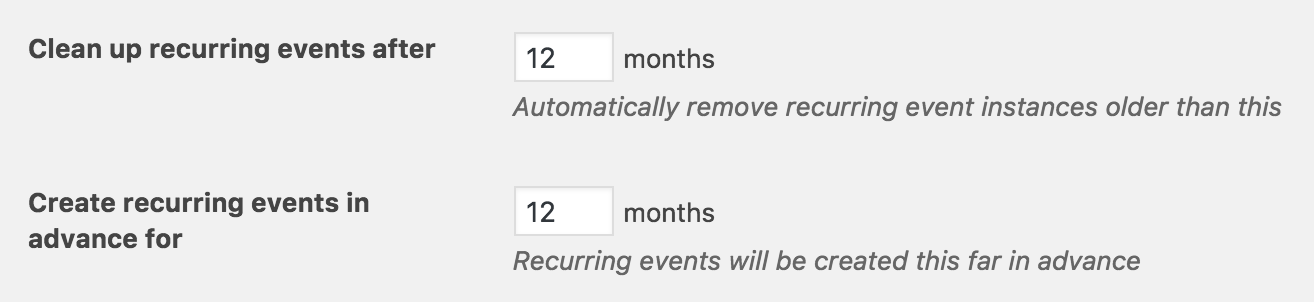
The default is 12 months for both, but dropping them to something like 3 will prevent The Events Calendar from storing too many events far back in the archives and creating too many events upon creation of recurring events. You noted have tried that in your last reply, but that is the best way to limit the data being stored and created by the plugin at once.
There’s is the possibility that someone will submit an event incorrectly in a way that will generate way more events than intended. I would suggest changing the Community Events submission settings so that submissions are marked as Drafts so you can review them before they actually get generated and published and have a chance to correct those errors in advance.
And, yes, your configuration sounds mighty powerful enough to handle a typical workload from The Events Calendar. I do want to note that same thing I was trying to communicate before that, while those specifications sounds great, they also depend on what other themes, plugins and other resources are installed and running on your site at the same time. In general, though, those look solid. And, again, if you see a negative impact in your performance when recurring events are being submitted, then the Query Monitor plugin I mentioned earlier is a great tool for debugging.
I hope this helps clarify things a bit! Definitely let me know if there’s anything in here I can clarify further and I’d be happy to.
Cheers!
Geoff -
AuthorPosts